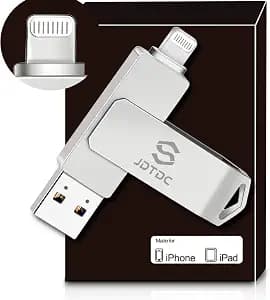
Genuine Apple MFi Certified iPhone USB Flash Drive 128GB - Real Capacity - No Fake Storage, Genuine Lightning, encrypted Auto Backup Photo Stick for iPhone iPad Photos/Videos - Avoid Fake MFi Clones!
Description
This MFi Certified photo stick for iPhone USB flash drive for iPhone 128GB photostick mobile for iPhone flash drive 128GB iPhone external storage iPhone picture stick memory stick iPhone thumb drive for iPhone x flash drive for photos storage. If you want to make your iPhone/iPad more convenient, If you want to take as much photos videos as you can in your life, for yourself, babies, pets, If you want to transfer files, photos, videos among different computers, iPhone, iPad, but you don’t like iTunes, or there is no internet or WiFi, If you want to watch favorite movies or listen music in the journey, Then this photo stick for iPhone is Perfect for you. Yeah, this iPhone memory is a perfect Partner for your iPhone/iPad. NOTE: 1, For a better experience, please remove the iPhone protective cases if necessary before using this photo stick for iPhone. 2, Due to DRM (Digital Rights Management), we cannot transfer Music or Video files in iTunes or downloaded by the 3rd APP to this iPhone storage. Take this Photo Stick for iPhone, share your favorite photos, videos, documents to friends or families easily. Also you can transfer these files to other iOS devices quickly while no Internet or WiFi required. This photo stick for iPhone make the distance among you and friends more closely~.~ The photo stick for iPhone could be really helpful for those who have an iPhone or iPad without a large or sufficient storage. Take this iPhone storage, free up photos videos from your iPhone (so easy and fast), then go to take lots of pictures and videos on your upcoming vacation or to an event/festival where you might take a lot of photos videos and you can fill up the external iPhone flash drive instead of your iPhone storage. TIPS:Plug the iPhone storage, taking Photos/Videos from the APP, all Photos & Videos Will be Stored in the iPhone Flash Drive directly.
One less thing to search
Before you buy: quick questions
Is this drive truly "plug-and-play" easy, or is there a learning curve?
While the hardware is simple to connect, using the drive requires its companion app to transfer photos and videos. Many users find it straightforward, but some online reviews mention a learning curve. We recommend checking the quick-start guide and allowing a few minutes to familiarize yourself with the app's interface for the smoothest experience.
Is this drive truly "plug-and-play" easy, or is there a learning curve?
Based on user feedback, there is a noticeable learning curve for some. While the hardware is simple to connect, the companion app required for transfers can be finicky. Many satisfied users on platforms like Reddit recommend setting aside 20-30 minutes for the initial setup, reading the instructions carefully, and ensuring your iOS is updated. Think of it as a powerful tool that requires a bit of patience to master, rather than an instant solution.
How reliable is the companion app and the "Auto Backup" feature?
The app enables all file transfers. While most users report successful backups, a common note from social media feedback is that the "Auto Backup" may require the app to be open on your device. For large transfers, some users recommend doing it in batches and keeping your screen awake to ensure the process completes without interruption.
How reliable is the "Auto Backup" feature and the app overall?
Experiences vary. When it works, the auto-backup is a great hands-off feature. However, a common pain point mentioned in reviews is that the app can sometimes freeze, crash, or fail to recognize the drive. We strongly recommend not relying on it as your *only* backup method initially. Use it for scheduled transfers when you can monitor the process, and always keep your photos in at least one other location (like your phone or iCloud) until you're confident in the routine.
Is the 128GB capacity real, and will it work with both my iPhone and computer?
Yes, this is a key benefit. Unlike many non-certified clones, this drive provides genuine, usable 128GB storage. It features both a Lightning connector for iPhone/iPad and a standard USB-A connector. It works directly with your iOS device via the app and functions like a standard flash drive on Windows or Mac computers—no special software needed on the computer side.
Answers are limited to the manufacturer's listing and the reviews we analysed. Questions those sources cannot support are not answered here.
Transparent by design