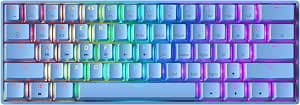
GK61, Mechanical Gaming Keyboard, 61 Keys Multicolor RGB Backlit LED Backlit Wired Programmable Keyboard for PC Mac Gamers
Description
RGB Backlight: 16.8 million color combinations, multiple backlight modes (aurora, ripple, music, rainbow, waves, gradient, windmill, spectrum and single light), no drivers needed. Small plug & play keyboard; Gateron Optical Switches - Gateron optical switches can be hot-swapped at will and replaced with other switches. The hot-swappable keyboard does not require soldering or desoldering the switches. (Only optical switches are hot-swappable); ABS double mold keycaps - GK61 keycaps are double moulded in ABS and you can change them as you like thanks to the keycap puller included in the package.; Macro recording and other functions: Record macros through software, customize advanced functions, customize function keys, etc. Full anti-ghosting mode (NKRO).; Mac and Windows Compatibility - Compatible with Windows 10, Windows 8, Windows 7, Windows Vista, Windows XP and Mac OS, the GK 61 keyboard comes with a 60-inch USB Type-C to Type-A cable. The keyboard is suitable for all environments, for home and office use, thanks to its small form factor for small spaces.
One less thing to search
Before you buy: quick questions
I'm new to 60% keyboards. Is it hard to get used to not having dedicated arrow keys?
It's a common adjustment! The arrow keys are accessed by holding the "Fn" key + IJKL (or WASD, depending on your setting). Most users adapt within a week, but if you use arrows constantly for work or gaming, you might want to consider a 65% layout keyboard. Many TikTok users show off their customized keymaps to make the transition easier.
Are the keycaps good quality, and can I easily replace them?
While the RGB shines through nicely, the stock ABS keycaps can develop a shiny feel with heavy use. A popular first upgrade is a set of PBT keycaps for better texture and durability. Important note: The GK61 has a *non-standard bottom row*, so ensure any replacement set includes keys that fit the smaller Ctrl, Alt, and spacebar modifiers.
Is the software difficult to use for programming and lighting?
The software is powerful but has a learning curve. It allows deep customization of RGB effects and key programming. The interface isn't the most intuitive, and as noted in several Reddit threads, it can take a little patience to master. We recommend checking the manufacturer's website for the latest version and looking up setup guides on YouTube for visual help.
Is this keyboard compatible with Mac computers?
Yes, it is plug-and-play compatible with Mac. The keyboard will be recognized immediately for typing. For the best experience, you may want to remap the "Alt" and "Windows" keys to match the Mac's "Option" and "Command" layout, which can be done through Mac's System Preferences or the keyboard's software.
How does the GK61 hold up over time? Should I expect to mod it?
The aluminum frame provides solid long-term durability. The most common points of wear are the stabilizers (which can feel rattly) and the keycaps. This keyboard has a huge modding community precisely because it offers such great value as a base. Many owners happily lubricate the stabilizers and switches or change keycaps to perfect the sound and feel, viewing it as part of the fun. Out of the box, it performs reliably for most users.
Answers are limited to the manufacturer's listing and the reviews we analysed. Questions those sources cannot support are not answered here.
Transparent by design