Included does not mean verified authentic. Flagged does not mean proven fake. These are analytical classifications.
Showing 3 illustrative excerpts, not the complete review set.
Included in analysis5.0/5 stars
Outstanding Peformance in a Small Computer-Gamer Ready
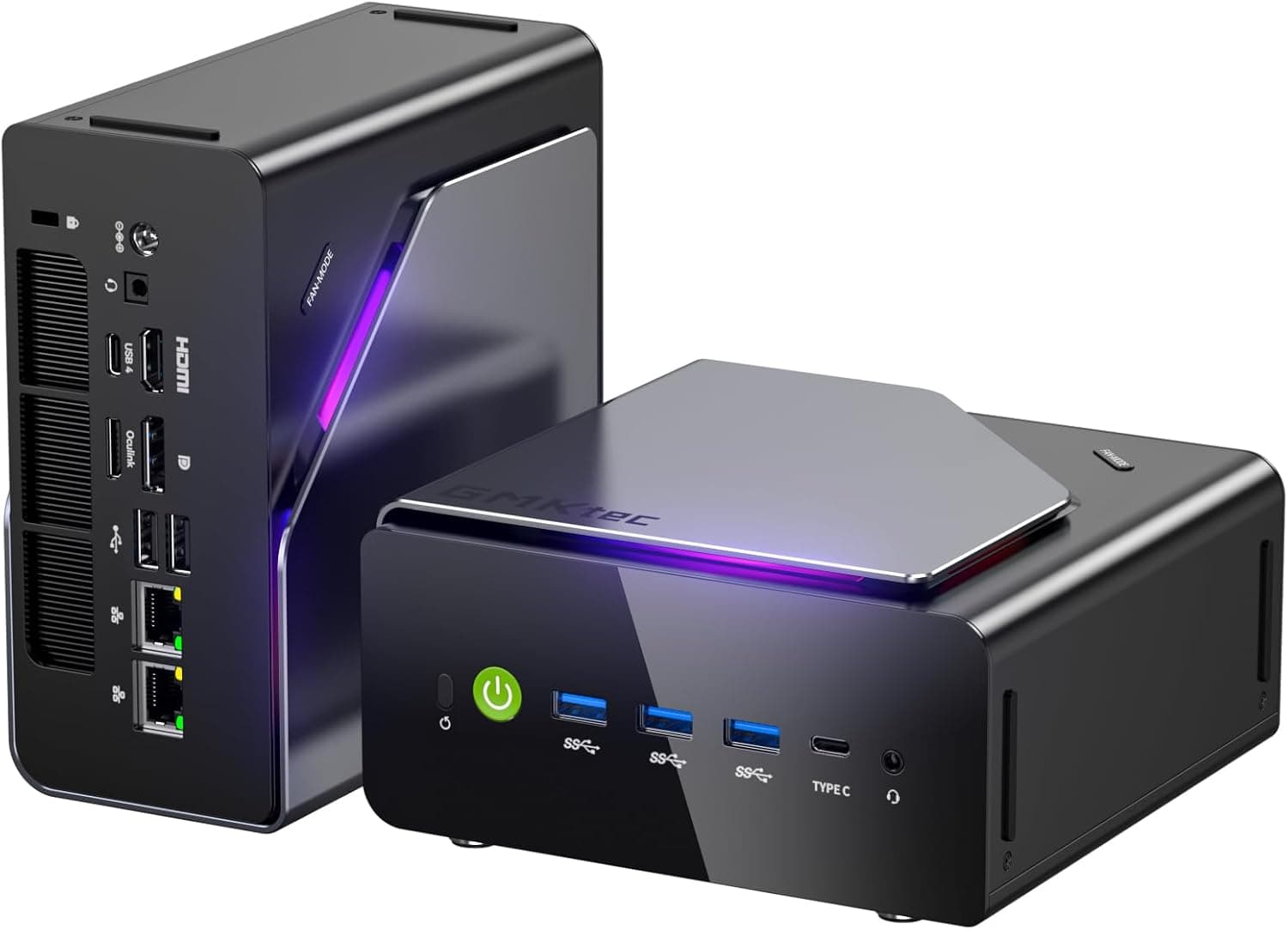
“GMKTEC K12 Mini Computer BASIC SPECS: (See listing for more comprehensive spec info.) DUAL FANS - CPU and CHASSIS w ADJUSTABLE SPEEDS RYZEN 7 H 255 CPU 8 Cores 16 Threads Up to 4.9Ghz Radeon 780M iGPU with AVX512 Support Multiple Displays to 8K HDMI 2.1 (8K@120HZ), DP1.4 (8K@120HZ), Type-C (PD/DP/Data), USB4.0 32GB of DDR 5 5600 Dual channel RAM configured in 2 x 16GB laptop sized modules. (Upgradeable to 128GB-2 x 64GB) M.2 NVMe PCIe 4.0 1Tb SSD drive with heat sink. (Upgradeable to 24Tb in three NVMe slots. 1st Slot PCIe 4.0 x 4 2nd and 3rd Slots PCIe 4.0 x 2) One HDMI 2.1 and one Display Port 1.4 USB 2.0 x 2 USB 3.2 10Mbs x 3 Type A - 1 Type C USB 4.0 Type C DUAL ETHERNET NIC @ 2.5GbE each WIWI 6E and Bluetooth 5.2 OCuLink Port (PCIe 64Gb/s) OCuLink Port is essentially an external extension of the PCIe 4 buss 64Gb/s. NOTE: As also noted clearly by the manufacturer, OCuLink is NOT Hot Swappable. You can buy an OCuLink dock/enclosure that houses a full PCIe graphics card which then plugs into the OCuLink port. This is just the dock...graphics card and external power supply are extra. Most docks requires external ATX or SATA power supplies.) ----------------------------------------------------------------------------------------------------------------------------------------- INSTALLED APPS BY ME: 1) ATTO (Disk Benchmark Utility) 2) Office 2021 Pro Plus (Excel Word Power Point etc) 3) Firefox (Web Browser) 4) Nuance PaperPort Professional.14.5.15168.1450 (Scan and Document App) 5) Thunderbird (Email Client) 6) WinRAR 6.3 x64 (File Compression and Archiving) 7) Stardock Fences (Desktop Organizer) 8) VLC (Media Player & More) 9) Adobe Audition 3 (Audio Multitrack Recording) 10) Virtualbox 7.0.18 (I use a Virtual XP 32 Bit to run archaic 16 Bit Apps) 11) 7-Zip (File Compression and Archiving) 12) Shadow Protect 3.5.0.3570 (Archaic 20 year old backup software) 13) Team Viewer (Remote View Other Computers) 14) Auto Hotkey (Script writing tool to automate functions in Windows and in other programs) 15) jv16 Power Tools (A Suite of Admin Tools for Registry, Uninstalling, File management, Performance Monitoring, and much more) 16) Canon MG600 Printer-Scanner 17) Scan Utility From Microsoft 18) Speedtest (Utility to test internet bandwidth speed) 19) Adobe Acrobat Reader 20) Coretemp (CPU Temperature Monitor Utility) 21) Macromedia Fireworks MX 2004 (Old Graphics Program) 22) Macrium Reflect (Modern Current Backup Software) 23) Easeus Partition Manager Free Version 18.5.0 24) Cubase 5.1 (Older MIDI Music composition software) My set up uses a 30 inch Samsung monitor, and an Samsung 27 inch curved monitor each 1920 x 1080 60hz. I use this for business, word processing, internet and audio processing of larger files, typically Wav files 90 to 180 minutes long.(600Mb to 1500Mb) as well as VST virtual instruments and music composition. ------------------------------------------------------------------------------------------------------------------------------------------ UNBOXING: Durable plastic box with a wrap around metal cover. 6in x 6in x 2 3/4in (approx.) 120W power supply. (19V 6.32A) (Nice and compact-4in x 2 1/2in x 7/8in / Adequate cord length) Power supply seems to have adequate head room to power all my peripherals (i.e. mouse / keyboard / External Drives etc.) HDMI cable and mounting bracket included. SEE Photo #1 #2 and #3 DISSASSEMBLY: Upgrading is not as easy as I have seen in my previous computer but still OK...To access, 3 screw in metal disc feet (with rubber bottoms) must be unscrewed to remove a metal wrap around plate. Lining up the metal plate to reinstall the disc metal feet is a little tricky. Mine were torqued tightly enough that I needed pliers to initially break the torque but after this they can be installed and removed by hand. After this 4 small Philips screws must be removed from the sides. Now the top can be removed to expose RAM slots and NVMe slots. (Note: I read an article on line complaining about the metal feet being difficult to remove and seemingly calling it a big deal. It really isn't. Just carefully break the torque with pliers the first time. Put a cloth around the metal disc feet to avoid scratching if you are concerned however I did mine without any cloth buffer without scratching.) Likewise the NVMe mounting screws were quite tight initially and released with a ever so slight "snap" but no big deal. SEE Photo #4 / Photo #5 ----------------------------------------------------------------------------------------------------------------------------------------- 1ST POWER UP & RGB LIGHTING My computer allowed me to set up a local account without having to set up a Microsoft Account. (Yeah!) For me, RGB lighting that originates in the chassis fan was too obscured by the metal wrap around cover to be effectively noticeable for my liking. You can see some light peek through the gap between wrap around cover and plastic box and also some light bleeds slightly through the USB Ports.(However, being a pragmatic guy I don't care much about extra lighting one way or another; I buy computers strictly for performance.) You can cycle through 13 lighting modes by pressing the "Fan Mode" switch on the top right corner of the case. Personally I would have preferred the lighting effect to be more pronounced; perhaps the wrap around cover could be clear or opaque on top so you could you can appreciate the various modes of lighting more easily. This is a highly subjective comment. I'll probably turn my lighting off. SEE Video for RGB Lighting Demo and modes. ----------------------------------------------------------------------------------------------------------------------------------------- BIOS: {Esc} Button while powering up puts you in BIOS {F7} Button while powering up brings you to Boot Selection Not much to say here. A very simplified BIOS set up with a few things you may want to note: On the Main BIOS Page set "Power Mode Select" parameter to "Performance" The included instruction book advised this also. Both fans speeds can be adjusted in BIOS by enabling "Smart Fan Configuration" This setting is on the Advanced Tab....navigate to: Advanced>Hardware Monitor>CPU Smart Fan Configuration (or SYS Smart Fan Configuration) After enabling this parameter, speed can be set anywhere from "Off" to "100%" in 20% increments. (Basically both are 5 speed fans.) Default Chassis setting is 80%. The CPU fan...40%. At these settings, the fans are extremely quiet. CPU fan noise becomes noticeable when increasing up to 100% except my CPU temps were low enough to be able to leave the CPU fan at 40%. SEE Photo #6 #7 and #8 ----------------------------------------------------------------------------------------------------------------------------------------- BOOT TIME AFTER ALL INSTALLS: I did boot time tests under 2 conditions: 1) Boot Time from a "shutdown" state (which allows Windows 11 Fast boot to be applied.) Fastest boot time here from pressing power button to full desktop was around 12 sec. After installing more programs this increased to 15 - 20 sec. 2) Restart which restarts the computer from an already operating state. (Windows fast boot has no effect.) These boot times were longer and ranged from 27 sec to just about 41 sec but typically towards 40 sec. SEE Video ----------------------------------------------------------------------------------------------------------------------------------------- CPU THERMAL: My CPU temperatures rarely got above 60C to 65C and on a very few occasions into the 70's. Typical idle temperatures are between 35C and 40C. Max operating temperature fir this CPU is 100C. Remember here that this is where the CPU fan is running at 40% to reduce noise so the fan speed has lots of room to increase if CPU temps get higher. SEE Photo #9 ----------------------------------------------------------------------------------------------------------------------------------------- NVME DISK BENCHMARK 1TB PCIe 4.0 : I did benchmark tests with ATTO DISK BENCHMARK utility. This maxed out at 4.41GB/s Write and 4.68GB/s Read speeds. This is OK. Some PCIe 4.0 NVMe drives are rated more towards the 7 GB/s speed but nice to see read and write speeds give basically parallel performance. SEE Photo #10 ----------------------------------------------------------------------------------------------------------------------------------------- PRACTICAL TESTS: To give you an idea of just how fast this computer can be: I have a 2TB NVMe (PCIe 3.0) drive in an enclosure as an external drive for computer backups. I use Macrium Reflect backup software. On the USB 4.0 Type C port, my Macrium Reflect backup of this computer took 1 minute and 1 sec to create a 90GB backup image. Keep in mind though that the data transfer here is from an NVMe drive to another NVMe drive on a USB 4 port. Typical USB 3 external drives won't reach this level of performance. I also tried opening 15 Word documents at once and they all loaded in less than 5 seconds. SEE Photo #11 (61 sec backup of 90GB Partition) SEE Video (Opening Documents) ----------------------------------------------------------------------------------------------------------------------------------------- CONCLUSION: Previous models of mini computers, while able to do some gaming often lacked sufficient on-board graphics to do high end gaming. I believe this computer is different. Remember also that the OCuLink port allows full high end graphics cards to be implemented although it will cost you the card, a power supply and some interface docking stuff. I looked around the web and noted that this Ryzen 7 CPU (8 Cores 16 Threads) outperforms the Intel Core Ultra 5 125H (found on the GMKtec K9) which is 14 Cores and 18 Threads and way out performs it in terms of integrated graphics. Supports 4 x 4K monitoring and can render in 8K as well! Some may be interested in the AMD Adrenalin Software installed on this computer which allows monitoring graphics metrics and configuring for gaming performance on the software level. Very noteworthy is that fan noise is VERY minimal compared to anything I've ever used in the past. When travelling (which I do frequently) I used to bring a copy of all desktop files with me on an external drive and then work from a laptop where I would migrate email and internet browser profiles to the laptop and then resync everything from laptop back to desktop when I got home but I can now just bring this computer with me and a small monitor. Furthermore, I used to have a desktop in my office and one in the bedroom. Now I just carry the K9 from room to room as needed since I have keyboards and monitors in both places. With the fast NVMe drive and the large amount of fast RAM I can't find any downside to this machine. Its performance rivals any full desktop that I've ever used and it's portability means that I can pack it up and bring it with me anywhere. Every aspect of hardware is significantly expandable. There are enough USB Ports to cover peripherals like printers, portable optical drives, hard drive docks etc. It is a completely adequate full desktop replacement..... a mini power house. Whether it is audio or video editing, music composition and multitracking, VST instruments, a gazillion internet tabs opened at once, there are adequate resources to do anything I can think of. I can't think of a downside to this computer with regard to performance. You may need USB extenders to provide clearance when using many peripherals because it can get a little crowded with some ports configured close together but it isn't any worse than what you would find in a laptop. One thing is that I'm not sure whether I would pay more than $1000.00 for this rig. (Possibly I might?) Currently on Amazon.ca, Canada, it is listed at $1039.99 CAN. but I got mine with a coupon price of $769.99 CAN. This machine shows an outstanding impressive performance for a computer of any size. I am very happy with it and do not regret this purchase.”
Signals matched: Specific detail: quantity, entity · Mentions: performance, functionality
Included in analysis5.0/5 stars
Strong compact AI workstation for running OpenClaw and local models in Ollama
“I bought the GMKtec K15 with the Intel Core Ultra 5 125U, 32GB DDR5 memory, and 512GB SSD primarily as a compact local AI workstation rather than a general office PC. My use case is running Ollama models locally, testing OpenClaw, and experimenting with agent workflows without having to tie up my main laptop. So far, it has handled that role very well. I tested several local models in Ollama, including Mistral 7B (51.52 tokens/s), Gemma 31B (4.42 tokens/s), a quantized Gemma model (32.13 tokens/s), and Qwen 35B(10.16 tokens/s). The smaller models were responsive enough for practical local use, including interactive prompting and agent-style workflows. The larger 31B and 35B models were naturally slower, but they did run, which is impressive for a machine this small and quiet. For my purposes, that matters more than synthetic benchmark scores because I wanted to know whether it could actually support local AI experimentation. Compared with my M5 MacBook, the MacBook still feels faster and more polished for heavy day-to-day work, especially where Apple silicon optimization matters. But that is not really the point of this machine. The GMKtec gives me a dedicated Windows/Linux-style box that can sit on the desk, run services, host local models, and keep background AI tooling separate from my main laptop. As a small always-available AI node, it is surprisingly capable. Setup was straightforward. I installed Ollama, pulled several models, and connected it into my OpenClaw workflow. The 32GB RAM gives enough headroom for experimenting with different model sizes and keeping the system usable while other tools are running. The storage expansion options is a major plus. For local AI work, model files add up quickly, so having multiple RAM expansion slots will be useful down the road. The port selection is another strength. Dual 2.5GbE, USB4, HDMI 2.1, and Oculink make this feel more like a small lab machine than a basic mini PC. I have not fully pushed the Oculink setup yet, but I like having that path available if I want to experiment with external GPU acceleration later. My main caveat is expectations. This is not going to replace a high-end workstation or beat my M5 MacBook on raw AI performance, but it's 1/3 of the cost. Large local models are still large local models, and you can feel the difference once you move beyond smaller quantized models. But for a compact, relatively quiet mini PC that can run Ollama, support OpenClaw, and act as a dedicated local AI test box, it is very capable. Overall, I’m pleased with it. The machine is fast enough for real local AI experimentation, flexible enough for expansion, and small enough to leave running as part of a desktop AI setup. I would recommend it to someone who wants a compact mini PC for local models, agent workflows, homelab tasks, or development experiments, provided they understand the limits of integrated hardware on the largest models.”
Signals matched: Specific detail: quantity, entity, scenario, process · Mentions: performance, compact, functionality · Reads as an authentic voice
Included in analysis5.0/5 stars
Solid machine for work and gaming
“From my testing, this can handle gaming to work from home to entertainment very well. This packs: -Ryzen 7 8845HS 8 Cores 16 Threads @3.8Ghz base clock (Max 5.1Ghz) -32Gb DDR5 Crucial RAM @5600Mhz SO-DIMM (Max 96Gb) -Radeon 780M 3Go 2700Mhz -Intel i226v Dual 2.5G Lan ports with Wifi 6 card + Bluetooth 5.2 -1Tb M.2 Drive (max 4Tb) Dual PCIE 4.0 slots -Dual Cooling fans (Upgrade from their M6 model that only had one) -1 Display port 2.1(8K@60hz), 1 HDMI 2.1(8K@60hz) and 2 Type C USB 4.0 supporting Video. -2 USB 3.2 Gen2 on front and 2 USB 2.0 on back -Oculink Port -Headphone jack on front. -Windows 11 Pro pre-installed and activated Now, for the performance! Here are multiple benchmarks I did to test this machine's CPU and GPU: *Tested with the Performance mode in BIOS and all up to date drivers* Cinebench Single core - 106pts Cinebench Multi core - 966pts Geekbench Single core - 2589pts Geekbench Multi core - 13191pts Geekbench GPU - 31717 Userbenchmark 1-2 core - 216pts Userbenchmark 4-8 core - 1068pts I did not test the gpu much more since the CPU is definitely the star of this machine it definitely performed well, especially in multicore testing. Games. Well, I gotta admit that it runs most games better than I anticipated. Beforehand, the GPU is not going to run the biggest games at high setting and rust was one of those games where it didn't seem to be performing well. I tested Rust, Cs2, valorant and Fortnite at 1080P and it ran smoothly except Rus which is GPU demanding It is also important to consider the size of this machine, which runs really well considering that. Since this has an oculink port, you can plug an external GPU and obtain alot more performance, which is awesome and works well. I also tried emulation for NES, Wii and Gamecube and obviously it ran without a problem In terms of temps: CPU: lowest was 42.6c and highest was 88.4c while on full load GPU: Sadly not showing up in HWMonitor RAM: Lowest was 40c and highest was 57.3c while on full load Finally, Pros and Cons PROS: -Compact -aesthetically pleasing -Easily upgradable (internals easily accessible) -Good performance for medium load Gaming -Windows 11 pre-installed and activated -Very quiet, even on full load -Oculink port (possibility to plug an external GPU) CONS: -Performance lacks on bigger games because of the GPU (although, oculink is possible) -A bit pricey for the GPU offered -USB ports are a little rough To sum up, outside of gaming, this mini pc can handle absolutely anything from office work, video editing, Entertainment, emulation, router, anything. For gaming, you can definitely run a lot of popular games with good FPS AND you can also plug your own GPU to obtain more performance which is a huge improvement from the old models. I would say this is worth it if you are looking for a compact, powerful and versatile machine.”
Signals matched: Specific detail: quantity, entity, scenario, comparison · Mentions: performance, functionality · Reads as an authentic voice