What people like
Compact, quiet, and great value
Reviewers consistently praise the tiny, quiet design and strong performance for everyday tasks, often calling it an excellent value for the price.
The 30-second read
What people like
Reviewers consistently praise the tiny, quiet design and strong performance for everyday tasks, often calling it an excellent value for the price.
The main watch-out
Some users report slow or failed Windows updates during setup, and one reviewer experienced serious drive-mounting and freezing problems a few months after purchase.
Before you choose
Consider the available ports and expansion slots for your setup, and note that reviews cover various GMKtec models with different specs, so confirm the exact configuration you need.
From a similar, more-reviewed product in this category: KAMRUI P1 Mini PC W-11 pro, AMD Ryzen 7330U Mini Computer (Βeats 3550H/R3 5300U,Max 4.3GHz,4C/8T), 16GB RAM 256GB M.2 SSD, Triple 4K Display, WiFi/BT/for Business Home Office Mini PC
What people like
Reviewers repeatedly praise the small form factor, quick performance, and simple setup, with several noting it handles everyday work and even Linux well.
The main watch-out
One reviewer reports weak wireless due to a tiny antenna, and another says the unit did not include a valid Windows 11 Pro license despite being advertised with it.
Before you choose
Some reviews mention limited storage that may need upgrading and setup complications with Bluetooth keyboards or mice, so confirm your needs before buying.
Your use case first
5 of 48 mentions describe a negative experience (10%).
3 of 19 mentions describe a negative experience (16%).
0 of 14 mentions describe a negative experience (0%).
0 of 14 mentions describe a negative experience (0%).
2 of 14 mentions describe a negative experience (14%).
0 of 10 mentions describe a negative experience (0%).
2 of 10 mentions describe a negative experience (20%).
5 of 11 mentions describe a negative experience (45%).
One review can mention several topics. Percentages describe the reviews we analysed, not all buyers or the product's overall failure rate.
From a similar, more-reviewed product in this category: KAMRUI P1 Mini PC W-11 pro, AMD Ryzen 7330U Mini Computer (Βeats 3550H/R3 5300U,Max 4.3GHz,4C/8T), 16GB RAM 256GB M.2 SSD, Triple 4K Display, WiFi/BT/for Business Home Office Mini PC
23 of 118 mentions describe a negative experience (19%).
4 of 41 mentions describe a negative experience (10%).
1 of 26 mentions describe a negative experience (4%).
0 of 21 mentions describe a negative experience (0%).
0 of 20 mentions describe a negative experience (0%).
1 of 15 mentions describe a negative experience (7%).
1 of 10 mentions describe a negative experience (10%).
3 of 8 mentions describe a negative experience (38%).
Compare the trade-offs
A random selection of analyzed products from the same category. Different products are not necessarily interchangeable.

Beelink SER8 Mini PC, AMD Ryzen 7 8745HS 8C/16T,32G DDR5 RAM 500G NVME SSD

Beelink EQR5 Mini PC with AMD Ryzen 5 5625U, 16GB DDR4 RAM 500GB NVMe SSD, Dual HDMI 4K@60Hz Display, WiFi 6 & BT5.2, Built-in Power Supply, Compact Desktop Computer
Beelink Mini PC, EQR6 with AMD Ryzen 5 6600U Processor 24GB LPDDR5 500G SSD
Check the evidence
Included does not mean verified authentic. Flagged does not mean proven fake. These are analytical classifications.
Showing 3 illustrative excerpts, not the complete review set.
I Bought One GMKtec Mini PC. Now We Have Seven. That Pretty Much Says It All.
“The first time I came across one of these GMKtec mini PCs, I dismissed it. I figured it was just another tiny computer being pushed online with specs that probably looked better on paper than they performed in real life. Then GMKtec started showing up on literally every app I have on my phone. At some point I thought, okay, maybe this isn't just clever marketing. Maybe there really is something to these mini PCs, specifically the ones from GMKtec. So I bought one. The price was right, the hardware specifications were almost ridiculous for the money, and the price to performance ratio looked too good not to try. When it arrived, it instantly became the fastest computer we had in the shop. Now we have seven of them. That probably tells you most of what you need to know. These little things are seriously tiny. We mount ours directly to the back of standard VESA compatible monitors. We use Sceptre monitors in our shop, and once the GMKtec is mounted behind one, you basically can't even see the computer. It completely changes your idea of what a desktop computer needs to look like. Setup has been extremely easy. Everything you need is accessible, the ports are spaced well enough that you can actually use them without cables fighting each other, and even when the machine is mounted behind a monitor, everything remains practical to reach and connect. And the performance is where these little computers really surprise you. They will absolutely destroy whatever assumptions you once had about computer performance being related to physical size. For normal day to day work, these things fly. Noise levels are about what you would expect from something this small with active cooling, but most of the time they are surprisingly quiet. You can enable the higher performance modes when you need additional power, but obviously that comes with more fan noise. If you don't need something pulling around 45 watts for what you're doing, the lower power modes are perfectly capable for most everyday operations and are much more pleasant acoustically. But now that I've talked about the computers, I want to talk about something that might actually be more impressive: GMKtec's customer support. GMKtec is based in China. I'm in America. Normally, that combination makes me assume that if I ever need support, I'm going to be sending emails into the abyss and waiting forever for somebody to eventually respond. That has absolutely NOT been my experience with GMKtec. I don't know whether they have a really good support team, a really big support team, or both, but every time I've contacted them, I've received a response generally within about 24 to 72 hours. And I need to emphasize something here: I have NEVER consistently had that kind of experience with any other computer manufacturer or supplier. Not the big brands. Not the household names. Not the companies with enormous American support departments. With some major manufacturers, getting an actual problem resolved can turn into a week or two of emails, transfers, scripts, troubleshooting steps you've already completed, and trying to convince somebody that the problem actually exists. GMKtec has been different. I've had them take machines back. I've had them replace machines. I've had them replace individual parts. When something legitimately goes wrong and you didn't cause the problem, they actually try to help you fix it. That shouldn't feel unusual in the computer industry, but unfortunately, it does. I also want to be fair about the warranty side of this review. I haven't been sitting here with a calendar carefully measuring every warranty interaction against the exact warranty period because, frankly, that isn't how most of us use computers in the real world. What I can tell you is this: We've been using GMKtec computers for about a year now, and every legitimate issue I've brought to them has been resolved promptly and professionally. That matters to me far more than a warranty statement printed on a webpage. These machines are worth the money. You're getting an incredible amount of hardware packed into an unbelievably small enclosure, already assembled, configured, and ready to become an actual working computer. And depending on the GMKtec model you choose, if you pair one of these little machines with an external GPU, you can take the concept even further and build an incredibly compact, hidden HTPC or living room gaming setup without needing a giant traditional tower sitting next to your television. I started with one because I was curious. We now have seven because the first one proved itself. And these won't be the last ones I, or the company I've built, buys. We WILL get more. The performance is excellent. The size is almost comical. The price to performance ratio is fantastic. The machines are easy to deploy. And, perhaps most importantly, when something goes wrong, there are actual people on the other side willing to help. For an American customer buying computers from a company based in China, GMKtec has exceeded basically every expectation I had going into this. Thank you, GMKtec, for making your products available here in America. You've earned a lifelong customer. I love these little computers.”
Signals matched: Specific detail: quantity · Reads as an authentic voice
Powerful Home Workstation or Home Lab Server
“Wow, the GMKtec Nucbox K10 is fast and powerful filling the role as an advanced Workstation or a Home Lab server running a Proxmox high availability cluster. In my testing with both cases, it performed impressively. If you have more advanced needs for your computer other than reading emails, checking social media and some internet surfing then you know how quickly the responsiveness of your computer can deteriorate when subjected to intensive memory/ CPU tasks. In my case I typically have half a dozen or more Windows virtual desktops open. In each desktop I will be simultaneously running application for 3D CAD design, multiple browsers, several videos for viewing and editing along with some equipment control GUI’s which heavily load down the CPU. Operating the GMKtec K10 with my normal daily workstation configuration and with a heavily loaded combination was snappy and it performed flawlessly. The K10 Bios was set to Performance mode, and I rarely heard the fan while it was located only two feet away. The normal working power consumption ran around 45 watts while less than 20 watts when idle. Every now and then when needed the power consumption would jump to the 90-watt range and I could hear the additional cooling kick in, but the noise was not obtrusive or distracting. I was impressed with the speed at which tasks were executed. Many which I normally must wait to wait a second or two to complete were done almost immediately. Rendering detailed 3D designs, Video edits and even loading web pages all were more responsive. Often while researching I can have a couple of dozen web pages open at a time and depending upon the browser being used this can have a visible impact on web page responsiveness. This was not an issue while using the K10. Next, I used the GMKtec K10 as my primary Proxmox server within a High Availability Cluster and it showed the same snappy response. It was clear that it was able to easily handle the dozen or more LXC/Docker Containers and Virtual Machines that I have distributed across two Proxmox Servers. As a test I moved all the containers and VM’s over to the K10 and then started them all and accessed three different operating systems within Virtual Machines from separate clients. It was nice to see that the K10 did not experience any lags or performance issues while using the clients simultaneously. On the hardware side of things, I tested the operation of all ports and found them to be up to specifications. The one standout was the long-range capabilities offered by the external antennas. I was able to connect and experience Wi-Fi 6 speeds with one of my attic access point located two floors away from the basement. I normally utilize wired connections for all devices, when possible, but it was impressive to know that a high-speed Wi-Fi connection could be achieve even if the access point is far away with the K10 should it be needed. My disk read/write testing showed that GMKtec had supplied an upper tier NVME drive in the K10 package. At this price point that was a nice bonus. Old school but I do maintain a remotely controlled Amateur Radio station in my house which has several control devices and interfaces to accomplish switching and antenna control. Some of these utilize RS 232 Com ports so I hooked those directly to the K10 RS232 port to confirm its operation and capability. No issues were noted, and the operation was as expected. Although I was impressed with how the GMKtec K10 will improve my daily experience while using either my Proxmox Server or Home Workstation it does have a few areas that might be important for other use cases. I am a casual gamer at best and with my limited testing the K10 performed up to a level of my ability. However, my son, who is more of a hard-core gamer, used the K10 and mentioned in general it was very capable but on some games the GPU capabilities were limiting the experience. On my personal list of skills to learn is to become familiar with the use of AI functionality to enhance daily tasks at home. I have not ventured very deeply into this area mainly because I wish to utilize local AI models and my computers to date have not been able to deliver an enjoyable experience with AI due to CPU and GPU constraints. To this end I briefly tested some local AI models on the K10. It was able to easily run the DeepSeek r1 8b model very well with snappy response. The K10 would also run the DeepSeek r1 70b model but it was rather slow with its responses. In summary if you’re not some who demands top tier gaming performance or the ability to utilize the largest AI models locally then you will find the GMKtec K10 to be up to almost every other task you can throw at it.”
Signals matched: Specific detail: entity, scenario, process · Mentions: power, speed, home use · Reads as an authentic voice
A GREAT COMPUTER, THE BEST BANG FOR THE BUCK!
“I dare you to find a better bargain. These are the specs (much of it not shown on their page): Windows 11 pro (without bloatware), 1TB of SSD memory, 13th gen i9 Intel processor with 14 cores at 20 threads [specifically it is divided (A-Core: 6x Raptor Cove standard operating at 2.60 GHz, up to 5.40 GHz) & (B-Core: 8x Gracemont 1.90 GHz, up to 4.10 GHz)], 64 GB of DDR5, graphics card is an Intel Iris Xe (only 128mb however, it does draw from the RAM as well, so it has a capacity of up to 32 GB, and with so much RAM on this rig it's a good compromise), four regular 2.0 usb, AND four 3.2 gen2 usb (10 GB each), 2 hdmi and 1 DP (on their page it states 60 Hz each however, it does modify, I have the monitor set for 165 Hz and the computer card did automatically set for 165Hz), Wi-Fi 6e which is blazing fast (this is usually the one thing most economical brands tend to skip on and will give you the standard Wi-Fi 6). I don't believe you could find this configuration in any other rig WITHOUT GOING WELL INTO THE 4 DIGITS (even if you factor in the cost of speakers, monitor, mouse and keyboard when comparing to laptops, which I bought all on Amazon for an additional $300, still under 4 digits). I hooked this thing up to a Sceptre 34-inch screen (3440 X 1440), and it's a beautiful display. Got some standard Creative speakers and the sound is still amazing. And a Logitech wireless mouse and keyboard. I live in the Arizona desert. I like windows open as much as possible; it's not uncommon for me to let the inside temps run to nearly 100 degrees before I wimp out and turn the AC on. I mention this only because this computer has been operating at those temps and doing so smoothly and seamlessly without any additional cooling measures (haven't found a laptop capable of that). It's a fast little beast, and it's still as quiet as can be. Yes, there is a minor hum, but it's about the same as a fan on any standard large computer. The only difference being that, since it is so small, it will inevitably lay on the desktop, so yeah, you will notice the sound more; however, it's really not a factor. To me, the major drawback is the power supply. It's an unexpectedly heavy-duty cord with a box about a 1/4 the size of the actual computer, lol. Since I did put it on the desktop, I had to be a little creative to not make it so encumbering; in my opinion, they could probably improve on the size. But equally so, it doesn't even heat up like you would see many laptop power supplies do; in the nearly 100 degree environment, it's hardly noticeably warm to the touch (my power supply to the monitor is much hotter). This purchase was the culmination of many long hours of research, which originally started with me replacing my laptop that died. I don't really need a laptop, so I started thinking outside the box and comparing possibilities from Best Buy, Walmart, and Amazon (MANY LONG HOURS!). The price on this was at my limit. It was loaded with everything I wanted (I expected to make compromises for this price point, happy to say I didn't have to). GMKtec's Amazon reviews are great on all the other models they offer; however, this one model sits on its own with few reviews. I felt it important to help spread the word here. All of this simply to say one thing: if you're on the fence, just stop already—you've hit the jackpot. BUY IT!”
Signals matched: Specific detail: quantity, entity, comparison · Mentions: value for money, power · Reads as an authentic voice
One less thing to search
Reviewers describe it as good for light office use and capable of running everyday applications very fast, with one buyer using it for their kids' Google Classroom work. It is not intended for gaming, and the manufacturer notes other dedicated models for that.
Multiple reviewers say setup was easy and fast with no advanced OS knowledge needed, though some mention Windows and syncing updates failed or were slow on the first attempt and required patience.
Some reviewers call it quiet with no sound, while another describes the fan as very active, "like living in a wind tunnel." The listing lists a silent cooling fan.
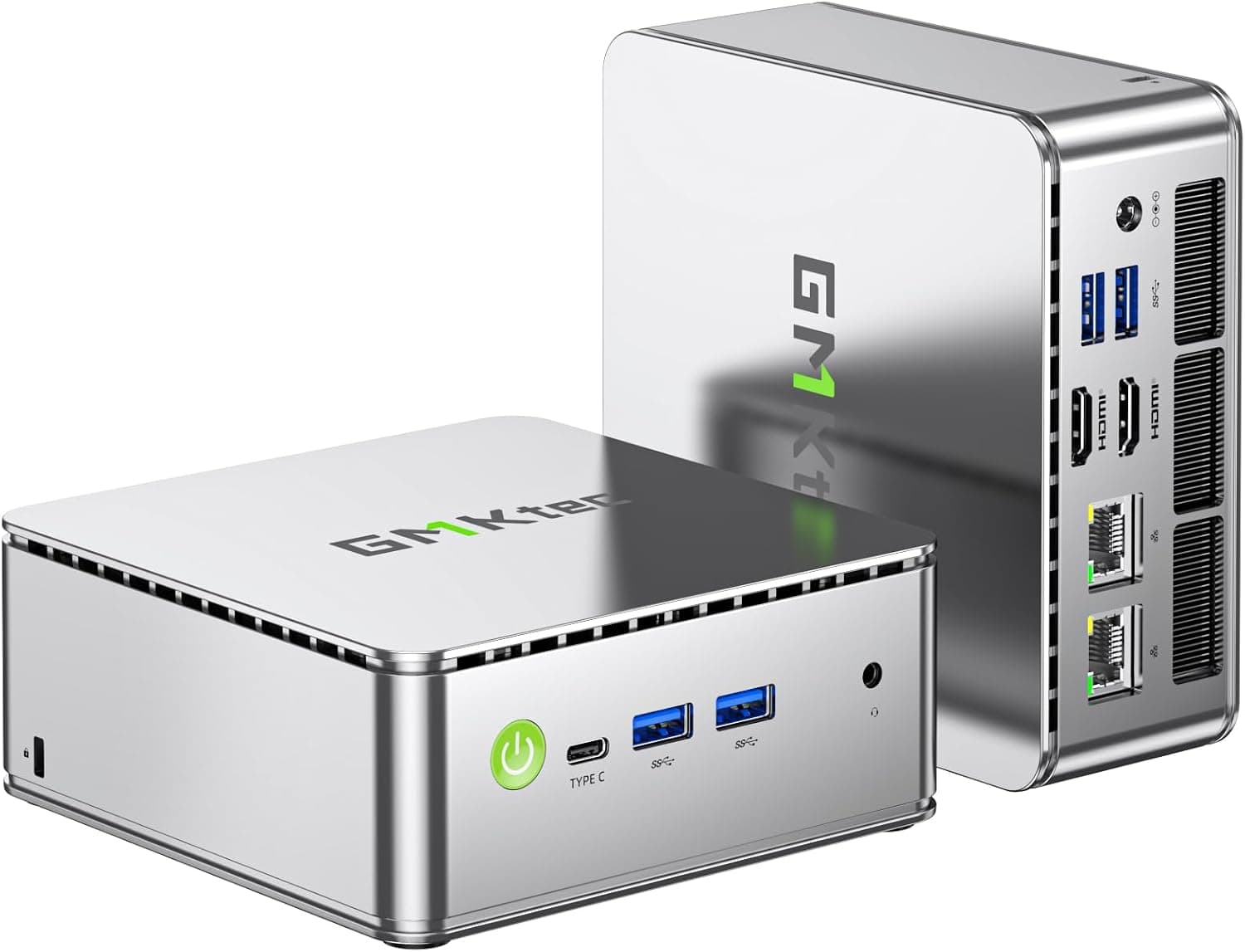
The listing specifies dual 2.5GbE LAN, WiFi 6E and BT5.2, triple display output via dual HDMI 2.0 (4K@60Hz) and Type-C (4K@60Hz), four USB 3.2 ports, one USB 2.0 port, and a 3.5mm audio jack. A reviewer confirms four USB-A 3.2 ports, two HDMI outputs, a 2.5G LAN port, and a 3.5mm audio jack.
Reviewers repeatedly call it an excellent bargain and "the best bang for the buck," with one noting it was $205 after tax and another calling it a "raspberry pi killer." The listing shows 16GB DDR4 RAM and a 512GB PCIe 3.0 NVMe SSD with expansion up to 16TB.
From a similar, more-reviewed product in this category: KAMRUI P1 Mini PC W-11 pro, AMD Ryzen 7330U Mini Computer (Βeats 3550H/R3 5300U,Max 4.3GHz,4C/8T), 16GB RAM 256GB M.2 SSD, Triple 4K Display, WiFi/BT/for Business Home Office Mini PC
The listing describes the operating system as OS(64bit), and one customer reported that the unit arrived with Windows 11 pre-installed, while another customer stated that no Microsoft license was included and that continued use required purchasing a valid license. The material does not consistently confirm that a Windows 11 Pro license is included.
Customers describe it as fitting in the palm of a hand, shorter than a mouse, and about the size of a breakfast English muffin, with one calling it very compact.
The listing states the P1 supports triple 4K@60Hz display via USB3.2 Gen2 Type-C, DP1.4, and HDMI2.0, and one customer reported connecting three 4K HDR monitors along with a mouse, keyboard, and speakers.
The listing says the P1 starts with 16GB DDR4 RAM (upgradable to 64GB, not included) and a 256GB M.2 SSD, and states storage is expandable to 4TB.
Customers report it is fast and easy to set up, with good performance for everyday tasks and cloud-based applications, and the listing cites an AMD Ryzen 7330U with boost clock up to 4.3 GHz for multitasking, 4K video playback, and light games.
Answers are limited to the manufacturer's listing and the reviews we analysed. Questions those sources cannot support are not answered here.
Transparent by design