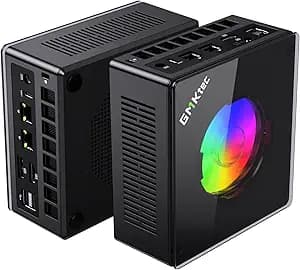
GMKtec Gaming PC, K11 AMD Ryzen 9 8945HS(8C/16T, Up to 5.2GHz), 32GB DDR5 RAM 1TB Mini PC Desktop Computer, Oculink, Dual NIC 2.5GbE LAN, HDMI/DisplayPort/USB4*2
Description
AMD Ryzen 9 8945HS Processor - GMKtec K11 mini pc equipped with the AMD Ryzen 9 8945HS CPU, featuring 8 cores, 16 threads, and boost up to 5.4 GHz. It offers superior multitasking performance for demanding tasks like gaming and content creation, with energy-efficient power management at 35W TDP (upgradable to 70W); 32GB DDR5 + 1TB PCIe 4.0 SSD - GMKtec K11 mini computers comes with 32GB(dual-channel) DDR5 RAM at 5600 MT/s , which can be expanded to 128GB and 1TB PCIe 4.0 M.2 2280 SSD supports dual PCIe Gen4 x4 SSD slots expanded up to 8TB, ensures lightning-fast read/write speeds; Oculink Port - The Oculink port enables higher bandwidth capabilities, better frame rates and lower lag. The standard also operates at PCIe x4 speeds, compared to Thunderbolt's x3. Gamers and content creators can benefit from Oculink's higher bandwidth, resulting in better performance and lower lag for eGPU setups; 4-Screen 4K Display Support - K11 mini pc supports simultaneous 4K display output on 4 screens via HDMI 2.1 (4K@60Hz), DisplayPort 2.1 (4K@60Hz), and USB4 (up to 40Gb/s). Ideal for multitasking, it provides an immersive experience for professional work, gaming, and entertainment; Dual NIC Intel i226V 2.5Gbps + WiFi 6 + BT 5.2 - Dual Intel NIC 2.5G LAN port design provides more applications, such as firewall, multichannel aggregation, soft routing, file storage server, etc. WiFi 6 provides a faster internet experience for browsing, streaming and gaming. Built-in Bluetooth 5.2 is more stable and efficient to connect multiple wireless devices such as projector, printer, monitor, speakers and etc; Upgraded Dual Cooling Fans - Our new Hyper Ice Chamber 2.0 design uses larger top and bottom cooling fans with 360 degrees in and out air flow. The copper base keeps the fan cool and we have lowered the fan noise down to 35dB in Quiet mode; Three Performance Modes & Updated UEFI (BIOS) - The K11 Mini PC features an all new BIOS update with three performance modes (Quiet 35W, Balance 54W, or Performance 65W). VRAM Allocation is also possible with Auto Power On, Wake-on-LAN options available; GMKtec Warranty - GMKtec offers a 1-year limited warranty for each mini PC, starting from the date of the purchase. All defects due to design and workmanship are covered. With a professional after sales team always ready to attend to your needs, you can simply relax and enjoy your mini PC
Compare the trade-offs
Similar products, side by side
A random selection of analyzed products from the same category. Different products are not necessarily interchangeable.

Beelink Mini PC, AMD Ryzen 5500U (6C/12T, Up to 4.0GHz), 16GB DDR4 500GB M.2 NVME SSD, Mini Computer Support 2.5G LAN/Triple Display/USB3.2/WiFi6/BT5.2 Home/Office Micro Desktop Computer

Beelink EQI12 Mini PC,Intel 12th Gen Core i5-1235U (10C/12T,up to 4.4GHz),Mini Computer with 16GB DDR4 RAM 500GB M.2 2280 PCle 4.0x4 SSD,4K Dual Screen Display/WiFi6/BT5.4/USB3.2/Dual Gigabit LAN

BOSGAME P6 Gaming Mini PC w/AMD Ryzen 9 6900HX | 32GB LPDDR5 RAM | 1TB PCIe 4.0 NVMe SSD | Dual Gigabit Ethernet | Triple Display (HDMI/DP/USB-C) | AX210 Wi-Fi 6E | Compact Desktop Computer
One less thing to search
Before you buy: quick questions
Is this mini PC really powerful enough for modern gaming and creative work like video editing?
Absolutely. Based on user feedback and benchmarks, the Ryzen 9 8945HS processor and 32GB of DDR5 RAM make this a powerhouse for its size. It comfortably handles AAA games at 1080p/1440p with good settings and is frequently praised by users for smooth performance in applications like Adobe Premiere and DaVinci Resolve. It's a fantastic all-in-one compact workstation.
How loud are the fans during use? I'm concerned about noise in a quiet room.
This is a common and fair question. During everyday tasks like web browsing or office work, it's very quiet. However, under heavy load (like gaming or rendering), the cooling system ramps up and can become quite audible—some users on Reddit have humorously called it a "mini jet engine." If you're sensitive to noise or plan to use it in a silent home theater setup, using headphones or placing it a few feet away is recommended.
I see it has an Oculink port. What can I do with it, and is it easy to set up an external GPU?
The Oculink port is a standout feature for future expansion! It provides a direct, high-bandwidth connection for an external GPU enclosure, allowing you to add a more powerful desktop graphics card later. Setup requires a compatible Oculink-to-PCIe cable and an eGPU enclosure/power supply. It's a more advanced project, but many tech enthusiasts on forums love this for its upgrade potential beyond the capable integrated graphics.
What's the real-world experience with build quality and customer support from GMKtec?
Reviews indicate the core mini PC unit is well-built and reliable. A frequent note from users is that while the computer itself is solid, some included accessories (like the power adapter) can feel less premium. Regarding support, experiences vary. It's advisable to purchase through a reputable retailer (like Amazon) for easier returns. The brand has a growing community presence, and many users find help through online forums and detailed YouTube setup guides.
Who is this mini PC NOT a good fit for?
It might not be the best choice if: 1) Absolute silence is your top priority under load, 2) You are a complete beginner uncomfortable with potential driver updates or BIOS checks, or 3) You plan to upgrade your graphics card every year—while Oculink offers an eGPU path, the internal GPU is not replaceable. It's perfect for power users who value a tiny footprint but might disappoint those needing whisper-quiet operation or maximum, easy component swaps.
From a similar, more-reviewed product in this category: GMKtec Mini PC Computer, G10 Ryzen 5 3500U (Beats N150/4300U/3200U), 16GB RAM 512GB SSD 2.5GbE NIC LAN Desktop Office Home Business HTPC, Triple 4K Display, WiFi, BT, USB-C, DP, Type-C PD, HDMI 2.1
Can this mini PC really run three 4K monitors at the same time?
Yes — it has HDMI 2.1, DisplayPort 1.4, and USB-C outputs, each capable of driving a 4K display (HDMI and DP at 60Hz, USB-C at 30Hz). Productivity users on YouTube and Reddit frequently praise this triple-display flexibility for spreadsheets, trading, and multitasking. Just note the USB-C video port runs at 30Hz, so if you need smooth 60Hz on all three, plan your primary screens around HDMI and DisplayPort.
Is the 16GB RAM enough, and can I upgrade it later?
For office work, browsing, and streaming, 16GB is plenty. One thing the tech community consistently flags: the 16GB ships as a single stick, which limits the Vega 8 graphics to single-channel mode. If you want better graphical performance, adding a matching 16GB DDR4 3200MHz stick (dual-slot, up to 32GB total) is the most-recommended upgrade — many Reddit users call it a "day-one" must for light gaming. Storage is also expandable via a second M.2 2280 slot.
Will it handle gaming, or is it strictly for office use?
Be realistic here — this is an office-and-media machine that handles *light* gaming. The Ryzen 5 3500U with Vega 8 runs esports titles and older or indie games at modest settings, but modern AAA games will struggle, especially before you add that second RAM stick. Many TikTok and YouTube reviewers note the "gaming" label oversells it. If gaming is a priority, the Ryzen 7-based M5 or M5 Plus in the same lineup is the better fit.
How quiet is it, and will it fit in a bedroom or living room setup?
At idle and for everyday tasks it's essentially silent, which makes it a popular HTPC and bedroom choice. Under sustained heavy loads the compact fan becomes audible — some users describe a "small jet engine" during rendering — and airflow matters, so keep it ventilated rather than boxed in. For browsing, streaming, and Office work, most people never notice it.
What about warranty, returns, and after-sales support — is it trustworthy?
It carries a 3-year limited replacement-parts and service policy, and buyers consistently rate the value highly (around 4.2/5 across hundreds of reviews). That said, some shoppers rightly ask *who* to contact in year two, since support is handled through the seller rather than local service centers. Our advice: buy from a retailer with a clear return window, register the product on arrival, and keep your order confirmation — that's the safest path if you ever need service.
Answers are limited to the manufacturer's listing and the reviews we analysed. Questions those sources cannot support are not answered here.
Transparent by design