What people like
Powerful, compact, great value
Reviewers consistently praise the strong performance packed into a small form factor, especially for local AI and heavy workloads, at a price they consider excellent value.
The 30-second read
What people like
Reviewers consistently praise the strong performance packed into a small form factor, especially for local AI and heavy workloads, at a price they consider excellent value.
The main watch-out
One reviewer reported the unit arriving non-functional, requiring a fresh Windows install and hours of troubleshooting with freezes and black screens.
Before you choose
Some buyers note soldered LPDDR5X memory, wish for extra HDMI or faster networking, and mention that running large local models requires careful configuration.
From a similar, more-reviewed product in this category: KAMRUI P1 Mini PC W-11 pro, AMD Ryzen 7330U Mini Computer (Βeats 3550H/R3 5300U,Max 4.3GHz,4C/8T), 16GB RAM 256GB M.2 SSD, Triple 4K Display, WiFi/BT/for Business Home Office Mini PC
What people like
Reviewers repeatedly praise the small form factor, quick performance, and simple setup, with several noting it handles everyday work and even Linux well.
The main watch-out
One reviewer reports weak wireless due to a tiny antenna, and another says the unit did not include a valid Windows 11 Pro license despite being advertised with it.
Before you choose
Some reviews mention limited storage that may need upgrading and setup complications with Bluetooth keyboards or mice, so confirm your needs before buying.
Your use case first
9 of 34 mentions describe a negative experience (26%).
3 of 14 mentions describe a negative experience (21%).
2 of 7 mentions describe a negative experience (29%).
1 of 6 mentions describe a negative experience (17%).
4 of 9 mentions describe a negative experience (44%).
3 of 8 mentions describe a negative experience (38%).
4 of 8 mentions describe a negative experience (50%).
4 of 7 mentions describe a negative experience (57%).
One review can mention several topics. Percentages describe the reviews we analysed, not all buyers or the product's overall failure rate.
From a similar, more-reviewed product in this category: KAMRUI P1 Mini PC W-11 pro, AMD Ryzen 7330U Mini Computer (Βeats 3550H/R3 5300U,Max 4.3GHz,4C/8T), 16GB RAM 256GB M.2 SSD, Triple 4K Display, WiFi/BT/for Business Home Office Mini PC
23 of 118 mentions describe a negative experience (19%).
4 of 41 mentions describe a negative experience (10%).
1 of 26 mentions describe a negative experience (4%).
0 of 21 mentions describe a negative experience (0%).
0 of 20 mentions describe a negative experience (0%).
1 of 15 mentions describe a negative experience (7%).
1 of 10 mentions describe a negative experience (10%).
3 of 8 mentions describe a negative experience (38%).
Compare the trade-offs
A random selection of analyzed products from the same category. Different products are not necessarily interchangeable.
Check the evidence
Included does not mean verified authentic. Flagged does not mean proven fake. These are analytical classifications.
Showing 3 illustrative excerpts, not the complete review set.
Capable of running large AI models
“The largest AI model I am able to load onto my GMKtec EVO-X2 into the LM Studio software outputs about 8 tokens/second: Qwen3-235B-A22B-Instruct-2507-gguf-q2ks-mixed-AutoRound-inc This mixture-of-experts AI model is also known as: Qwen3-235B-A22B-Instruct-2507-128x10B-Q2_K_S-00001-of-00002.gguf This is a 235 Billion parameter model with Q2_K_S automatic Intel quantization. I am able to load this model with 96GB of memory dedicated to VRAM and the following model config in LM Studio 0.3.20: GPU Offload: 80 / 94 Offload KV Cache to GPU Memory: NO (slider to the left) Keep Model in Memory: NO (slider to the left) All other model config settings are at their default values, including the attempt to use mmap option, which seems to be necessary to load this particular model. In the magnifying lens / Runtime window, I had to select: GGUF: ROCm llama.cpp (Windows) v1.42 ROCm allows more layers to be offloaded to the GPU and allows this large model to be faster than the Llama 3.3 70B parameter model, which outputs about 5 tokens/second with Vulkan and with the test prompt, "Why is the sky blue?" The smaller models seem to run faster with Vulkan. When you reboot the computer, you can repeatedly press the Esc key to enter the BIOS configuration and set 96GB for the graphics memory and activate Performance mode. I learned that it is possible to activate the High Performance mode in Windows 11 by right clicking in the Windows menu and selecting: Terminal (Admin) A command prompt will then open. You can then enter: powercfg -setactive SCHEME_MIN I then went into the Control Panel / Power Options to change the advanced power settings for the "High performance" plan which was now unhidden. I set the "Turn off hard disk after" option to Never. I set the "Sleep after" option to Never. I set the "Minimum processor state" to 100%. The output speed of Qwen3 235B increased to 8.7 to 8.8 tokens/second for the test question, "Why is the sky blue?" This output rate is faster than the rate at which I can read when I think about what the AI model is writing. Smaller AI models might output answers faster, but the answers tend to be wrong with greater frequency than larger AI models. Wrong answers delivered fast are useless to me. Qwen3 235B sometimes outputs gibberish, such as, "GGGGG..." I don't know if this is due to a memory shortage, a context window that is too small, a result of the quantization, or something else. I don't seem to have enough memory left to increase the context windows size from the default 4,096. Keeping prompts short on one line seems to help prevent this issue. 08/04/2025 Update: I was able to increase the context window size by setting the options: Context Length: 262144 Evaluation Batch Size: 256 Flash attention: YES (slider to the right) The default Evaluation Batch Size of 512 seems to cause an eventual crash, but 256 seems stable. The speed of Qwen3 235B gradually slows down as the context window fills up. After about 27,000 tokens are in the context window, the output speed drops to about 1 token/second, so 27,000 is about the practical limit for the context length unless you are patient. I deleted OneDrive and the Recall feature. In the Edge browser, I disabled the Settings / System and performance / System / "Startup boost" option to prevent Edge from staying resident in memory all the time. I also disabled the option for "Continue running background extensions and apps when Edge is closed". I ran the msconfig program to disable the Print Spooler and some other print-related process which I will never use on this computer. 8/5/2025 Update: I was able to load the new AI model: openai/gpt-oss-120b The GGUF files come in 2 parts: gpt-oss-120b-MXFP4-00001-of-00002.gguf gpt-oss-120b-MXFP4-00002-of-00002.gguf This is a 120 Billion parameter GPT Open Source Software version from OpenAI with MXFP4 quantization. The size listed in LM Studio is 63.39GB. In the BIOS, I had to select 64GB dedicated to graphics memory. I am still able to load Qwen3 235B, but the output speed drops to about 7 tokens/second for the test question, "Why is the sky blue?" For Qwen3 235B, it seems better to have 96GB dedicated to graphics memory. The output speed of openai/gpt-oss-120b is about 10 tokens/second for the same question. The following is the openai/gpt-oss-120b model config in LM Studio 0.3.21: Context Length: 30000 GPU Offload: 36 / 36 Evaluation Batch Size: 4 Offload KV Cache to GPU Memory: NO (slider to the left) Keep Model in Memory: NO (slider to the left) Try mmap: NO (slider to the left) All other model config settings are at their default values. Attempting to offload the KV cache to GPU memory results in a failure to load. Attempting to activate Flash memory results in a failure to load. Setting the mmap option to NO seems to result in much more RAM being available once the model is loaded, dropping from about 57GB used to less than 5GB used according to the number in the lower right corner of LM Studio. In the Magnifying lens (Discover) / Runtime window, I had to select: GGUF: Vulkan llama.cpp (Windows) v1.44.0 Attempting to use the ROCm llama.cpp v1.43.1 causes the openai/gpt-oss-120b model not to load. So, if I switch between loading Qwen3 235B and openai/gpt-oss-120b, I must choose the version of llama.cpp that works with each model. 8/7/2025 Update: I was occasionally getting an error in GPT after it had finished outputting a response. The error message was something like: "Unexpected end of grammar stack after receiving input: G". Repeated outputs of the letter G, such as, "GGGGG...", seems to be related to the Evaluation Batch Size, which seems to be stable at a value of 4 for the GPT model. I used a variation of the following prompt and kept dividing the Evaluation Batch Size by 2 until I no longer got the error message: Please write a story about people who wake up from suspended animation in another star system. The study of Arctic and Antarctic fish allowed scientists to develop an artificial protein that inhibits ice formation. The people left Earth due to warfare and did not have time to prepare. The ship's AI still thinks it is near Earth in the past, because that is when the AI was last updated while its atomic clock still functioned. The atomic clock was hit with shrapnel in orbit, caused by anti-satellite weapons, that was recorded as a micro-meteorite strike. Automated systems sealed the hole in the hull, but the clock remained non-functional. Any watches worn by the people in cryochambers caused frost injuries to the skin where bare metal contacted skin. The watches were broken by the cold in the cryochambers. Any watches that were stored outside the cryochambers either have depleted batteries or have not been regularly wound by movement in the case of automatic watches. Analog watch hands are halted at various time indications. An automated routine in the cryochambers wakes the crew up independently of the main AI system. Any views of the outside are through cameras and sensors which are controlled by the AI. A crew member tells the AI system to start up the main systems, but the AI system refuses to do so, because the AI refuses to accept that time has passed and thinks the crew is discussing a hypothetical scenario. The crew must either convince the AI that time has passed or somehow bypass the AI's control over the ship to survive. Bypassing the AI will result in loss of navigation and dynamic fusion containment. The AI shows the crew a picture of the Earth before they reached escape velocity as if the Earth were outside in the present. The image causes one crew member to believe that they are still on Earth. The crew member's mental illness had been well treated on Earth before the war made prescription refills impossible. The crew attempt to improvise a new clock for the AI, but the AI recognizes the inaccuracy of the clock and ignores the clock. The crew attempt to manually restart the fusion reactor but abandon the attempt when they almost lose containment. All hope seems to be lost. However, the improvised clock allows the AI's predictions, which are analogous to dreams or hallucinations in humans, to move forward in time. Previously, the AI's predictions had all been overlaid on top of each other at the same instant in time. The AI decides on its own to search for a pulsar as a time reference. 8/10/2025. I feel the need to respond to Bill Bohn's review of a computer which he apparently does not own. There is nothing misleading in my review. The numbers are what they are. If you actually had a GMKtec EVO-X2, then you could reproduce my numbers. Moonshot Kimi-K2 is simply wrong when it writes, "The reviewer is running a GMKtec EVO-X2 mini-PC that houses a Ryzen 9 8945HS (8 Zen 4 cores + Radeon 780M iGPU) plus 96 GB of system DDR5 and BIOS UMA set to 96 GB." Moonshot Kimi-K2 is incorrectly identifying the processor, the graphics unit, and the amount of memory the GMKtec EVO-X2 computer has. The processor is a Ryzen AI Max+ 395 which has 16 processor cores, not 8. The graphics processor is an integrated AMD Radeon 8060S, not 780M. The GMktec EVO-X2 has 128GB of total system memory, not 96GB. A maximum 96GB of the 128GB total system memory can be allocated for VRAM. Why are you reviewing a computer that you apparently do not own and apparently know nothing about? Do not blindly accept whatever information an AI system gives to you. 8/11/2025. I have changed the previous Evaluation Batch Size from 16 to 4 for the gpt-oss-120b model. This seems to be most stable setting so far. 8/17/2025. The gpt-oss-120b model from OpenAI now outputs 36 to 40 tokens/second for the prompt, "Why is the sky blue?" This speed increase was made possible by selecting the new ROCm llama.cpp v1.46.0 and choosing 96GB of memory to be allocated to video memory in the BIOS. Thanks to whomever made this dramatic speed increase possible. What's funny is gpt-oss-120b tells me it is impossible for consumer-level computer hardware to achieve this speed. In the gpt-oss-120b settings, I set: Context Length: 63000 GPU Offload: 36/36 Evaluation Batch Size: 256 Offload KV Cache to GPU Memory: YES (slider to the right) Flash Attention: YES (slider to the right) In the magnifying lens / Runtime setting, I set: GGUF: ROCm llama.cpp (Windows) v1.46.0 All other parameters are at their default settings for gpt-oss-120b. Qwen3 235B now outputs about 9 to 10 tokens/second. The new version of ROCm llama.cpp v1.46.0 seems to allow 81 layers to be offloaded to the GPU instead of 80 layers. My model settings for Qwen3 235B are now: Context Length: 30000 GPU Offload: 81/94 Evaluation Batch Size: 128 Offload KV Cache to GPU Memory: NO (slider to the left) Keep Model in Memory: NO (slider to the left) Flash Attention: YES (slider to the right) In the magnifying lens / Runtime setting, I set: GGUF: ROCm llama.cpp (Windows) v1.46.0 All other parameters are at their default settings for Qwen3 235B. Currently, there seems to be no substitute for experimenting with the various parameters to get a stable configuration in LM Studio. The parameters that AI models recommend do not work. I recommend dividing the Evaluation Batch Size by 2 if you get gibberish from one of these large AI models or if the AI model crashes. 8/26/2025. After upgrading to AMD Adrenalin 25.8.1, the gpt-oss-120b AI model stopped working with ROCm llama.cpp v1.46.0 in LM Studio 0.3.23. I am still able to use Vulkan llama.cpp v1.46.0 but at a reduced output speed of about 33 tokens/second for the test prompt, "Why is the sky blue?" You might want to set a System Restore point before upgrading the AMD Adrenalin software so that you can go back to a faster configuration if the upgrade degrades inference speed. 9/10/2025. I installed a second 4TB NVME drive made by Western Digital after removing the rubber feet to reveal the screws. I followed the instructions of gpt-oss-120b for running a free Windows program named Rufus to make a bootable USB drive with a Debian installation *.iso file extracted to the USB drive and booting from the drive. Everything was going well until I had to enter my wireless network password. After repeatedly entering the correct password, the installation would not advance beyond the DHCP configuration. Updating the computer's BIOS did not help. I discovered I had to select, "None", as the driver for my wired network adapter. That option comes up somewhere in the non-graphical installation process. The wireless network Debian installation then worked. The gpt-oss-120b AI model outputs at 47 tokens/second in LM Studio 0.3.25 running in Debian Linux with the Gnome graphical interface for the prompt, "Why is the sky blue?" Gnome has an option for High Performance mode, similar to Windows, which I activated. I set the magnifying glass / Hardware / Memory Limit value to 110. The Runtime / GGUF setting is Vulkan llama.cpp (Linux) v1.50.2. For some reason, the ROCm llama.cpp v1.50.2 program does not work in Debian Linux with the EVO-X2 computer at present. The gpt-oss-120b model settings in LM Studio in Debian Linux are: Context Length: 30000 GPU Offload: 36/36 Evaluation Batch Size: 127 Keep Model in Memory: NO (slider to the left) Try mmap(): NO (slider to the left) Flash Attention: YES (slider to the right) All other gpt-oss-120b model parameters are at their default settings. 10/1/2025. LM Studio 0.3.27 running in Debian "Trixie" Linux automatically installed ROCm llama.cpp (Linux) v1.52.0 and selected that as the engine for GGUF even though ROCm is currently not supported in the Debian "Trixie" edition. The Vulkan llama.cpp (Linux) v1.52.0 apparently uses more memory than v1.50.2 and causes the output speed of gpt-oss-120b to plummet to around 2 tokens/second. This is a step in the wrong direction. Luckily, I could scroll down in the All tab of the Runtime window and click on the "..." next to Vulkan llama.cpp (Linux) and select, "Manage Versions", and delete Vulkan llama.cpp v1.52.0 to make v1.50.2 the default. I also had to uncheck the, "Auto-update selected Runtime Extension Packs". 9/12/2026. My GMKtec EVO-X2 computer began to shut down due to overheating in the past month. Attempting to turn the GMKtec EVO-X2 computer on again resulted in the LED lights turning on for about 5 seconds before the computer shut down again. After putting the computer in the refrigerator for 30 minutes, I was able to get the computer to boot again and repeatedly press the Esc key to go into the BIOS hardware monitor settings and manually turn on the fans. I learned the fan 3 speed can be set to 100% all the time without producing much noise. Fans 1 and 2 are smaller and produce more noise. The long-term solution to the overheating was to replace the thermal paste. You can search YouTube for, "GMKtec EVO-X2 teardown", to find videos that show how to open up the computer to remove the heat sink. I used PTM7950 to replace the thermal paste. PTM7950 is a phase-change material that has the feel of sticky clay and easily crumbles like clay. PTM7950 becomes stiffer and easier to handle after being put in the freezer for 45 minutes or so. I cut just enough of the PTM7950 sheet to replace the thermal paste, an area about 20mm by 30mm (rough estimate from memory), but it might have been better for me to put a larger sheet of PTM7950 on the heat sink over the processor to distribute the heat over a larger area. It helps to buy extra PTM7950, because you are likely to mess up in your first attempt. The computer power draw seems to be limited to about 60 Watts with PTM7950 in high performance mode instead of the 120 Watts with the original thermal paste. The computer is still very fast. The AI inference speed actually is faster in balanced power mode instead of high performance mode by about 1 token per second at 50+ tokens/second for the AI model GPT-OSS-120B in Debian Trixie Linux in LM Studio 0.4.24 for the prompt, "Why is the sky blue?" My theory is there is more thermal headroom in balanced power mode for the GPU. I'm just glad my computer is working again.”
Signals matched: Specific detail: quantity, entity, scenario · Mentions: performance, compatibility · Reads as an authentic voice
A Tiny AI Workhorse: The Surprisingly Powerful GMKtec NucBox Evo-X2 Mini PC
“My Evo-X2 Mini PC Review This new mini PC made by GMKtec is honestly incredible. Out of all the mini PCs I’ve tested so far, this one is by far the most impressive. Inside such a small form factor there is an insane amount of power it almost feels ridiculous how much performance they managed to pack into this tiny machine! Can't wait to see what we will have in the future! The PC was mainly designed and marketed around AI workloads, but it also works extremely well as a gaming machine. For example, I was literally able to play Resident Evil Requiem at Maximum settings with very good performance. And remember, this system is running only an iGPU. That really shows how fast technology is moving. Being able to play modern AAA games on an integrated GPU would have sounded crazy a few years ago. Performance wise, the integrated GPU is roughly comparable to an NVIDIA GeForce RTX 4060 Laptop GPU. But let’s focus on the main selling point of this machine: AI. AI Performance If you bought this machine for AI workloads, you are definitely in the right place. For my testing I installed LM Studio and ran 3 different Qwen models. (9B, 35B, 122B) The system handled them without any major issues. (Vulkan was used and not Rocm) *Benchmarks in the pictures attached. I also tried Openclaw with Ollama running GPT-OSS-20B, and that worked well too! (Openclaw is an Ai assistant that you can configure to do pretty much what you want) However, it’s important to remember that AI software is still evolving very quickly. Because of that, you may sometimes run into compatibility issues especially with relatively new hardware. (Like I am using just now) In my case, I had some problems getting ROCm working properly under Windows 11. For Linux users, compatibility should generally be much better. Hardware Overview The system comes with some seriously impressive specs: CPU AMD Ryzen AI Max+ 395 16 cores / 32 threads Up to 5.1 GHz boost clock 16 MB L2 cache / 64 MB L3 cache Runs around 120W sustained (up to ~140W peak) GPU AMD Radeon 8060S integrated graphics (Most Powerful IGPU on the market right now) 40-core RDNA 3.5 architecture NPU Dedicated 50 TOPS NPU Up to 126 TOPS total AI performance Memory & Storage This unit comes with: 128GB LPDDR5X RAM @ 8000 MT/s 2TB M.2 SSD Other configurations are also available: 64GB RAM + 1TB SSD 96GB RAM + 1TB SSD An interesting detail is that the RAM is shared between CPU and GPU, and you can adjust this in the BIOS. For example, my configuration was: 96GB VRAM for the iGPU 32GB for CPU / system This gives a lot of flexibility depending on the type of work you plan to do. Benchmarks I’ve included benchmark images in this review if you want to see performance results for: Cinebench 3DMark AI inference LLM performance Resident Evil Requiem Performance Connectivity & Ports Front I/O 2 × USB-A 3.2 Gen2 1 × USB-C (USB4) 1 × 3.5mm audio jack 1 × SD card reader (SD4.0 / SDXC) Buttons: Power System fan lighting control Performance mode switch Rear I/O 1 × DisplayPort 1.4 1 × HDMI 2.1 1 × USB-A 3.2 Gen2 2 × USB-A 2.0 1 × USB-C (USB4) 1 × 3.5mm audio jack 1 × 2.5G Realtek Ethernet port 1 × DC power input Wireless connectivity includes: WiFi 7 Bluetooth 5.4 Dimensions: 193 mm × 185.8 mm × 77 mm Despite the small size, the system still manages to deliver desktop level performance in many workloads. Pros ✔ Really powerful and extremely versatile ✔ High-quality metal chassis ✔ The most powerful iGPU currently available ✔ SD card reader ✔ Different power mode button ✔ Excellent for local AI / LLM workloads ✔ Dual M.2 2280 slots (upgradeable storage) Cons ✖ Ethernet connection seemed a bit unstable during my testing (WiFi worked perfectly) ✖ The system can get quite loud under heavy load ✖ No OCuLink port (although USB4 can still be used for external GPUs) ✖ LPDDR5X RAM is soldered (not upgradeable) (more performance but harder to repair) ✖ AI ecosystem is still evolving, so Windows compatibility can sometimes be tricky (*Not a pc problem, but more of a technology problem) Final Thoughts Overall, the GMKtec Evo-X2 is one of the most impressive mini PCs I’ve bought and tested so far. It combines: serious AI performance surprisingly capable in gaming extremely powerful integrated graphics Inside out a very compact system. If you’re looking for a mini PC capable of running local AI models while still being able to handle modern games, this machine is honestly hard to beat.”
Signals matched: Specific detail: comparison, entity · Mentions: performance, compact size · Promotional-style language
120B at 131K works, but only with careful LM Studio tuning
“Edward Lee's detailed review helped me get started, so I am posting my exact working configuration for other local-AI buyers. My system: - GMKtec EVO-X2 with Ryzen AI Max+ 395 and 128 GB LPDDR5X - Windows 11 Pro - BIOS UMA allocation: 96 GB - Performance mode enabled - LM Studio ROCm llama.cpp (Windows) 2.31.2 - Model: gpt-oss-120b Ultra Heretic MXFP4, a single 65,369,016,640-byte GGUF My stable LM Studio load profile: - Context length: 131072 - Parallel requests: 1 - GPU offload: 36 layers (do not simply choose "Max") - Evaluation batch size: 256 - Micro-batch size: 512 - Flash Attention: ON - KV cache offload to GPU: ON - K and V cache quantization: q4_0 / q4_0 - mmap: ON Important mmap correction: ON is the setting in this qualified Windows LM Studio profile. Do not transfer it blindly to Linux. On Linux LocalAI 4.8.2 with the Strix Halo iGPU, keep mmap OFF: that release predates llama.cpp's August 11, 2026 automatic iGPU load-mode change, and mmap can temporarily duplicate model pages in shared UMA. With a newer runtime containing that change, start with load-mode auto and qualify it instead of forcing either value. I validated this with a prompt that tokenized to 128,143 model tokens before chat-template overhead. LM Studio reported 128,210 effective prompt tokens, generated 51 completion tokens, and completed successfully at 128,261 total tokens. With the model already loaded, I observed about 34 output tokens/second. Windows commit headroom matters. I used a fixed 128 GiB pagefile. Keep parallelism at 1 and load only one 120B model. Selecting maximum GPU offload, allowing parallel=4 defaults, or trying to keep another large model resident can turn a working configuration into allocation failures or timeouts. For headless LM Studio loading, also make sure the model has an explicit entry in LM Studio's shared user-concrete-model-default-config store. A sidecar beside the GGUF was not enough for the daemon in my testing; without the shared entry it reverted to defaults. The practical limitation is memory margin. With 96 GB assigned to the iGPU, Windows has roughly 32 GB remaining, while the model weights, 131K KV cache, runtime allocations and transient buffers consume most available headroom. This machine can complete a single 120B long-context request, but it is not comfortable production capacity for concurrency, model switching, or 262K context. For those uses I would choose a 192 GB or 256 GB system. For smaller models this is a powerful, compact machine. For 120B at long context it can work, but expect careful tuning and treat the configuration above as the starting point rather than relying on automatic defaults.”
Signals matched: Specific detail: quantity, entity, process, scenario · Mentions: performance, setup, compatibility · Reads as an authentic voice
One less thing to search
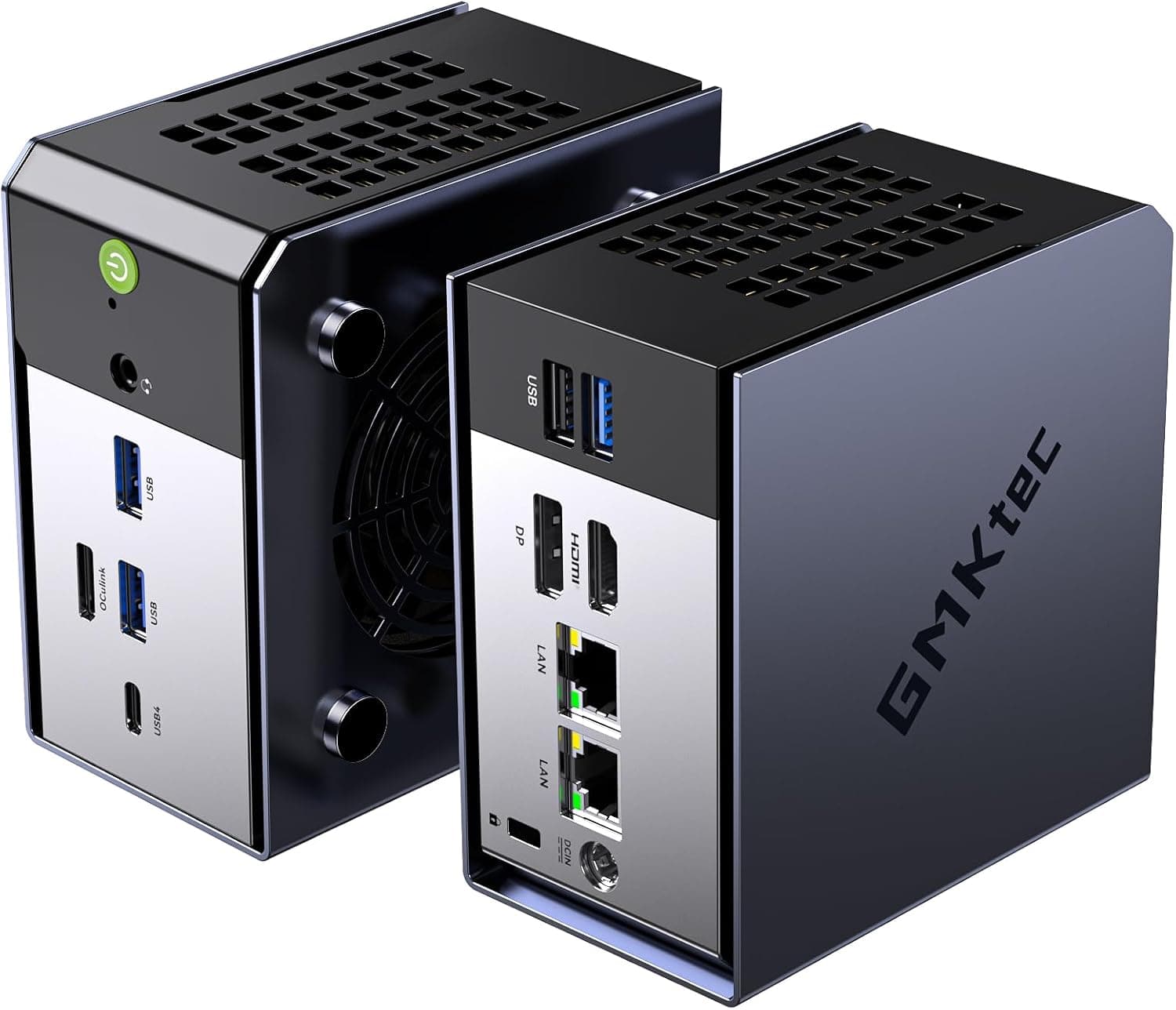
It has an AMD Ryzen 7 7735HS (8C/16T, up to 4.75GHz), AMD Radeon 680M graphics, 32GB dual-channel LPDDR5 6400MT/s (on board), and a 1TB PCIe 3.0 M.2 2280 NVMe SSD.
It includes 1x Oculink, 1x USB4 (PD/DP/DATA), 1x HDMI 2.0, 1x DP1.4, 3x USB 3.2 Gen2, 1x USB 2.0, 2x RJ45 2.5G LAN, and a 3.5mm audio jack, with triple display output support.
Yes, the PCBA design supports two 2280 SSDs at PCIe Gen4 x4, for a maximum of 16TB (8TB x2).
Reviews describe it as a capable AI workhorse that can run large models, with one reviewer noting a 235-billion-parameter model running at about 8 tokens/second, though results depend on configuration and tuning.
Multiple reviewers call it great value for the price, with one software engineer noting it is way cheaper than a comparable Mac Pro while delivering similar performance.
From a similar, more-reviewed product in this category: KAMRUI P1 Mini PC W-11 pro, AMD Ryzen 7330U Mini Computer (Βeats 3550H/R3 5300U,Max 4.3GHz,4C/8T), 16GB RAM 256GB M.2 SSD, Triple 4K Display, WiFi/BT/for Business Home Office Mini PC
The listing describes the operating system as OS(64bit), and one customer reported that the unit arrived with Windows 11 pre-installed, while another customer stated that no Microsoft license was included and that continued use required purchasing a valid license. The material does not consistently confirm that a Windows 11 Pro license is included.
Customers describe it as fitting in the palm of a hand, shorter than a mouse, and about the size of a breakfast English muffin, with one calling it very compact.
The listing states the P1 supports triple 4K@60Hz display via USB3.2 Gen2 Type-C, DP1.4, and HDMI2.0, and one customer reported connecting three 4K HDR monitors along with a mouse, keyboard, and speakers.
The listing says the P1 starts with 16GB DDR4 RAM (upgradable to 64GB, not included) and a 256GB M.2 SSD, and states storage is expandable to 4TB.
Customers report it is fast and easy to set up, with good performance for everyday tasks and cloud-based applications, and the listing cites an AMD Ryzen 7330U with boost clock up to 4.3 GHz for multitasking, 4K video playback, and light games.
Answers are limited to the manufacturer's listing and the reviews we analysed. Questions those sources cannot support are not answered here.
Transparent by design


