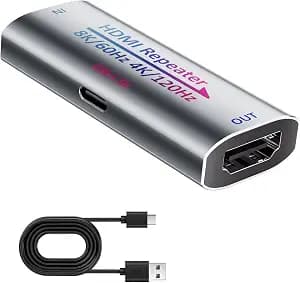
HDMI 2.1 Booster Repeater Active– Supports 8K@60Hz & 4K@240Hz, USB‑C Powered, Extends HDMI Signal up to 164ft for PS5, Xbox Series X/S, Projector, Home Theater
Description
⚠️ IMPORTANT – Read Before Buying This booster includes a USB‑C power cable. You must connect it to a 5V/1A USB power adapter (not included) or to a USB port on your TV/game console. Without external power, the booster WILL NOT work. Also, you MUST use certified Ultra High Speed HDMI 2.1 cables (48Gbps) on both ends. Standard HDMI cables will cause black screen or flickering. ✅ Compatibility check before purchase – see product images.; 【Active Signal Regeneration vs. Passive Connection – Solve the Root Cause】 This is an Active HDMI 2.1 Signal Booster with a built‑in chip that actively receives, reshapes, and amplifies degraded signals – fundamentally different from passive couplers that merely join cables. Designed for long‑distance runs (35ft, 50ft, even 164ft), it eliminates flickering, black screens, and dropouts. Real user: “50ft HDMI cable wouldn’t work at all – after adding this booster, the picture was rock solid.”; 【True 8K/4K High‑Refresh Performance – Real‑World Verified】 Supports lossless transmission of 8K@60Hz, 4K@120Hz/240Hz with full passthrough for HDR10+, Dolby Vision, VRR, ALLM, and HDCP 2.3. Users confirm: *“Xbox Series X to 4K/120Hz TV – smooth, no lag”*; “PS5 over 35ft to projector – perfect signal, no handshake issues.” Note: This booster regenerates signals – it does not “upscale” lower resolutions.; 【Mandatory USB‑C Power – The Key to Stability】 To guarantee absolute stability for 8K/4K high‑refresh signals, connecting the included USB‑C power (5V/1A) is REQUIRED. Without external power, the chip cannot operate at full capacity – leading to flickering or black screens. With power, you get rock‑solid performance every time. (Any standard 5V/1A phone charger works.); 【Resolution‑Based Distance Limits – Honest & Practical】 We specify maximum individual cable length for INPUT and OUTPUT at each resolution: 8K@60Hz / 4K@240Hz: IN ≤ 10m (32.8ft), OUT ≤ 8m (26.2ft) → Total ≤ 18m (59ft) 4K@120Hz: IN ≤ 11m (36ft), OUT ≤ 9m (29.5ft) → Total ≤ 20m (65.5ft) 4K@60Hz: IN ≤ 15m (50ft), OUT ≤ 10m (30ft) → Total ≤ 25m (80ft) User confirmed: “25ft Blu‑ray connection – picture became sharper, better color.” Unibody aluminum housing for heat dissipation and durability.; 【Professional Setup Guide – Get It Right First Time】 For best results: (1) MUST use certified Ultra High Speed HDMI 2.1 cables (48Gbps) on BOTH ends (2) Connect Source → INPUT, Display → OUTPUT (3) Always connect USB‑C power Users appreciate the clear, honest specs: “Followed the guide – worked perfectly the first time.”; This product is independently developed by our team based on real‑world market feedback. For any questions regarding functionality, compatibility, or setup, please contact our technical support via Amazon—we’re here to help you get the most out of your purchase.
Compare the trade-offs
Similar products, side by side
A random selection of analyzed products from the same category. Different products are not necessarily interchangeable.

2026 WiFi Extender Internet Booster, 10000 Sq.ft Long Range Repeater Wireless Routers Amplifier, Mesh Wi-Fi 80% Faster | Broader Than Ever, Support More Network Devices at Home, 1-Tap Setup

TP-Link AX3000 WiFi 6 Range Extender | PCMag Editor's Choice | Dual-Band Wireless Repeater w/Ethernet Port | Up to 2400 Sq. Ft., 64 Devices | Internet Signal Booster | APP Setup | EasyMesh (RE715X)

4K UHD HDMI Extender - Female to Female HDMI Repeater for Oculus Rift and More - Up to 40 Meters Lossless Transmission
One less thing to search
Before you buy: quick questions
I’m planning a 50-foot run from my PS5 to my projector. Will this repeater handle 4K@120Hz with VRR, or will I lose gaming features?
You’re good to go. This repeater is built specifically for high-bandwidth HDMI 2.1 data. It supports 4K@120Hz and even 8K@60Hz without compressing the signal, so gaming features like VRR and ALLM are passed through untouched. Just remember that the source devices (your PS5 and the projector) also need to support those features. Many viewers have noted that while the image stays crisp on long runs, it’s still best to keep an eye on your projector’s specific frame-rate limits—but the booster won’t be the bottleneck.
Does it really work out of the box, or do I need to buy extra cables?
It’s functionally plug-and-play, but you *must* provide power via a USB-C connection. This is not a passive cable. You’ll need a standard USB-C adapter (usually a 5V/1A phone charger is plenty) to plug into the unit. TikTok reviews often show people using the spare USB port on their TV or a gaming console to power it, which keeps cable clutter down. Once power is connected, it works immediately—no drivers or software updates.
The casing gets warm during use. Is this normal, or will it melt/burn out in my wall cavity?
Yes, it’s completely normal and a sign that the active chipset is doing its job. The metal housing acts as a heatsink, which means the unit will feel warm to the touch during heavy 4K/8K sessions. That said, we strongly advise against installing this inside a sealed wall or enclosed media cabinet without ventilation. It is designed for open, accessible setups. As long as there is some airflow, the heat is within safe limits. A few users have even zip-tied it to an open rack to maximize cooling—though that’s probably overkill for most home theater setups.
I’m getting intermittent black screens when I change inputs. Is this a common issue?
A brief handshake delay when switching sources is a known characteristic of many active repeaters, not just this model. During the HDMI connection handshake, the TV and source device renegotiate the signal. If you experience a black screen for 5-10 seconds on an input change, that’s often the TV processing the EDID information. If the screen goes black *during* normal playback, however, that suggests a different issue—usually an under-powered USB source or a low-quality HDMI cable on one side of the booster. We recommend ensuring the power source is stable and that the cables are certified Ultra High Speed to eliminate that variable.
Is this a better buy than just using a long certified HDMI cable, or a fiber optic cable?
It depends on your setup. For runs *under* 25 feet, a high-quality passive copper cable is usually cheaper and simpler—skip the repeater. For a 164-foot run (the limit here), this active unit is far more reliable than a standard passive cable, which will drop signal noise well before that distance. If you are doing a brand-new install and don’t mind the cost, a fiber optic HDMI cable offers a sleek, single-cable solution. However, fiber cables are fragile at the connector points and can’t be bent tightly. This repeater allows you to use two robust copper cables, which are easier to snake through existing walls and pull through tight turns, making it a more forgiving choice for renovations or tricky conduit paths.
From a similar, more-reviewed product in this category: TP-Link RE615X AX1800 WiFi 6 Range Extender w/Ethernet Port
Does this range extender increase my internet speed?
No. The manufacturer states that all wireless extenders are designed to increase or improve WiFi coverage, not to directly increase speed, and in some cases improving signal reliability can affect overall throughput. Reviewers confirm this, with one noting download speed will be about half what your router provides.
How easy is it to set up the RE615X?
Reviewers consistently describe setup as easy and quick, typically done through the TP-Link Tether app in just a few minutes. One reviewer noted that a second run through setup worked great after an initial attempt.
Will this extender help with dead spots and weak signal areas in my home?
Yes. Reviewers report it filled dead spots and improved signal in back rooms, upstairs, the backyard, and even out to a pool area, with one describing signal going from unusable to solid.
Does this extender have an Ethernet port?
Yes, it has a gigabit Ethernet port for connecting a wired device, and one reviewer found it useful for a wired device. The manufacturer notes it provides wired speed and reliability anywhere in your home.
Is the RE615X compatible with mesh systems?
It is EasyMesh-compatible and works with any EasyMesh-compatible router, but the manufacturer states it is not compatible with mesh systems like Deco.
Answers are limited to the manufacturer's listing and the reviews we analysed. Questions those sources cannot support are not answered here.
Transparent by design