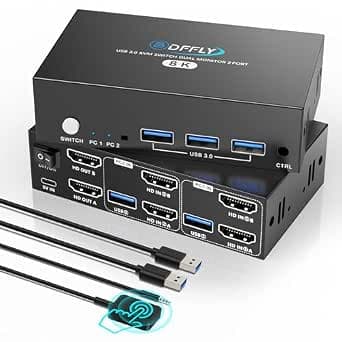
HDMI KVM Switch 2 PC 2 Monitor 8K @ 60 Hz 4K @ 120 Hz, KVM Switch for 2 Computers 2 Monitors and 4 USB Devices with 2 USB 3.0 Cables and Desktop Controller
Description
KVM Switch for 2 Monitors and 2 Computers: This HDMI KVM switch with 2 HDMI ports allows you to control 2 computers and share one monitor as well as keyboard and mouse. It combines the functions of a USB and HDMI switch in one device. This dual monitor KVM switch supports various input devices such as PC, laptop, PS4 etc. and is compatible with a variety of operating systems, including Windows 7/8/10/11/Vista/XP, Linux, Mac and more.; Three USB 3.0 ports: The dual monitor KVM switch has 3 USB 3.0 ports for ultra-fast data transfer speeds of up to 5 Gbps. This allows you to seamlessly share peripherals such as printers and external hard drives between two computers for more order and efficiency. Ideal for sharing USB devices such as keyboards, mice, scanners, printers and USB flash drives. The switch automatically detects and configures connected devices.; 8K resolution and HDCP 2.3: The HDMI KVM switch supports an impressive 8K resolution at 60 Hz, ensuring crisp and detailed images on your monitors. In addition, it is HDCP 2.3 compatible, so you can play HDCP protected content without interruption. It also supports 8K@30Hz, 4K@240Hz, 2K, 3D and 1080P, providing flexibility for different display needs. This guarantees both exceptional image quality and a smooth and secure multimedia experience.; Two switching options: the 8K dual monitor KVM switch offers two switching options: one button on the HDMI KVM switch and a wired remote control. With the wired remote control, you can place the KVM switch for 2 monitors and 2 computers in a hidden or remote place, keeping your desk tidy. Simply place the wired remote within reach on your desk for quick access. With the touch of a button, you can seamlessly switch between computers, boosting productivity and keeping things tidy.; Adaptive EDID & Plug and Play: This USB 3.0 HDMI KVM switch has adaptive EDID and thus ensures stable and smooth image transmission by automatically optimising the display settings. This easy-to-install dual monitor dual computer KVM switch requires no power supply and driver software - just plug in and connect all cables to seamlessly switch between two computers and one monitor.; Our dual monitor KVM switch comes with two USB 3.0 cables and a wired remote control. Please note that you need three HDMI 2.1 cables to connect two computers and one monitor. We offer a lifetime warranty on our products. For faster support, please contact us stating your order number. We will find a solution for you.
Compare the trade-offs
Similar products, side by side
A random selection of analyzed products from the same category. Different products are not necessarily interchangeable.

4K144Hz HDMI Displayport KVM Switch 4 PC 2 Monitors 8K60Hz USB 3.0 KVM Switches For 4 Computers Share 2 Monitors and 4 USB Devices, Support Copy and Extension Display

UGREEN Displayport KVM Switch 8K@60Hz, DP 1.4 with 4 USB 3.0 Ports Supports 8K@60Hz 4K@240Hz Share 1 Monitor Keyboard Mouse U-Disk Printer, with 2 DP Cables, 2 USB A to C Cables

UGREEN Displayport KVM Switch 2 PC 2 Monitors 8K60Hz KVM Switch with 4 USB 3.0 Ports Keyboard and Desktop Controller Switching Compatible with Windows/Linux/MacOS etc.
One less thing to search
Before you buy: quick questions
Do I need to buy extra HDMI cables, or are they included?
The box includes two USB 3.0 cables for connecting your computers, but HDMI cables are not included. Several reviewers on Reddit and YouTube pointed this out — you'll need two HDMI 2.1 cables to hit 4K@120Hz or 8K@60Hz. It's a small extra cost, but worth planning for before your switch arrives.
Will this actually run 8K at 60Hz, or is that just marketing?
It genuinely supports 8K@60Hz and 4K@120Hz — but only if your GPU, monitors, and cables all support HDMI 2.1. If any link in the chain is older, you'll drop to a lower resolution or refresh rate. Think of the switch as a pass-through, not an upgrader. Most users running 4K@120Hz report flawless performance.
How reliable is the switching, and does it work with Mac and Windows together?
Switching is one of the most-praised features — users describe it as instant with no lag or black-screen delay. It works cross-platform with Windows, macOS, and Linux. A few Mac users mention needing to tweak EDID settings for certain monitors, but the desktop controller and hotkeys make daily switching effortless.
What's the build quality like, and is the desktop controller wired?
The housing is metal, not plastic, and reviewers consistently call it "solid" and "premium for the price." The desktop controller is wired — a small cable runs from the unit to the remote — which some users wish was longer, but most find it a huge convenience over reaching behind their desk. USB devices like keyboards, mice, and webcams are recognized reliably.
Who is this best suited for, and is it worth the money?
It's ideal for remote workers, gamers, and streamers running two computers and two monitors who want one keyboard, mouse, and headset across both. At this price point, it undercuts most brand-name KVMs while matching their performance — the main trade-off is buying your own HDMI cables. If you need DisplayPort instead, or want everything in the box, consider alternatives like TESmart or UGREEN.
From a similar, more-reviewed product in this category: 4K144Hz HDMI Displayport KVM Switch 4 PC 2 Monitors 8K60Hz USB 3.0 KVM Switches For 4 Computers Share 2 Monitors and 4 USB Devices, Support Copy and Extension Display
Will this KVM switch work with my two HDMI monitors?
Not directly — and this is the detail most buyers wish they'd caught first. Monitor 1 must connect via **DisplayPort** and Monitor 2 via **HDMI**; the switch isn't designed for two HDMI displays, and adapter cables aren't recommended. Before ordering, check the ports on the back of both monitors. If you're running dual HDMI, an HDMI-only KVM will serve you far better.
Can I actually get 4K at 144Hz, or is that just marketing?
You can — but only if your entire signal chain supports it. Your graphics card, both monitors, *and* every cable in the run need to handle 4K@144Hz (or 8K@60Hz). Many reviewers note that weaker GPUs or standard HDMI cables will quietly cap you at 60Hz. Think of it as a team effort: one weak link and the whole chain drops to the lowest spec.
How reliable are the USB 3.0 ports with things like external SSDs or webcams?
For keyboards, mice, printers, and USB sticks, the four USB 3.0 ports are fast and dependable. High-power devices are a different story — the manufacturer itself recommends checking with support before connecting power-hungry gear like bus-powered SSDs. A quick message to AILVLVNG customer service before you buy can save you a return.
Is switching between computers smooth, and does the remote actually work?
You have two options: a physical button on the unit or the included remote. The remote is a real convenience for multi-PC desks, though users report it works best with a clear line of sight — treat it like a TV remote, not a long-range device. Expect a brief screen re-sync when switching inputs; that's normal EDID handshaking, not a defect.
The metal build looks great, but is this overkill for a non-technical user?
The metal housing is genuinely rugged and runs cool — a common point of praise. The real hurdle is setup: routing cables for four computers and two monitors takes patience, and labeling everything beforehand is worth the ten minutes. If you're comfortable with a bit of cable management, it's a solid long-term investment; if you want true plug-and-play, a simpler single-monitor KVM may suit you better.
Answers are limited to the manufacturer's listing and the reviews we analysed. Questions those sources cannot support are not answered here.
Transparent by design