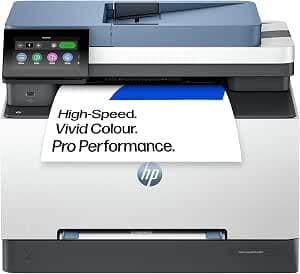
HP LaserJet Pro MFP 3302fdw Laser Printer | Colour | Printer for Small Medium Business | Print, Scan, Copy, Fax | Automatic document feeder | 2-Sided Printing | Wireless | Front USB port | Touchscreen
Description
PROFESSIONAL COLOUR AND SPEED: Experience high-speed, automatic two-sided colour printing at 25 pages per minute, bring your business to life with next-generation TerraJet Toner designed for more true-to-life, vibrant colours, streamline your workspace and help boost your team's efficiency with this compact laser printer, centralise your printer management, HP Web Jetadmin easily adds and updates devices, solutions, and policies; PEACE-OF-MIND WITH AWARD-WINNING RELIABILITY: Performance you can count on page after page with award-winning reliability, keep your business connected with reliable Wi-Fi that automatically reconnects to stay online, rely on low maintenance printing to avoid downtime and stay focused on your business; PRO LEVEL SECURITY TO HELP PROTECT YOUR BUSINESS: Safeguard your business with proactive, embedded security ready out of the box and tamper-resistant toner, professional level printer security with preconfigured settings mean it's ready for business, strengthen and simplify compliance, HP Security Manager upgrade applies policies across your printer network; COMPACT AND ENERGY EFFICIENT DESIGN: Designed in a compact size with energy saving auto-on/auto-off technology to optimise printer energy use, specially formulated HP TerraJet Toner engineered for low energy use when printing. trim your paper use, default duplex setting prints on both sides of each page, easily recycle your used Original HP Toner Cartridges for free through the HP Planet Partners program; COMPACT DESIGN: Streamline your workspace, reduce clutter, and help boost your team's efficiency with a compact laser printer; RELIABLE PRINTING: Stay focused on your business - award-winning reliability means less downtime for printer maintenance; RELIABLE WI-FI: Keep your business connected with reliable Wi-Fi that automatically reconnects to stay online; FAST, AUTOMATIC SINGLE-PASS TWO-SIDED COLOUR PRINTING, SCANNING, AND COPYING PLUS FAXING: Experience high-speed, automatic two-sided colour printing, scanning, and copying at up to 25 pages per minute plus faxing; TRUE-TO-LIFE COLOURS: Bring your business to life with next-generation HP TerraJet Toner designed for more true-to-life, vibrant colours; CLUTTER-FREE AI PRINTING: Print web pages and emails with precision, no wasted pages or awkward layouts; HP AI easily removes unwanted content, so your prints are just the way you want.
One less thing to search
Before you buy: quick questions
I keep reading that the starter toners run out fast. How much does it actually cost to replace all four cartridges, and are there high-yield options?
You’re right to ask—many users on Reddit and TikTok flag this as the biggest hidden cost. The included “starter” toners typically print only about 700–1,000 pages total. Genuine HP standard-yield cartridges for the 3302fdw cost roughly $50–$60 each (cyan, magenta, yellow, black), so a full set runs around $200–$240. HP does offer “high-yield” XL versions for the black cartridge, which can double your page count. For the best value, consider enrolling in HP’s Instant Ink subscription—it automatically sends toner before you run out and lowers your per-page cost significantly.
Is the wireless setup really as difficult as some people claim? I’m not very tech-savvy.
It varies. YouTube and Reddit reviews show two clear camps: those who get it working in under 10 minutes via the touchscreen setup wizard, and those who hit snags with dual-band routers or firewall settings. A common tip from community forums is to temporarily connect the printer via Ethernet for the first setup, then switch to Wi-Fi afterward. If you’re comfortable following on-screen prompts, you’ll likely be fine—but if you prefer a zero-fuss connection, the Ethernet port or front USB drive method may suit you better.
My home office is small—how loud is this printer when running, and can I place it near a desk?
Noise is one of the top complaints in bedroom-office setups. Multiple TikTok reviewers describe it as having a “low hum plus mechanical clunks” during printing and scanning. At idle, it’s quiet, but during a multi-page job, you’ll definitely hear it—around 50–55 dB, similar to a conversation. If you take frequent calls, we’d recommend placing it on a separate table or using a vibration-dampening mat underneath. For comparison, Brother’s LED-based color printers tend to be noticeably quieter.
Can I print from my iPhone or Android without installing drivers, and does it support AirPrint?
Yes, this model fully supports Apple AirPrint and Mopria for Android—so you can print directly from your phone without installing anything extra. Many iPad users also highlight the handy feature of printing from cloud services like Google Drive or Dropbox using the HP Smart app. Just ensure your printer is connected to the same Wi-Fi network as your phone. A small caveat: the HP Smart app occasionally logs you out after updates, but reconnecting takes only a minute.
I’ve heard the touchscreen can be slow. Is it a major annoyance for everyday use, and can I bypass it most of the time?
The touchscreen has a slight delay—about half a second per tap compared to a modern smartphone—which some users find frustrating when quickly navigating menus. However, for most daily tasks like making copies or scanning to email, it’s perfectly usable. Many IT managers in small businesses report that they set up the printer’s shortcuts (e.g., “ID Copy” or “Scan to Folder”) on the first day, and then barely use the main screen afterward. If responsiveness is critical, you can also control the printer from your computer’s HP Smart app, which is faster and more intuitive.
Answers are limited to the manufacturer's listing and the reviews we analysed. Questions those sources cannot support are not answered here.
Transparent by design