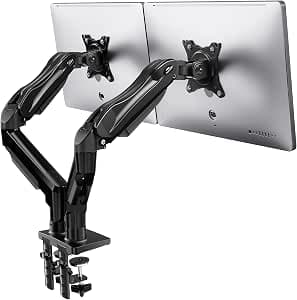
HUANUO Dual Monitor Arm - Full Adjustable MGas Spring Double Monitor Mount with C Clamp, Grommet Mounting Base for 13 to 32 Inch Computer Screens - Each Arm Holds 2 to 9kg - HNDS6
Description
Compatibility: Ensure your desk is solid wood (1.5-9cm thick, no underside beams) and each monitor meets requirements: 13-32 inch screen, 2-9kg weight, and 75x75mm or 100x100mm VESA holes. Verify before buying this dual monitor mount.; Robust Stability & Mounting: The HUANUO monitor arm features a unique, strong hinge design for superior stability. Securely attach it to your desk using either the C-clamp or grommet base options, providing reliable support for your dual monitor arm.; Smooth Adjustment & Range: Effortlessly position your screens with the gas spring system. This dual monitor mount allows smooth swivel, tilt, and rotation for each monitor arm, enabling custom viewing angles and optimal comfort.; Ergonomic Comfort: Improve posture and reduce neck/shoulder strain. The height-adjustable monitor arms raise screens to eye level. This ergonomic positioning from the dual monitor mount enhances comfort and boosts productivity.; Easy Setup & Space Saving: Includes clear instructions and hardware for straightforward installation. The monitor mount features cable management for a tidy desk and frees up significant workspace – reclaiming ~50% of your desktop area with this monitor arm dual setup.
One less thing to search
Before you buy: quick questions
I have two different monitors—one 24" and one 27"—and the 27" is quite a bit heavier. Will this arm handle that setup, and is it hard to balance?
Yes, this arm is designed for exactly that scenario. Each arm independently supports 2-9kg (4.4-19.8 lbs), which covers most 13-32" monitors. The key is the adjustable gas spring tension. You'll use the included Allen key to fine-tune the tension knob for each arm separately. Many users on setup videos note it takes a few minutes of trial-and-error to get the perfect "float" for mixed monitors, but once set, it's very stable.
My desk has a built-in cable management tray or a very thick back edge. Will the C-clamp fit?
This is a common pre-purchase concern. The C-clamp has a maximum thickness of about 3.15 inches (80mm). If your desk edge is thicker than that or has a horizontal cable tray attached, the clamp may not fit. In that case, you can use the included grommet mount (for a desk hole 1.5"-3.15" / 38-80mm in diameter). Checking your desk's clearance before ordering is highly recommended.
How difficult is the installation for one person, and what tools do I need?
Most reviews and social media tutorials highlight the installation as straightforward for one person, typically taking 20-30 minutes. Everything you need is included: the arms, bases, all necessary screws, an Allen key, and a small wrench. The instructions are visual. The trickiest part for some is attaching the VESA plates to the monitors first, which is easier to do before mounting the arm.
I've seen comments about parts not matching the listing or monitors sagging over time. Are these common issues?
While the vast majority report a sturdy, reliable product, a small number of users have noted occasional inconsistencies, like receiving plastic instead of metal cable clips. Regarding sag/drift, it's not common but can occur with very heavy use over many months; the tension can be re-adjusted if needed. The product comes with a 5-year warranty, which the manufacturer honors for any legitimate defects in materials or workmanship.
Is this arm a good choice for a standing desk that moves up and down frequently?
Absolutely. This is one of its most praised features. Once properly tensioned and tightened, the arm maintains its position rock-solidly, even when you raise or lower your standing desk. The smooth articulation also makes it easy to reposition your screens to the perfect ergonomic height whether you're sitting or standing. Just ensure your desk itself is stable to minimize overall shake.
Answers are limited to the manufacturer's listing and the reviews we analysed. Questions those sources cannot support are not answered here.
Transparent by design