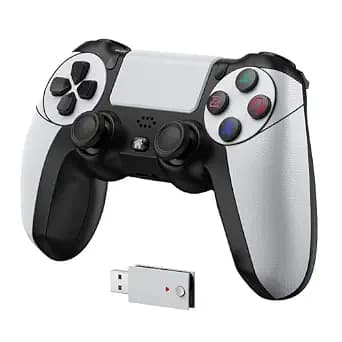
IWGAME Controller for PlayStation-5, Compatible with PS-5/PS-5 Pro/PS-4/ PC, Wireless Controllers Supports Adjustable Turbo, Remap, Hall Effect, Gaming Controller for PS-5 Games (2.4G Adapter Required)
Description
[Upgrade Notice] This product requires a firmware upgrade to function properly. Please contact customer support to receive the upgrade package.; 𝗕𝗲𝗳𝗼𝗿𝗲 𝗨𝘀𝗲 𝟭: 𝗚𝗼 𝘁𝗼 𝘁𝗵𝗲 𝗣𝗦-𝟱 𝗦𝘆𝘀𝘁𝗲𝗺 𝗦𝗲𝘁𝘁𝗶𝗻𝗴𝘀 𝗜𝗻𝘁𝗲𝗿𝗳𝗮𝗰𝗲 𝗮𝗻𝗱 𝗖𝗵𝗮𝗻𝗴𝗲 𝘁𝗵𝗲 𝗖𝗼𝗺𝗺𝘂𝗻𝗶𝗰𝗮𝘁𝗶𝗼𝗻 𝗠𝗲𝘁𝗵𝗼𝗱 𝘁𝗼 "𝗨𝘀𝗲 𝗨𝗦𝗕 𝗖𝗮𝗯𝗹𝗲", otherwise the Adapter will not be recognized.(Settings> Accessories>Controller (General)>Communication Method>Select “Use USB Cable”); 𝗕𝗲𝗳𝗼𝗿𝗲 𝗨𝘀𝗲 𝟮: 𝗨𝗦𝗕 𝗔𝗱𝗮𝗽𝘁𝗲𝗿 𝗥𝗲𝗾𝘂𝗶𝗿𝗲𝗱: PS-5 games are playable with the adapter. Without it, controller works as a PS-4 controller. Please refer to the tutorial video or instruction manual; Multi-Platform - In 2.4G mode, the gaming controllers are compatible with PS-5/PS-5 Pro/PS-5 Slim and Windows (PC), offering driver-free and plug-and-play capability.In Bluetooth mode, the new controller supports PS-4, Android, and iOS; Rapid Fire - the controller for ps-5 pro with 2.4G not only features 3 adjustable turbo speeds—3Hz, 6Hz, 12Hz—but also allows you to customize , which makes it easier to win in FPS games; Programmable Function - The mappable gamepad for PS-5 with 2.4G supports key swap, one-key combo functions, ensuring game-altering moves and crucial controls are constantly within your reach; Adaptive triggers & Audio - The controllers for ps five feature adaptive triggers that provide varying force and tension in supported games, as well as vibration motors, a touchpad, speakers, and a 3.5mm headphone jack that enhance the gaming audio experience
One less thing to search
Before you buy: quick questions
Does this controller work with all PS5 games, or will I need my original DualSense?
For the best experience, you should plan to keep your original DualSense. While the IWGAME controller connects to the PS5, many users on forums like Reddit report that major PS5-exclusive titles may require a DualSense to launch the game. Once launched, you can often switch to the IWGAME controller for gameplay. It's perfect for PS4 games on your PS5 and PC, but for native PS5 games, having the official controller on hand is a recommended workaround.
What happens when my PS5 system software updates?
This is a common concern. After a major PS5 system update, the controller may temporarily stop working until IWGAME releases a compatible firmware update. This process can take a few weeks. Many YouTube reviewers suggest checking IWGAME's official website for firmware updates promptly after any PS5 update to restore functionality.
Is the build quality durable for long-term use?
Feedback on durability is mixed. Many users praise the comfortable grip and responsive Hall Effect joysticks (which resist drift). However, some TikTok and Amazon reviews mention issues like mushy face buttons or unresponsive triggers developing after several months of heavy use. It offers great value but may not match the long-term durability of a first-party controller from Sony.
Who is this controller actually best for?
It's an excellent, feature-packed choice for PC gamers and PS4 players looking for customizable options like turbo and remappable buttons at a great price. It's also suitable for tech-savvy PS5 owners who don't mind occasional firmware updates and using a workaround with their DualSense. If you want absolute, hassle-free compatibility for all PS5 games, the official DualSense is a better fit.
What's included, and what is required for it to work wirelessly?
The controller comes with a USB-C charging cable. Crucially, a 2.4GHz wireless USB adapter is required and is included in the box. You do not need Bluetooth. Plug the adapter into your PS5, PS4, or PC, sync the controller, and you're ready to go. Just remember, for PS5, you'll likely need an original DualSense controller to navigate the system dashboard and launch certain games.
Answers are limited to the manufacturer's listing and the reviews we analysed. Questions those sources cannot support are not answered here.
Transparent by design