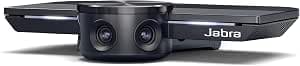
Jabra PanaCast – Intelligent 180° Panoramic-4K Huddle Room Video Camera – Inclusive Video Conferencing Camera with Full Room Coverage, Easy to Set-Up Wide Angle Webcam for Streaming
Description
Jabra PanaCast Portable Webcam is engineered to be the world’s first 180° Panoramic-4K plug-and-play video conferencing solution, designed to bring huddle rooms to life with high-definition video. It’s the perfect partner for the Jabra Speak range to bring virtual meeting participants and huddle room attendees closer together. PanaCast features three 13-megapixel cameras, which stream continuously, and patented real-time video stitching technology to create a full, 180° view of the huddle room in Panoramic-4K. This camera for video conferencing is the only plug-and-play solution available which provides a full field of vision, with most wide-angle cameras offering a maximum horizontal field of view of 120°. Exclusive to the Jabra Panacast, Intelligent Zoom detects where the people are and automatically and continuously adjusts the field of view to include everyone in the conversation. Plus, Vivid HDR automatically optimizes video quality under a wide range of lighting conditions. Simply plug the Jabra PanaCast into your computer’s USB port, and it’s ready to provide you and your remote colleagues with a clear, panoramic view of the room. With certification for Microsoft Teams and compatibility with leading audio and video-conferencing solutions, you can be sure that the PanaCast is compatible with your set up.
Compare the trade-offs
Similar products, side by side
A random selection of analyzed products from the same category. Different products are not necessarily interchangeable.

One less thing to search
Before you buy: quick questions
Is the Jabra PanaCast truly plug-and-play, or will I face driver issues?
For most users on modern Windows and macOS systems, it is plug-and-play. However, based on user reports, a small percentage may need to visit the Jabra website to download the PanaCast application for firmware updates or to access advanced features. This quick step resolves most recognition issues with apps like Zoom or Teams.
How good is the built-in microphone, and will I need a separate one?
The built-in microphone is adequate for individual use or very small, quiet rooms. A common piece of feedback from users in typical 3-4 person huddle rooms is that while the 4K video is exceptional, they often pair the PanaCast with a dedicated conference speakerphone or USB microphone for optimal, full-room audio clarity.
What exactly is the "Intelligent Zoom," and does it reduce video quality?
The Intelligent Zoom is a software feature that automatically detects and frames active speakers within the 180-degree panoramic view. It doesn't use a physical zoom lens. Instead, it digitally crops the ultra-wide 4K feed to focus on people, which maintains a high-quality image. You're always using the full sensor, so it's very effective for keeping the meeting focused.
Who is this camera really best suited for, and who might it not be right for?
The PanaCast is a perfect fit for small to medium conference rooms (huddle rooms) where capturing everyone evenly without a mechanical pan is key. It's ideal for professional teams, coaches, and educators. It's likely overkill for a single user at a desk, and if your primary need is an all-in-one audio/video solution, you might consider a dedicated video bar system.
How does it perform in rooms with less-than-ideal lighting?
The camera performs best in well-lit environments. User reviews note that while the image quality is stellar in good light, in dim or unevenly lit rooms, some of the sharpness and "intelligent" tracking can be impacted. For the best experience, we recommend using it in a room with consistent, overhead lighting.
From a similar, more-reviewed product in this category: EMEET 1080P Webcam with Microphone, C960 Web Camera 2 Mics Streaming Webcam
Is the EMEET C960 easy to set up?
Yes. Reviewers describe setup as truly plug-and-play with no drivers needed, and several say it was easy to install and works right away.
What is the video resolution and field of view of the C960?
The listing states it delivers 1920 x 1080p Full HD video at 30 fps with a 90° field of view and a 5-layer anti-glare lens.
How good is the microphone on this webcam?
The listing says it has 2 built-in omnidirectional noise reduction microphones that pick up your voice and filter out background noise. Reviews are mixed: some call the audio impressive and clear without being overwhelmed by background noise, while others say the mic is not very good at picking up voice.
Is the C960 compatible with Windows and Mac?
The listing says it is compatible with Windows 10/11, Mac OS 10.14 or higher, and Linux. Reviewers report it works well with a variety of setups, is fully compatible with Windows 11, and that a Mac recognized it right away.
Does the webcam have a privacy cover?
Yes. The listing states the C960 has a built-in privacy cover to protect your privacy, and reviewers mention the privacy cover and how securely it clips to the monitor.
Answers are limited to the manufacturer's listing and the reviews we analysed. Questions those sources cannot support are not answered here.
Transparent by design