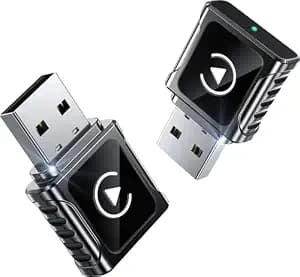
JDG Wireless CarPlay Adapter, Converts Wired CarPlay to Wireless, for Cars with Built-in Wired Apple Carplay, Super Mini USB Design Car Play Adapter for iPhone, (Black)
Description
JDG Wireless CarPlay Adapter - The Ultimate Wireless Solution for Your Car Experience the freedom of wireless connectivity with the JDG Wireless CarPlay Adapter, the perfect CarPlay wireless adapter for your vehicle. This compact CarPlay wireless adapter transforms your wired CarPlay into a seamless wireless CarPlay experience, compatible with cars with built-in wired carplay system. Designed for effortless use, this wireless CarPlay adapter features plug-and-play installation—no complex setup or additional apps required. Simply connect the CarPlay adapter to your car's USB port (includes both USB-A and USB-C adapters), pair with your iPhone 5s or later model(iOS 10+), and enjoy instant wireless CarPlay functionality. Key benefits of our 2025 wireless CarPlay adapter: Dual-band (2.4G + 5G) technology for stable, low-latency connections Full retention of steering wheel controls, touchscreen, and knobs Advanced heat dissipation for reliable performance on long drives FCC-certified reliability with 10,000-insertion tested USB port 24/7 support and free lifetime firmware updates Our wireless CarPlay adapter for iPhone delivers: Faster response than Bluetooth CarPlay adapters More stable connection than standard wireless car play adapters Better compatibility than generic play for car solutions Perfect for: ✔ Daily commuters tired of plugging cables ✔ Road trippers needing reliable navigation ✔ Music lovers wanting uninterrupted streaming ✔ Anyone valuing a clean, wire-free dashboard Upgrade your driving experience today with the JDG CarPlay Wireless Adapter—the smarter choice for wireless CarPlay in 2025!
One less thing to search
Before you buy: quick questions
Is this adapter truly compatible with my car, and how can I be sure before buying?
While it's designed for cars with *built-in wired* Apple CarPlay, compatibility can vary by manufacturer, model year, and even your car's software version. Based on user reports, it works seamlessly for many but can be finicky with others. We strongly recommend checking your car's infotainment system is fully updated and searching online forums (like specific car model subreddits) for experiences from owners with your exact setup before purchasing.
How stable is the wireless connection in real-world use?
Experiences vary. Many users enjoy a stable, "set-it-and-forget-it" connection, especially for daily commutes. However, a notable number of reports on social media mention occasional disconnections, particularly on bumpy roads or after the device heats up during longer drives. For the most reliable experience, ensuring both your iPhone and car software are updated is crucial.
I've heard about overheating issues. How serious is this, and is it safe?
The super-mini design can lead to noticeable heat buildup during extended use, which is a common point of feedback. While no safety hazards have been widely reported, the heat concerns some users and may be linked to performance drops or disconnections on very long trips. It's a trade-off for the ultra-compact size. Letting it cool down if you're parked for a while is a practical tip shared by many users.
What's the real deal with setup? Is it actually "plug-and-play"?
For many, it is: plug in, pair your iPhone via Bluetooth once, and you're done. However, don't be surprised if you need to do a bit of troubleshooting. Common tips from the community include performing a factory reset on your car's CarPlay system, updating the adapter's firmware via a computer, or ensuring "Allow CarPlay While Locked" is enabled on your iPhone. Having some patience for a 10-15 minute initial setup is wise.
If it doesn't work well for me, what is the return or support process like?
We stand by our products and offer a standard return window for defective or non-working units. Please check your order details for the specific return policy. For technical support, we recommend contacting our team first, as they can often provide firmware or troubleshooting guidance that solves the issue—a step many TikTok reviewers found helpful before opting for a return.
Answers are limited to the manufacturer's listing and the reviews we analysed. Questions those sources cannot support are not answered here.
Transparent by design