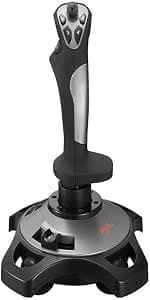
Joystick PXN-2113 PRO 12 Tasten
Description
Joystick PXN-2113 PRO Flight Control
One less thing to search
Before you buy: quick questions
Is the PXN-2113 PRO compatible with Windows and Flight Simulator, or does it work with Mac/consoles as well?
It’s mainly a PC-friendly device and is commonly used with Windows and Flight Simulator. Compatibility with other platforms isn’t clearly documented, so Windows-based sims are the safest bet.
Does the PXN-2113 PRO have true analog thumbsticks, or is it all digital inputs?
The unit uses button-based inputs for the 12 actions and does not offer true analog thumbstick control. If you need analog precision for flight sims, you’ll likely want a dedicated flight stick.
How easy is it to map controls for Flight Simulator or other games?
Many users report you’ll need to manually map controls in-game, and you may also rely on in-game remapping or third-party software. It’s not a plug-and-play set it and forget it experience for Flight Simulator.
What about build quality and comfort for long gaming sessions?
It’s a budget device, so some users feel it’s lightweight and may feel cheaper over time. If you have larger hands or plan long sessions, comfort and durability may be concerns.
Is this a good value, and who should buy it?
If you’re shopping on a tight budget for basic input in non-sim games, it could be worth a try. However, Flight Simulator enthusiasts or players seeking precise control and easy setup should consider higher-end alternatives. Many social posts compare it unfavorably to purpose-built sticks but acknowledge the low price as a decent entry point.
Answers are limited to the manufacturer's listing and the reviews we analysed. Questions those sources cannot support are not answered here.
Transparent by design