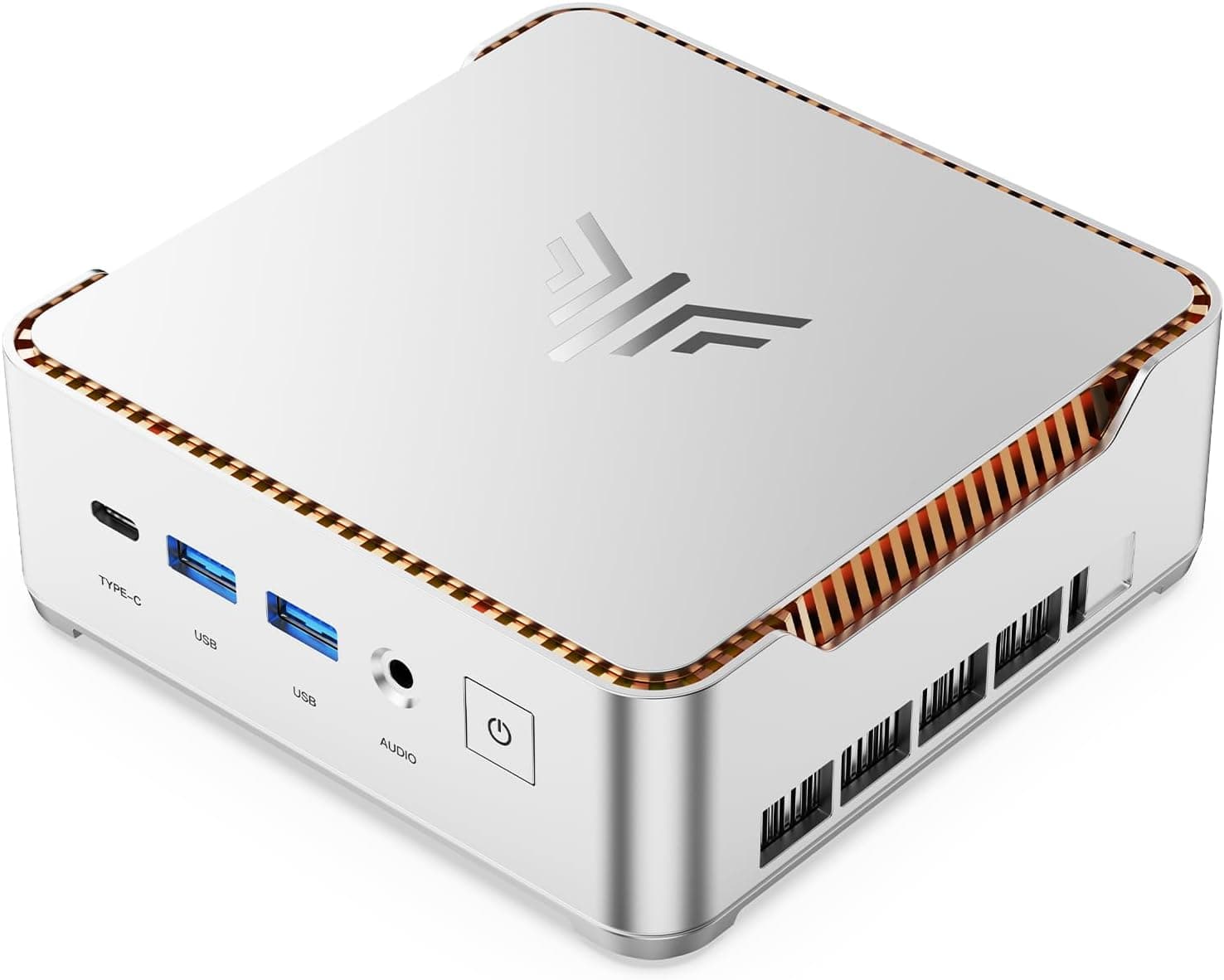
KAMRUI Hyper H2 Mini PC Intel Core 5 220H, Mini Computer (12C/16T, Up to 4.9GHz) 16GB LPDDR5 512GB SSD Desktop Computers, HDMI+DP+USB-C/Triple 4K Display/WiFi6E/BT5.2

KAMRUI Hyper H2 Mini PC Intel Core 5 220H, Mini Computer (12C/16T, Up to 4.9GHz) 16GB LPDDR5 512GB SSD Desktop Computers, HDMI+DP+USB-C/Triple 4K Display/WiFi6E/BT5.2

4.3 on Amazon2,281 ratingswww.amazon.ca
Review reliability
83/ 100Grade B
Star ratings and review wording mostly agree, 85% of reviews offer specific verifiable details, 69% are top-rated with 23% mid-range, and none use promotional phrasing while 85% sound authentic.
Affiliate link — commission is the same whatever the score.

Description

Product Description KAMRUI Hyper H2 Intel Core 220H Mini PC The video showcases the product in use. The video guides you through product setup. The video compares multiple products. The video shows the product being unpacked. Video Player is loading. Click to play video Play Mute Current Time 0:00 / Duration 0:41 Loaded : 7.32% 0:00 Stream Type LIVE Seek to live, currently behind live LIVE Remaining Time - 0:41 1x Playback Rate Chapters Chapters Descriptions descriptions off , selected Captions Captions off , selected Audio Track default , selected Fullscreen This is a modal window. mini pc computer Previous page Next page 1 Intel Core 5 220H 2 Smooth Multitasking 3 Stable Wireless 4 Better Performance 5 16GB LPDDR5& 512GB SSD Previous page Next page 1 Triple 4K Display 2 Cooling and Quiet 3 For Business 4 For Factory 5 For Home Previous page Next page Can this mini PC handle 4K video playback and multiple monitors? Yes, it support 3 monitors simultaneously: HDMI 2.0 ×1; USB-C (DP Alt Mode) ×1; DP1.4 ×1. Each supports 4K@60Hz. Can it run 24/7? What’s the power consumption? Yes, designed for 24/7 operation. Idle: ~8–12W Full load: ~90–110W Great as a home server, surveillance NVR, or always-on download machine. Can I upgrade RAM or SSD myself? Only can upgarde SSD. RAM: 16GB LPDDR5 5200MT/s, non-expandable. SSD: M.2 2280 PCIe 3.0, currently 512GB, supports up to 4TB. You can access both slots by removing just 4 bottom screws. Can I install Linux (e.g., Ubuntu)? Yes. Comes with Windows 11 Pro, but hardware is Linux-friendly. Ubuntu 22.04/24.04, Debian, Fedora work out of the box. WiFi 6E & Bluetooth require kernel 6.2+ (modern distros included). How does this compare to an AMD Ryzen 5 7535HS or Ryzen 5 6600HS? Compared to the Ryzen5 7535HS, the Core 5 220H delivers roughly 27% faster single-core performance and has 6 more physical cores. Against the Ryzen5 6600HS, it shows about 24% better single-core and 35% better multi-core performance in Cinebench R23. Choose KAMRUI, Choose Professional Mini PC H2 220H Mini PC 16+512 Buying Options P2 7330U Mini PC 16+256 Add to Cart 8745HS Mini PC 16+512GB Add to Cart GK3Plus Mini PC 12+256 Add to Cart P2 R2544 Mini PC 16+512 Add to Cart E3B 7430U Mini PC 16+512 Add to Cart Customer Reviews 4.3 out of 5 stars 2,281 4.3 out of 5 stars 2,281 4.4 out of 5 stars 410 4.3 out of 5 stars 408 4.3 out of 5 stars 2,281 4.4 out of 5 stars 410 Price $789.99 $ 789 . 99 $399.00 $ 399 . 00 $699.99 $ 699 . 99 $329.99 $ 329 . 99 $469.99 $ 469 . 99 $499.99 $ 499 . 99 Processor Intel Core5 220H Processor AMD Ryzen 7330U AMD Ryzen 7 8745HS Intel N5030 AMD Ryzen Embedded R2544 AMD Ryzen 5 7430U Graphics Coprocessor Intel Graphics AMD Radeon Graphics AMD Radeon 780M Intel UHD Graphics 605 AMD Radeon Graphics AMD Radeon RX Vega 7 Graphics Core/Thread Memory Size 12C/16T, 18MB 4C/8T, 8MB 8C/16T, 16MB 4C/4T, 4MB 4C/8T, 4MB 6C/12T, 16MB Memory Storage 16GB LPDDR5 512GB SSD 16GB DDR4 256GB SSD 16GB DDR5 512GB SSD 12GB LPDDR4 256GB SSD 16GB DDR4 512GB SSD 16GB LPDDR4X 512GB SSD Video Interface HDMI +USB3.2 +DP1.4 (4K@60Hz) HDMI +USB3.2 +DP1.4 (4K@60Hz) HDMI +USB4 +DP1.4 (4K@60Hz) HDMI*2 +VGA*1(4K@60Hz) HDMI +USB3.2 +DP1.4 (4K@60Hz) HDMI +USB3.2 +DP1.4 (4K@60Hz) WiFi & Ethernet WiFi 6+BT5.2+1GbE LAN WiFi 5+BT4.2+1GbE LAN WiFi 6+BT5.2 WiFi 5+BT4.2+RJ45 Ethernet WiFi 5+BT4.2+1GbE LAN WiFi 6+BT5.2 Power Consumption 6*USB3.2& 1*USB-C 6*USB3.2& 1*USB-C 6*USB3.2& 1*USB-C 6*USB3.2& 1*USB-C 6*USB3.2& 1*USB-C 6*USB3.2& 1*USB-C Output interfaces 45W 28W 45W 28W 28W 28W Auto Power On/Wake On LAN ✔ ✔ ✔ ✔ ✔ ✔

Compare the trade-offs

Similar products, side by side

A random selection of analyzed products from the same category. Different products are not necessarily interchangeable.

Check the evidence

What the review excerpts say

Included does not mean verified authentic. Flagged does not mean proven fake. These are analytical classifications.

Showing 3 illustrative excerpts, not the complete review set.

Included in analysis5.0/5 stars

A great, expandable mini Computer offered in two types of CPU’s. Explained below.

“There is a bewildering array of mini computers out there. First off I’d like to talk about the Kamru case. It’s very well built. From the fan to the placement of the extra 2.5 inch drive to the ability to quite easily replace the memory for higher speeds, everything is easily accessible. I don’t trust a manufacturer that hides the fact that “maybe” you can add an extra hard drive. There’s no indication of this except a little notice in the specs. These computers say and shows nothing about where it goes..that worries me. How easy is it to add or replace SSD Hardware? You won’t know until you purchase it and try to take it apart. And that’s even if it has the room. The Kamru shows the ability to had a second SSD and upgrade the memory of you wish. It’s in a graphic and I’m very impressed with that. Plus I’ve actually replaced the memory and added a hard drive and it’s so easy you can do it within a minute. So to recap: I’m very satisfied with Kamru as a manufacturer for mini PC’s and you won’t go wrong. I bought the one Gig version and I recommend that. One finale item. There is no virus on these computers. I’ve used NOD32 and scanned it twice and nothing came up. He might have accidentally infected his computer by himself. I doubt any manufacturer would install a virus on a virgin SSD. So on to the two different processors offered. Let’s compare these two. The two CPU’s are similarly priced and both offered by the same vender. I’m hoping to clear up some confusion. The N95 came out first quarter 2023. The N100 came out January first, 2023. The processors are released close to each other and from what I can see the N95 came out after, I have no idea why? The N95 sips energy at a tiny 100 MHZ until it’s required and then boosts up to 3.4 Gigahertz. It’s has four cores and a 6 Mb of L3 Cache. The maximum supported memory is 4800/MTS. I’ve looked at the memory that comes with it and it’s 3200/MTS and there’s no CAS rating. Chinese brand. For about sixty bucks you can max out the speed and lower CAS level to a respectable 18. WARNING, this mother board will not use DDR 5 or LPDDR5. I’ve looked at the pin out and am confident it will not work. It uses PCI Express Gen 3 which is great in a tiny PC. Four cores, four threads, no hyper threads. Graphics is 1,200 MGhz. Comes with either 512 GIG or 1024 GIG SSD. I purchased the larger hard-drive. The drive that comes with is an M.2 SSD and has respectable speed. The N100 sips energy at a tiny 8 watts. 100 Megahertz is the speed at idle until more is required and then boosts up to 3.4 Gigahertz. It’s has four cores and a 6 Mb of 6 MB of L3 Cache. The maximum supported memory is 4800/MTS. I don’t have the unit so don’t know what memory comes with it but I assume it’s the same. I would assume the SSD drive is similar. For about sixty bucks you can max out the speed and lower CAS level to a respectable 18. WARNING, this mother board will not use DDR 5 or LPDDR5. I’ve looked at the pin out and am confident it will not work. It uses PCI Express Gen 3 which is great in a tiny PC. Four cores, four threads, no hyper threads. Graphics is 1,200 MGhz. Comes with either 612 GIG or 1024 GIG. I purchased the larger hard-drive. The drive is an M.2 SSD and has respectable speed. I would assume the hard drives are similar. They are both Alder-Lake N processors. They both have a maximum of 16 Gig They both share identical video memory from the 16 Gig. They both have a ton of codecs built in and even new ones as of 2023. You seeing something here? There damn similar. The real difference is the watts they consume. N95, 15 watts. N100, 8 watts. It would seem the N100 has the edge but I’m not so sure, more watts “sometimes” means better processing. That may not be the case here. Other differences: The graphics on the N95 IS UHD resolution at 1.2 MHZ The graphics on the N95 IS UHD resolution at 750 MHZ However the N100 has more channels and even though the N95 has a higher frequency the N100 beats it in gaming. I’m not sure but I believe the Higher frequency on the N95 translates to clearer images. Anyone can correct me on that if they know. The test scores are very similar, one does better at one processor, the other does better at all four. One better at graphics, one better at video processing. I’m not going to get into that here, but I’ll give you my opinion. If you want a mini gaming computer that will play some games at lower res go with N100. If you want a video server like I do as well as audio go with the N95. This is by no means set in stone as they are similar, the tests on the web seem to point this out. Your YMMV Hope this review helps you in making a decision. Again, the Kamru mini computers because of their expansion capabilities is the clear winner in my opinion. The type of Processor and size of SSD is yours to decide. I’m pretty sure you can’t go wrong either way.”

Signals matched: Specific detail: entity, process · Reads as an authentic voice

Included in analysis5.0/5 stars

A Vast Improvement Over My Older Windows Computers

“I have had my new KAMRUI GK3 PLUS for several days now, and I must say it has been a delightful surprise coming from an older version of Windows and an older desktop computer. What a breath of fresh air! It is about the size of a double decker grilled cheese sandwich with double decker performance. I was pleasantly surprised at the speed....not an untamed blur, but very very manageable. I don't do all the performance testing of professionals, just my own tests in comparison of all the computers I have owned over the years. This KAMRUI is the fastest Windows machine I have owned personally. Of course I have not owned the most expensive gaming machines or some of the more expensive video editing computers, but I have always bought and ran low to mid-level consumer computers for home use, and I can say this one outperforms all the others (I personally) have owned. Of course technology moves fast, and the mini is a good example of that. It was very easy to set up, although the updates did take 45 minutes or so, and I did them without any peripherals attached except a keyboard. Since the original updates, it has asked me to update a couple times since, and I did quickly and without a hitch. So far, not a single freeze up, just a clean running computer. I run a lot of YouTube videos, and they are crystal clear, do not freeze, buffer, or distort. I also do desktop publishing and most other office type requirements without any problem at all so far. If the saying "You get what you pay for" is really true, then it is doubly true with this KAMRUI mini computer. For $149-$169 dollars, I just don't see where one could go wrong for the AVERAGE use of a home computer. All peripherals work as they should including stand alone DVD/RW read/write and burn. Works great. Keyboard, mouse, monitor, external hard-drive, and printer are all working flawlessly. I'm impressed by the performance of KAMRUI's package in such a small form. Will it perform as well as an Intel i9.....no, it wasn't meant to. Price one of those. Five stars from this user, because for me, it lives up to the description listed on Amazon. I hope anyone that reads this and buys one, finds the same satisfaction I have. I took a chance on the mini as opposed to going back to a cumbersome tower and all that, and I am a happy camper so far. Longevity? Only time will tell, as with all and anything electronic.”

Signals matched: Specific detail: entity, comparison, process · Reads as an authentic voice

Included in analysis5.0/5 stars

Impressive Mini PC for Streaming and Daily Use

“I have never tried a mini PC before, but based on the price and great reviews, I decided to give one a shot and I’m glad I did! The model I purchased is the KAMRUI GK3Plus, and this completely exceed my expectations. Fist, packing is great, it comes with power cable, HDMI cable and wall mount frame. It boots up quickly, with Windows starting fast. It performs smoothly and efficiently for everyday tasks like web browsing and video streaming. In fact, I was surprised to find its performance comparable to my work laptop, It's quite impressive for such a small and affordable device. My main purpose for this mini PC was to stream Netflix and YouTube, and it handles both perfectly. I’ve tested it with my PC monitor, TV, and projector, and the video playback has been flawless across all screens. The picture quality is decent and on par with my Firestick. It comes with 4 USB ports and 2 HDMI ports, which is more than enough for my wireless keyboard and mouse setup. Bluetooth connectivity works seamlessly with both my wireless speaker and headset. It also runs quietly and stays cool during streaming videos. If you’re looking for a budget-friendly mini PC for entertainment or everyday use, I highly recommend this mini PC. It delivers great value and performance for the price!!”

Signals matched: Specific detail: entity, quantity, process · Reads as an authentic voice

One less thing to search

Before you buy: quick questions

Can the KAMRUI Hyper H2 really run three 4K monitors smoothly?

Yes — that's one of its most praised features. With HDMI, DisplayPort, and USB-C outputs, it drives three 4K displays simultaneously, which remote workers and traders love. Just keep in mind that heavy 3D or video-editing workloads across all three screens will push the integrated graphics harder than everyday office or streaming tasks.

I've seen complaints about boot failures and dead USB ports. How common are these issues?

Most reviewers report flawless units, but a small number have flagged DOA boot failures, a dead USB port, or WiFi dropouts — a pattern many Reddit and YouTube commenters attribute to inconsistent quality control. If you receive a defective unit, use the return window promptly; KAMRUI's after-sales support has been hit-or-miss for some buyers, so buying through a retailer with easy returns is a smart move.

Is the 16GB LPDDR5 memory upgradeable, and is 512GB SSD enough?

The LPDDR5 memory is soldered, so 16GB is your ceiling — fine for multitasking, browsing, and office apps, but not ideal if you plan to run heavy VMs or pro-grade editing software. The 512GB SSD is user-replaceable, and several TikTok users recommend upgrading to 1TB if you store lots of media, since the base capacity fills up quickly.

How does it compare to alternatives like Beelink or GMKtec at a similar price?

The Hyper H2 holds its own thanks to the Intel Core 5 220H (12C/16T), triple 4K output, and WiFi6E — specs that often cost more elsewhere. Beelink and GMKtec are frequently mentioned as more established mini PC brands with slightly better QC reputations, so if reliability is your top priority, compare specific models side by side. For pure value on everyday work and streaming, the KAMRUI is competitive.

Who is this mini PC best suited for — and who should skip it?

It's ideal for remote workers, students, home-office users, and streamers who want a quiet, compact machine for multitasking and multi-monitor setups at a great price. Skip it if you're a gamer expecting discrete-GPU performance, a power user needing upgradeable RAM, or someone who wants zero risk of QC issues — in those cases, a desktop tower or a higher-tier mini PC brand may serve you better.

From a similar, more-reviewed product in this category: KAMRUI P1 Mini PC W-11 pro, AMD Ryzen 7330U Mini Computer (Βeats 3550H/R3 5300U,Max 4.3GHz,4C/8T), 16GB RAM 256GB M.2 SSD, Triple 4K Display, WiFi/BT/for Business Home Office Mini PC

Does the KAMRUI P1 come with Windows 11 Pro pre-installed?
From 8 kept reviews mentioning "setup"From the manufacturer's listing

The listing describes the operating system as OS(64bit), and one customer reported that the unit arrived with Windows 11 pre-installed, while another customer stated that no Microsoft license was included and that continued use required purchasing a valid license. The material does not consistently confirm that a Windows 11 Pro license is included.

How small is this mini PC?
From 6 kept reviews mentioning "compact"

Customers describe it as fitting in the palm of a hand, shorter than a mouse, and about the size of a breakfast English muffin, with one calling it very compact.

Can it drive three 4K monitors at once?
From 1 kept reviews mentioning "graphics"From the manufacturer's listing

The listing states the P1 supports triple 4K@60Hz display via USB3.2 Gen2 Type-C, DP1.4, and HDMI2.0, and one customer reported connecting three 4K HDR monitors along with a mouse, keyboard, and speakers.

Is the memory and storage expandable?
From the manufacturer's listing

The listing says the P1 starts with 16GB DDR4 RAM (upgradable to 64GB, not included) and a 256GB M.2 SSD, and states storage is expandable to 4TB.

Is it fast enough for everyday work and cloud-based applications?
From 7 kept reviews mentioning "performance"From the manufacturer's listing

Customers report it is fast and easy to set up, with good performance for everyday tasks and cloud-based applications, and the listing cites an AMD Ryzen 7330U with boost clock up to 4.3 GHz for multitasking, 4K video playback, and light games.

Answers are limited to the manufacturer's listing and the reviews we analysed. Questions those sources cannot support are not answered here.

Transparent by design

Understand the analysis