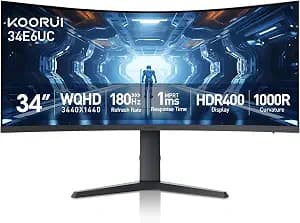
KOORUI 34-inch Curved Ultrawide WQHD 3440×1440 Gaming Monitor, 180Hz 1000R- PIP/PBP, 1ms(MPRT), HDR400, DCI-P3 95%, FreeSync Premium, 1 x DP 1.4 & 2 x HDMI 2.0, Tilt Height Swivel Adjustment, 34E6UC
Description
ULTRAWIDE CURVED GAMING MONITOR: The 34 inch ultrawide gaming monitor (3440×1440) with 1000R design and 21:9 aspect ratio brings a truly immersive experience that offers more realistic visuals and comfortable viewing.; VIVID AND VIBRANT COLORS: The 34 inch monitor is equipped with the DCI-P3 95% wide color gamut, 125% sRGB, 400nits brightness and HDR 400 so that you can enjoy the beauty and accuracy of 16.7 million colors on the big screen, and the 4000:1 contrast ratio gives you deeper insight into dark images.; SMOOTHEST GAMING EXPERIENCE: The 34" ultrawide monitor with HDMI 2.0 interface supports 100Hz/120Hz refresh rate and the DisplayPort 1.4 interface supports up to 180Hz refresh rate. Easily accessible 5-Way Joystick allows you to quickly adjust display parameters to different games. FreeSync & G-Sync, 1ms(MPRT) respond time, RTS, FPS, Timer, and Crosshair Functions allow you to target enemies faster in the game and win in one move.; EAGLE WING DESIGN: The design of the 34 inch computer gaming monitor is inspired by an eagle spreading its wings. The ergonomically shaped stand enables the 180Hz Gaming Monitor to be tilted for -5~20°, swivel for -15~15°and height adjustment up to 110mm. The curved monitor 34 inch is VESA compatible 75x75mm and allows you to save more space in your environment.; PIP PBP AND BLACK EQUALIZER:The KOORUI 34E6UC features Picture-in-Picture and Picture-by-Picture modes, allowing you to handle multiple tasks on one ultra-wide screen. Combined with the Black Equalizer to reveal hidden details in dark scenes, it provides a tactical advantage in gaming and maximum efficiency for professional workflows.; RELIABLE QUALITY&SUPPORT: KOORUI owns superb strength from monitor quality to premium service. With a 3-year spare parts replacement warranty, 12-month replacement service, and calling technical support. If you find any damage, malfunction, or missing accessories, please feel free to contact us.
One less thing to search
Before you buy: quick questions
How does the HDR400 performance really look, especially in games and movies?
Many users find the HDR400 mode subtle rather than dramatic—it adds a slight boost to brightness and contrast, but won’t deliver the punchy, vibrant HDR you’d get from higher-rated monitors (HDR600+). If you’re after true high dynamic range, you might want to look elsewhere. However, for everyday gaming and video, the standard SDR mode with the 95% DCI-P3 color gamut already looks rich and accurate. A common tip from Reddit: leave HDR off for most content and only enable it in games that support it well.
Are dead pixels or backlight bleed a common issue?
Based on real user reports, a small but notable percentage of units arrive with dead pixels or noticeable backlight bleed, especially along the edges. This is a QC lottery—some buyers get perfect panels, others have to exchange. Our advice: inspect the monitor immediately upon arrival in a dark room with a solid black screen. If you spot issues, contact support promptly. Many TikTok users recommend buying from a retailer with a hassle-free return policy, as KOORUI’s own support can be slow.
Can I use this monitor with my MacBook or laptop via USB-C?
The KOORUI 34E6UC does not have a USB-C input, so you’ll need an adapter (USB-C to HDMI or USB-C to DisplayPort). Note that some MacBook users have reported that the monitor may not provide full 3440×1440 resolution at 180Hz over HDMI 2.0—you’ll likely get 144Hz tops over HDMI. For the full 180Hz, use a DisplayPort 1.4 connection. Also, keep in mind there’s no built-in USB hub or USB-C power delivery, so you’ll need a separate cable for charging.
Is this monitor a good fit for competitive gaming?
Yes, especially if you play fast-paced shooters like *Valorant* or *Overwatch*. The 180Hz refresh rate and 1ms MPRT response time make motion feel smooth, and the 1000R curve helps with peripheral awareness. However, note that FreeSync Premium works only over DisplayPort, and there’s no G-Sync module (though most Nvidia cards will run in “G-Sync Compatible” mode). If you’re a pro-level esports player, you might notice minor ghosting in extreme scenarios, but for most competitive gamers, it’s more than adequate.
How does the return and warranty process work if I have a problem?
KOORUI offers a 1-year warranty and 30-day return window, but many users report that customer support can take several days to respond via email. For the smoothest experience, purchase through a platform like Amazon, which often handles returns directly. If you need a replacement for dead pixels or backlight bleed, be prepared to provide photos or a short video. Tip: keep your original packaging for at least 30 days—several buyers regretted tossing the box after finding a defect late.
Answers are limited to the manufacturer's listing and the reviews we analysed. Questions those sources cannot support are not answered here.
Transparent by design