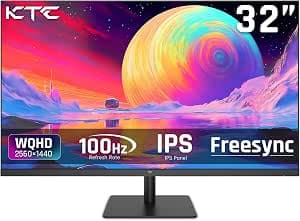
KTC 32 Inch 2K 120Hz Computer Monitor, IPS QHD 2560 x 1440p Monitor with Ultra-Thin Bezels, HDR10, Freesync/G-sync, HDMI/DP Ports, Tilt Adjustable, Eyecare, Ideal for Office and Casual Gaming
Description
Large and immersive, The KTC H32T13 is a 32 inch computer monitor, perfect for gaming, movies, and work.; Stunning visuals, With 1440p resolution, this pc monitor delivers crisp and clear images that will bring your content to life.; More screen, less bezel. Enjoy a fully immersive viewing experience thanks to the thin bezels that frame the monitor's expansive display.; Convenient connectivity, With HDMI, DisplayPort, and Mini DisplayPort inputs, you can connect the hdmi monitor to a variety of devices such as laptops, PCs, and Macs.; Eye comfort, this 32 inch monitor features flicker-free technology and a blue light filter that reduces eye fatigue, enabling you to work and play comfortably for long hours.; Vivid colors and contrast, The KTC H32T13 boasts a contrast ratio of 1000:1 and displays 1.07 billion colors that are sure to impress.; Customized view settings, Easily choose from five presets (Game, Movie, Web, Text, Mono) to optimize your viewing experience.; Ultra-fast refresh rate, Enjoy seamless, buttery-smooth visuals with a 120Hz refresh rate.; Versatile mounting options, The VESA-supported design enables you to mount the monitor on the wall or arm as per your convenience (3.9''x3.9''/100mmx100mm).; Ultimate gaming experience, With low blue light, flicker-free technology, HDR10 support, and Freesync & G-sync compatibility, this gaming monitor is sure to deliver an exceptional gaming experience.
One less thing to search
Before you buy: quick questions
Is KTC a trustworthy brand, and how is the monitor's overall build quality?
KTC is a value-focused brand known for offering high-spec monitors at competitive prices. Based on user feedback, the panel itself delivers excellent image quality, but the included stand is quite basic—it's stable for desk use but only offers tilt adjustment and can feel a bit lightweight. Many users on Reddit recommend planning to use the standard VESA mount (100x100mm) for a more robust setup. The overall sentiment is that you're paying for the screen performance, not premium build materials.
I keep hearing about the "panel lottery." What's the defect policy if I receive a monitor with dead pixels or backlight bleed?
This is a common pre-purchase concern. While the vast majority of units are fine, some users on platforms like Reddit have reported receiving monitors with minor defects. We recommend inspecting your monitor carefully upon arrival. If you encounter any significant issues like multiple dead pixels or excessive backlight bleed, please contact our store's customer support immediately to initiate a return or exchange. We stand behind the product and will work with you to find a satisfactory resolution.
Is the 120Hz refresh rate and HDR10 support good for gaming, or is it misleading?
The 120Hz refresh rate is a genuine and highly praised feature. Moving from 60Hz to 120Hz provides a noticeably smoother experience in both gaming and general desktop navigation, making it ideal for casual gaming. The HDR10 support, however, is more limited. As many YouTube reviewers note, while it can accept an HDR signal, the monitor lacks the peak brightness for a dramatic HDR experience. Think of HDR as a nice bonus, but buy this monitor primarily for its great 2K IPS image and smooth 120Hz SDR performance.
Who is this monitor best suited for, and who might want to look elsewhere?
This monitor is an ideal match for students, hybrid office workers, and casual gamers who want a sharp, fluid, all-purpose display without a huge investment. It's perfect as a first 2K/120Hz monitor. If you are a professional competitive esports player seeking the absolute fastest response times, or a home theater enthusiast prioritizing true, bright HDR for movies, you may want to consider monitors specifically designed (and priced) for those uses.
How does this monitor connect, and does it work properly with both AMD and NVIDIA graphics cards?
It includes HDMI and DisplayPort ports, which is standard for modern monitors. For the best experience, use the DisplayPort cable (included) to enable the full 2560x1440 resolution at 120Hz. It is officially FreeSync Premium compatible and works very well with AMD GPUs. For NVIDIA users, it is "G-Sync Compatible." Many users on forums confirm that enabling G-Sync in the NVIDIA Control Panel works seamlessly for tear-free gaming within the 48-120Hz range.
Answers are limited to the manufacturer's listing and the reviews we analysed. Questions those sources cannot support are not answered here.
Transparent by design