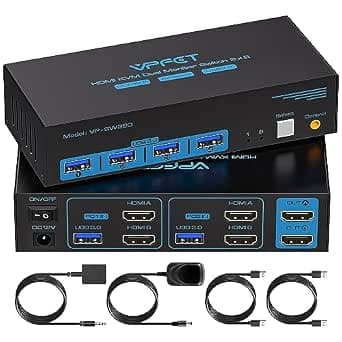
KVM Switch 2 Monitors 2 Computers HDMI 4K@60Hz USB 3.0 KVM Switches 2 port for 2 PC or Laptop share dual monitor and 1 set of keyboard mouse Printer and U Disk. Wired Controller and DC 12V Adapter
Description
【Dual Display KVM Switch】This Dual Monitor KVM Switch enables you to control 2 computers using one set of keyboard and mouse, share 4 USB devices and 2 displays. Note: Both of your two computers need to have 2 HDMI output ports, and both displays need to have HDMI interfaces to use this KVM switch normally.; 【4K 60Hz Switch】The 4K HDMI KVM switch supports a resolution of up to 4096*2160@60Hz and is backward compatible, bringing a better experience.The extended mode allows you to move the application window to another screen, providing sufficient workspace for multitasking. The copy mode can copy the picture of the main screen to the secondary screen and is suitable for presenting PPT, etc. Please note: To use the extended mode, it is necessary to ensure that your computer supports the extended mode.; 【Easy Switching】The indicator light shows the active channel. Besides the button switch on the device, there is an additional extended independent switch button. It is more convenient to move the entire KVM under the office desk and place the inconspicuous desktop switch button on the desktop, making the desktop neater and more spacious. Just click one button to switch between the work computer and the personal computer. Note: Keyboard shortcuts (hot keys) are not supported.; 【USB 3.0 KVM】Besides the mouse and keyboard, the additional USB port enables the two systems to share other USB 3.0 devices. No driver installation is required. It's plug and play. The data transfer rate of the USB 3.0 port is up to 5.0 Gbps per second, which is 10 times faster than the USB 2.0 port, making the connection smoother. Note: Please ensure that each computer is connected to the KVM using a USB cable. Otherwise, the USB device will not be recognized.; 【Well-made】: This switcher has a metal casing. It is small in size, compact in structure, works without noise, and has indicator lights on the top representing the active computer. It is also equipped with two USB A to USB A cables and a 12V/1A power adapter. Note: The length of the USB 3.0 cable is approximately 3.3ft. If you want a longer USB 3.0 cable, you need to prepare it yourself.It is recommended that the lengths of the two HDMI cables used for PC-kvm and kvm-display do not exceed 9.9ft.; 【After-sales Service】We can deliver the product to the customer's hands in a relatively short time. Within 24 months, we will replace the switch at no charge.If you have any questions, please contact us at any time. We will give the most professional answers and offer you a satisfactory shopping.
One less thing to search
Before you buy: quick questions
Does this KVM switch truly support 4K @ 60Hz on both monitors at the same time?
Yes, it does. The device is designed to handle dual 4K@60Hz signals simultaneously. Many users in tech forums confirm smooth performance for office work, content consumption, and moderate gaming. For optimal results, ensure you use high-speed HDMI cables (like the ones included) and a stable power source.
I'm worried about setup being complicated, especially with two monitors. Is it easy?
While the included manual is basic, the process is straightforward once you know the order: 1) Connect monitors to the KVM, 2) Connect computers to the KVM, 3) Plug in keyboard/mouse to the KVM's USB ports, and 4) Connect the power. The most common tip from Reddit users is to power everything on *after* all cables are securely connected. The wired controller makes switching during setup a breeze.
How reliable are the USB ports for things like external hard drives or webcams?
The USB 3.0 hub is best suited for low-to-moderate bandwidth devices. It works perfectly for wireless keyboard/mouse dongles, printers, or USB flash drives. However, as noted in some detailed reviews, users requiring fast data transfer for SSDs or high-bandwidth video capture cards might find performance limited. For those needs, connecting the device directly to your computer is recommended.
The price seems low compared to big brands. What's the catch with build quality and durability?
The trade-off for the affordable price is primarily in the physical materials. The unit uses a lightweight plastic casing and simple push buttons. It's functional and reliable for daily switching, as evidenced by its high rating, but it doesn't have the heft or metal construction of professional-grade KVMs. Think of it as a robust "workhorse" that saves desk space and time, not a luxury item.
I switch between a Windows PC and a MacBook Pro (USB-C only). Will this work for me?
Absolutely. This is a very popular setup. You will need a separate USB-C to HDMI adapter (or dock) for your MacBook to connect to the KVM's HDMI and USB cables. Once connected, switching is seamless. Many hybrid remote workers use this exact configuration to manage their company laptop and personal machine efficiently.
Answers are limited to the manufacturer's listing and the reviews we analysed. Questions those sources cannot support are not answered here.
Transparent by design