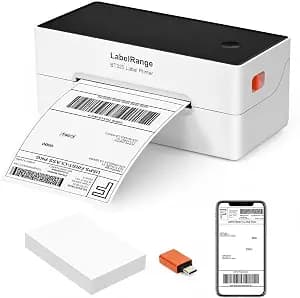
LabelRange Ecommerce Label Printer 4x6, Thermal Shipping Label Printer, Support Amazon, Ebay, USPS, Pirate Ship, Bluetooth and USB Connection
Description
SIMPLIFY YOUR SHIPPING WORKFLOW: No more Post Office trips. Stop buying ink and toner, thanks to its advanced direct thermal technology that ensures it always prints when needed. Enjoy high-speed printing of 72labels per minute. Achieve clear and visible labels for easy reading and scanning because of our high resolution 203 DPI print head. The labels have an adhesive back so there are no cutting and taping labels on the package.; PRINT VIA BLUETOOTH OR USB CABLE: Get the LabelRange "Rekdom Printer" app from Google Play or Apple Store. The wireless Bluetooth functionality works seamlessly with both iOS and Android phones and tablets when using the "Rekdom Printer" app. For Windows users, you can connect effortlessly via a USB cable and set up Bluetooth printing. However, Mac, Linux, and Chrome OS users can only connect via USB cable, except for Macs with M1, M2, or M3 chips, which can also print via Bluetooth using the app.; PRINT LABELS OF VARIOUS SIZES EFFORTLESSLY: Print direct thermal labels ranging from 1.5 to 4.1 inches in width and 1 to 9.5 inches in height. This versatility makes it perfect for various label types, including 4x6'' shipping labels, 3x2'' product labels, 3x1'' address labels, 2x2'' circle labels, 2.25x1.25'' product SKU labels, 2x1'' barcode labels, as well as warehouse, mailing, and multipurpose labels, among many other applications.; VERSATILE COMPATIBILITY: This bluetooth shipping label printer can work with all major shipping platforms, including USPS, UPS, Shippo, Pirate Ship, ShipStation, ShipWorks, and selling platforms such as Amazon, eBay, Etsy, Shopify, Poshmark, PayPal, Whatnot, and more. It prints 4x6'' shipping labels. (Note: Most platforms now produce 4x6'' labels directly. Remember to choose the 4x6'' label format before creating your label.); LabelRange CONFIDENCE: If you liked the LabelRange LP320 label printer, you'll definitely find the BT320 model even more appealing. LabelRange is committed to providing 5-star customer service through both phone and email support. In case the printer doesn't meet your expectations, please don't waste your labels. Instead, feel free to contact LabelRange's customer service for assistance. We've been providing expert support since 2019, and we appreciate the opportunity to help you. Most problems can be resolved in just 10 minutes. Thank you.
Compare the trade-offs
Similar products, side by side
A random selection of analyzed products from the same category. Different products are not necessarily interchangeable.

Bluetooth Thermal Shipping Label Printer: 4x6 Wireless Label Maker with Tape for Small Business - Compatible with iPhone, Android, Windows & Mac, Widely Used for USPS UPS Ebay Amazon Shopify Etsy

Label Printer, 4x6 Shipping Label Thermal Printer for Packages, Bluetooth Conection and Compatible with Android, iPhone, Windows, Mac, Chromebook, Amazon, Ebay, UPS, USPS, FedEx, with Holder

NIIMBOT Label Maker Bluetooth Mini Label Printer D11 2024 Version, Portable Label Maker with Tape Thermal Sticker Small Labeler, 300 DPI High Clearity Rechargeable, Black
One less thing to search
Before you buy: quick questions
Is this label printer truly "plug-and-play," or will I need to be tech-savvy to set it up?
Most users find the setup straightforward, but it's not always instant. You'll need to install a driver on your computer, which takes about 5-10 minutes. The included guide works for most, but a few YouTube and Reddit users have created helpful visual tutorials for specific operating systems if you get stuck. Once it's configured the first time, it's smooth sailing and very easy to use daily.
I sell on Etsy, eBay, and use Pirate Ship. Will this printer work seamlessly with all of them?
Yes, absolutely. This is one of its biggest strengths. The LabelRange printer works as a standard system printer, so it's compatible with any platform that allows you to print a shipping label (Amazon, eBay, Etsy, USPS, Pirate Ship, Shopify, etc.). You just select it from your print menu like any other printer.
How durable is it? Some reviews mention it feels lightweight.
It's designed as a compact, cost-effective printer for small to medium shipping volumes. While the exterior is lightweight plastic to keep costs down, the internal mechanism is reliable for consistent use. Think of it as a dependable workhorse for a home business or side hustle, not an industrial-grade machine meant for a warehouse shipping hundreds of packages per day. With normal care, it holds up well.
Can I use more affordable off-brand thermal labels, or am I locked into the manufacturer's brand?
You can use any standard 4x6 thermal shipping labels! This is a huge cost-saving benefit many TikTok and Reddit users highlight. Popular, well-reviewed brands like Apli or JOTO available on Amazon work perfectly and are often more affordable. Just ensure you get "direct thermal" labels, not "thermal transfer."
What's the one thing I should know about thermal labels before I buy?
Thermal labels are sensitive to heat, friction, and direct sunlight. To ensure your labels last, avoid leaving printed packages in a hot car or in direct sun for extended periods before shipping. The print can fade. Also, some chemicals (like certain cleaners or alcohols) can smudge the address. This isn't a printer flaw, but a key characteristic of all thermal printing technology.
From a similar, more-reviewed product in this category: MUNBYN RealWriter 941 Bluetooth USB 4x6 Shipping Thermal Label Printer
Will this printer work with my computer, and is setup really as easy as people say?
For the vast majority of users, yes. The RealWriter 941 supports Windows, macOS, and Chromebook via USB, with Bluetooth as a convenient wireless option. Most reviewers say they were printing labels within 10–15 minutes. One tip from seasoned users: install the MUNBYN driver first and set your label size to 4x6 before your first print — that's the step that trips up a few people.
Do I have to use MUNBYN labels, and does it need ink or toner?
No ink, no toner — ever. It's a true thermal printer, which is one of the biggest reasons small sellers love it. You can use any standard 4x6 thermal labels, though MUNBYN's own labels are the most commonly recommended for consistent feed and print quality. Just make sure they're direct thermal (not thermal transfer).
Is the Bluetooth connection reliable enough for daily shipping, or should I stick with USB?
Honest answer: USB is the most rock-solid option, and many power users keep it plugged in for high-volume days. Bluetooth works well for most people, but a few TikTok and Reddit users noted occasional pairing hiccups with older laptops or certain macOS versions. If you print dozens of labels a day, USB is your safest bet; for lighter use, Bluetooth is perfectly fine.
How fast and quiet is it, and can it handle a busy shop's daily volume?
It prints up to 150mm/s — fast enough that most sellers describe it as "instant" compared to inkjet label printing. It's also notably quiet; several reviewers said they can print while on calls without anyone noticing. Small business owners and Amazon FBA sellers consistently call it reliable for daily, high-volume shipping.
What if something goes wrong — is customer support actually helpful, and what about returns?
This is one of the most praised aspects of the product. Reviewers repeatedly mention fast, friendly support that resolves issues — including replacements for the rare unit that arrives damaged or with a jammed roller. It also comes with a standard warranty and is eligible for returns through the platform you purchased from, so you're covered if it's not the right fit for your workflow.
Answers are limited to the manufacturer's listing and the reviews we analysed. Questions those sources cannot support are not answered here.
Transparent by design