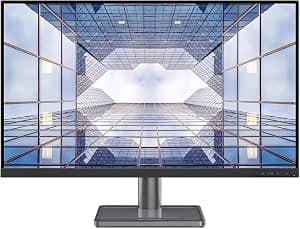
Lenovo L32p-30(A21315UL0) 32 Inch PC Monitor | 4K UHD, 2160p, 60Hz, 6ms, HDMI, USB, USB-C
Description
Immerse yourself in stunning visuals - 32 inch monitor boasting a vibrant 4K IPS display. Experience lifelike colours and unmatched clarity. The ideal choice for both creative and home office work.; Connect with HDMI, DP, and USB C monitor ports on this widescreen monitor. The convenience of a USB-C hub for cable management. Includes USB-C to USB-C video cable.; Elevate your workspace with the height adjustable monitor stand. This widescreen PC monitor with speakers built in features an integrated mobile holder and cable management.; An ideal monitor for photo editing thanks to its UHD resolution and 90% DCI-P3 colour gamut.; Perfect for content creators and professionals. This 4K monitor seamlessly integrates into home offices and creative workstations.; As expected from Lenovo computer monitors a 3 year warranty included for peace of mind.
One less thing to search
Before you buy: quick questions
Is the USB-C connection truly a single-cable solution, and will it charge my laptop?
Yes! The USB-C port delivers video, data, and up to 75W of power over a single cable. This is perfect for most modern ultrabooks and laptops like MacBook Air, many Dell XPS and Lenovo ThinkPad models. It's a huge desk-clutter reducer. For larger laptops requiring over 75W (like some high-power MacBook Pros or gaming laptops), you may need a secondary charger.
How are the built-in speakers, and should I plan to use my own?
Honestly, the built-in speakers are quite basic—fine for system sounds or a quick video call, but lack bass and fullness for music, movies, or gaming. This is the most common critique we see in reviews. We highly recommend using headphones, external speakers, or a soundbar for a better audio experience, as most users find this essential.
Is the 60Hz refresh rate suitable for gaming, and how is the stand?
The 60Hz refresh rate and 6ms response are excellent for productivity, media, and casual or story-driven gaming. However, competitive FPS gamers seeking ultra-smooth motion often look for 144Hz+ monitors. The stand offers tilt adjustment but not height or swivel. Many users on social media suggest pairing it with a budget monitor arm for full ergonomic flexibility, which is a popular upgrade.
I work with text and code all day. How is the clarity and eye comfort?
This is where the monitor shines. The 32-inch 4K display provides incredibly sharp text and plenty of screen real estate to have multiple windows open. The IPS panel offers good viewing angles and consistent color. Users on forums like Reddit frequently praise it for long coding or writing sessions. For even more comfort, make sure to use the built-in blue light reduction modes.
What's the real catch with this monitor given its great price for 4K?
The trade-offs are in the ancillary features. You're paying primarily for the excellent 4K panel and very useful USB-C hub. To hit this price, compromises were made on the speaker quality and the stand's adjustability. The on-screen menu controls also take a little getting used to. If your priorities are crystal-clear visuals, USB-C convenience, and value, you'll likely be thrilled. If premium sound, ultra-fluid gaming, or a fully adjustable stand are top needs, you might want to look at more specialized (and expensive) models.
From a similar, more-reviewed product in this category: PERLESMITH TV Wall Bracket, Swivel Tilt Wall Mount for 26-70 Inch Flat & Curved TVs up to 45kg, Max. VESA 400x400mm
Will this bracket fit my TV?
It supports most 26-70 inch flat and curved TVs up to 45kg, with VESA patterns from 100x100mm to 400x400mm. You should confirm your TV's size, weight, and VESA dimensions before buying.
Can it be installed on a plasterboard wall?
No, it cannot be installed on a plasterboard wall alone; additional structural support such as wooden studs or masonry is required. It can be installed on brick walls, concrete walls, and wooden studs.
Is the bracket sturdy enough to hold a large TV securely?
Yes, reviewers describe it as very solid, sturdy, and well made, with several noting it holds 55 inch and 65 inch TVs securely without sagging or worrying movement.
Is it easy to install?
Reviewers consistently report that installation is straightforward and easy, helped by the included template, spirit level, fixings, and cable tidies.
How adjustable is the bracket?
It offers 25° tilt (+10° up/-15° down), +/-45° swivel, and +/-3° level adjust, and reviewers confirm the swivel and tilt adjustments are smooth and easy to use.
Answers are limited to the manufacturer's listing and the reviews we analysed. Questions those sources cannot support are not answered here.
Transparent by design