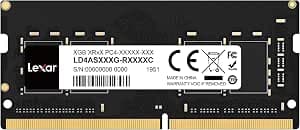
Lexar SODIMM RAM DDR4 16GB, 3200 MHz Memoria Laptop, DRAM Memoria SODIMM 260-Pin per Laptop, SO-DIMM ad alte Prestazioni, Memoria per PC Laptop (LD4AS016G-B3200ASST)
Description
Increase desktop performance; Quick and easy installation; Continuous Update Process; Speed 3200Mbps, backward compatible with 2666Mbps; Lifetime Limited Warranty
One less thing to search
Before you buy: quick questions
Is this Lexar RAM compatible with my specific laptop model (e.g., Dell, HP, Lenovo)?
This RAM uses the standard DDR4 SODIMM 260-pin form factor, making it compatible with most laptops and mini-PCs that have a DDR4 slot and support 3200 MHz. The best way to confirm is to check your laptop's manual or use a system scanner tool from a brand like Crucial to verify the supported specification before purchasing.
I installed it, but my system only shows 2666 MHz, not 3200 MHz. Is there a problem?
Not at all! Many laptops run RAM at a default, lower speed. To achieve the full 3200 MHz, you typically need to enable the XMP (Extreme Memory Profile) in your system's BIOS/UEFI. A quick search for "enable XMP [Your Laptop Model]" will yield specific guides. This is a standard step for most RAM upgrades.
How does Lexar's RAM compare to more well-known brands like Crucial or Kingston in terms of reliability?
Based on extensive user feedback, this Lexar module offers virtually identical real-world performance and reliability to those major brands for everyday tasks and gaming. The primary difference is the price point, with Lexar often providing better value. Many Reddit users in budget-build communities highlight it as a "hidden gem" for cost-effective upgrades.
What is the warranty, and what if the RAM doesn't work when I receive it?
Lexar provides a limited lifetime warranty for this product. If you encounter issues upon arrival, the process is straightforward. First, double-check the installation and BIOS settings. If the module is confirmed to be faulty, you can contact the retailer for a replacement/return or reach out to Lexar's customer support with your proof of purchase to initiate a warranty claim.
I'm not very tech-savvy. Is upgrading my laptop's RAM with this product a difficult process?
It's one of the easiest PC upgrades you can do! The physical installation involves removing a panel on the bottom of your laptop, gently inserting the RAM stick into the slot at an angle, and pressing down until it clicks. The most common advice from YouTube tutorial creators is to ground yourself first and follow a guide for your specific laptop model. For most users, the entire process takes under 10 minutes.
Answers are limited to the manufacturer's listing and the reviews we analysed. Questions those sources cannot support are not answered here.
Transparent by design