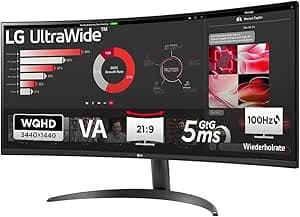
LG, 34 inch, UltraWide, 1800R Curved QHD Monitor, 3440 x 1440, 34WR50QK-B.AEU, 21:9, 5ms GtG, 100 Hz, HDR10, 99% sRGB, PBP Mode, OnScreen Control, AMD FreeSync - Black
Description
The LG Electronics 34WR50QK-B curved monitor shows what modern immersion looks like. Its curved (1800 R) display shows impressive contrast on a 34-inch diagonal screen with up to 300 nits brightness and HDR10 support. The 99% coverage of the sRGB colour space guarantees precise colour reproduction, which can benefit multiple devices if desired. With its connectivity and dual PBP mode, the monitor fits perfectly into multiple computer setups.
Compare the trade-offs
Similar products, side by side
A random selection of analyzed products from the same category. Different products are not necessarily interchangeable.

Minifire 34-Inch UWQHD Curved Gaming Monitor, 165 Hz (DP), 3440 x 1440, Curved 1500R, 1 ms (MPRT), 100 Hz (HDMI), AMD FreeSync, VA Panel, 2xHDMI 2.1(TMDS)/1xDP 1.4 Ports (MFG34C5Q DP Cable Included)

Ingnok 15.6" Portable Monitor (15.6 Zoll)

UPERFECT 4K OLED Portable Monitor 13.3 Inch UHD 3840 x 2160 Portable Monitor | 100000:1 | 500Nits | 100% DCI-P3 | 1ms Response | Ultra-Slim Aluminium Design, Travel Monitor for PC Phone Game Console
One less thing to search
Before you buy: quick questions
Is the included stand really as wobbly and limited as some reviews say?
Many users on forums like Reddit have noted the default stand is basic, offering only tilt adjustment and can be slightly wobbly on unstable desks. The consensus is that it gets the job done, but for optimal ergonomics (height, swivel), most enthusiasts recommend using the 100x100mm VESA mount with a third-party monitor arm, which is a popular and easy upgrade.
I'm coming from a standard 1080p or a 4K monitor. How sharp will text and images look for office work?
The 3440x1440 resolution on a 34-inch screen offers a great balance of space and clarity. You'll have ample room for multiple windows. While pixel-perfect sharpness might be slightly less than a 27-inch 4K display, the vast majority of users find text perfectly crisp for coding, writing, and spreadsheets. The curve actually helps reduce eye strain by keeping all screen areas at a consistent viewing distance.
My graphics card is a [GTX 1660 Super / RTX 3060]. Can it handle gaming on this ultrawide?
This is a crucial pre-purchase question. The 3440x1440 resolution has about 1.3 million more pixels than standard 1440p, so it's more demanding. A card like an RTX 3060 or AMD RX 6700 XT is a good starting point for modern games at medium-high settings. For less powerful GPUs, you can still run games at native resolution with adjusted settings or use a 16:9 resolution (with black bars) for higher frame rates. Checking benchmarks for your specific card at "1440p ultrawide" is highly recommended.
Who is this monitor NOT ideal for?
While excellent for many, it might not be the best fit if your top priority is: 1) Competitive Esports: Gamers seeking 144Hz+ refresh rates for titles like Valorant may want a dedicated high-refresh panel. 2) True HDR Experiences: The HDR10 support is basic; don't expect the vibrant HDR found on premium TVs or monitors. 3) Out-of-the-box ergonomics: If you need height and swivel adjustment immediately without buying an extra arm, consider models from Dell or Gigabyte in a similar price range.
How reliable is LG with dead pixels and warranty claims?
Based on widespread user feedback across thousands of reviews, LG's IPS panels are generally regarded as reliable with a low occurrence of dead pixels. The monitor includes a standard manufacturer's warranty. The process for claims is typical for large electronics brands; having your purchase receipt is key. Many TikTok and YouTube reviewers have highlighted that buying from a reputable retailer with a good return policy (like Amazon) provides an easier first line of defense if you receive a unit with noticeable backlight bleed or other defects.
From a similar, more-reviewed product in this category: Minifire 27 Inch QHD 300Hz 1ms Fast-IPS Gaming Monitor (MFG27F6Q Pro)
Is this monitor good value for the price?
Yes. Multiple reviewers describe it as excellent value for money, with one noting they got it for £130 and would never buy a "premium" monitor again, and another saying it offers incredibly much for the price.
What is the picture and color quality like?
Reviewers report strong, clear and vivid colors from the IPS panel, and the QHD resolution is noticeably sharper than older monitors. However, one reviewer received a unit with a pixel defect and found the menu settings not great, and another said the default image rendering was disappointing until adjusted via the OSD.
Does the monitor come with a cable, and what do I need for a laptop or console?
A DP cable (1.5m) is included for PCs, while laptops, PS5 and Xbox require an HDMI cable. The full 300Hz at 2K QHD is achievable via the HDMI 2.1 port.
What should I do if I find a dead pixel?
Every display is checked for pixel defects, but if you still find one, contact support immediately with a photo or video and they will handle it as quickly as possible.
Why can't I enable HDR or adjust colors?
This is not a defect. MPRT technically excludes HDR and Adaptive Sync, so MPRT must be off for HDR/Adaptive Sync, and in game mode colors are often fixed, so adjust colors before activating game mode.
Answers are limited to the manufacturer's listing and the reviews we analysed. Questions those sources cannot support are not answered here.
Transparent by design