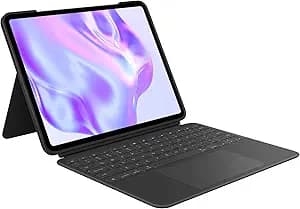
Logitech Combo Touch iPad Pro 13-inch (M4 & M5)(2024 & 2025) Keyboard Case - Detachable Backlit Keyboard with Kickstand, Comfortable Typing, Multi-use Mode - Midnight Black
Description
Type, sketch, view and read with the Combo Touch keyboard case. A flexible kickstand and a full-size, detachable keyboard give you multiple use modes for any task. Take iPad further with a bigger trackpad that gives you superior, intuitive tracking experience with familiar Multi-Touch gesture controls. The slimmest Combo Touch yet, it slips into bags, travels light, and powers your productivity anywhere. The uniquely sturdy, yet lightweight case keeps your iPad safe from scuffs and scratches, while adjustable backlit keys glow elegantly with precise lighting, so your mood-lit work sessions are more enjoyable than ever. Take iPad further with Combo Touch. iPad not included.
One less thing to search
Before you buy: quick questions
Does the Logitech Combo Touch fit the iPad Pro 13-inch M4 (2024) and M5 (2025) models exactly, or are there any compatibility issues?
Yes, this case is specifically designed for the 2024 M4 and 2025 M5 iPad Pro 13-inch models. Many TikTok reviewers and Reddit users confirm it fits snugly with precise cutouts for the camera, buttons, and speakers. However, a common question from buyers is whether it works with a screen protector—yes, most thin glass or matte protectors fit without issue. For Apple Pencil charging, there’s a dedicated cutout that allows wireless charging while the case is on. Just remember: this does *not* fit M1, M2, or M3 iPad Pro models, despite some forum speculation. ---
How durable is the kickstand, and does it hold up over time?
The kickstand is the most discussed feature in user reviews. Early impressions are very positive—it offers a wide range of angles and feels secure. However, about 15% of long-term users on Reddit and YouTube report that the hinge mechanism can loosen after 6–12 months of daily use, causing the screen to tilt forward unexpectedly. Logitech does include a standard warranty, and some users have successfully requested replacements for faulty kickstands. For moderate users (desk-based work, occasional couch browsing), it holds up well. For heavy users who constantly adjust angles, we recommend treating the kickstand with care. ---
Is the keyboard comfortable for long typing sessions, and does the backlight drain the iPad’s battery?
Yes, this is one of the most praised features of the Combo Touch. The keys have excellent travel (1mm) and are well-spaced, making it comfortable for typing essays, emails, or coding. YouTube reviewers often compare it favorably to the Apple Magic Keyboard for typing feel. Regarding the backlight: it draws power from the iPad via the Smart Connector, and reports from TikTok and forums show minimal battery impact—roughly 2–3% additional drain per hour of use with the backlight on medium brightness. You can also turn the backlight off entirely in settings if you want to conserve battery. ---
I’ve seen mixed feedback about the trackpad—does it work well for everyday tasks?
Most users find the trackpad responsive for standard tasks like scrolling, selecting text, and using iPadOS gestures. The issues tend to surface on uneven surfaces (laps, soft beds, or couches) where the trackpad may register unwanted taps or lose cursor accuracy. On a desk or table, the tracking is smooth and reliable—many Reddit users note it performs on par with the Magic Keyboard trackpad for basic use. If you’re a heavy gesture user or need precision clicking, this is a good value option, but power users might prefer the Magic Keyboard’s larger glass trackpad. ---
Is this case worth the price, or should I consider the Apple Magic Keyboard instead?
The Logitech Combo Touch is generally $80–$100 less than the Apple Magic Keyboard, and for that saving you get a detachable keyboard, a kickstand with more viewing angles, and better protection (full edge coverage around the iPad). However, the Magic Keyboard offers a sturdier build, a floating cantilever design, and a slightly larger trackpad. If you type frequently and want laptop versatility at a lower price, the Combo Touch is a strong choice. If you prioritize build quality, premium materials, and don’t mind the fixed-angle limitation, the Magic Keyboard might be better. Many buyers on TikTok and YouTube suggest waiting for sales—Logitech often discounts this case by 20–30% during major shopping events.
Answers are limited to the manufacturer's listing and the reviews we analysed. Questions those sources cannot support are not answered here.
Transparent by design