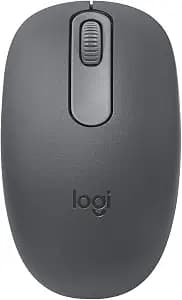
Logitech M196 Bluetooth Wireless Mouse, Compact and Portable Mouse for Laptops, Tablets and More, 12-Month Battery, Smooth Tracking, Compatible with PC and Mac, Windows and macOS - Graphite
Description
Convenient Portable Mouse for Laptops and Tablets: The Logitech M196 Bluetooth Wireless Mouse connects in seconds with a reliable pair-and-play Bluetooth connection—no dongle or port required; Comfortable, Travel-Ready Design: This Bluetooth travel mouse is lightweight and fits in any bag; its contoured, ambidextrous shape is comfortable for both left and right hands; Works on a Variety of Surfaces: With precise line-by-line scrolling and optical tracking; the M196 Wireless Bluetooth Mouse provides smooth and accurate cursor control on nearly any surface; Made to Last With Recycled Plastic: The plastic parts in the M196 contain certified post-consumer recycled plastic (67% for Graphite and 66% for Off-White and Rose (2)); 12-Month Battery Life: Enjoy a reliable 12-month battery life (1) and auto sleep feature for longer use between battery changes; 1 AA battery included; A Small Wireless Mouse for Almost Any Device: This versatile and cost-effective Bluetooth mouse is ideal for productivity and learning on the move; works with most operating systems and devices
Compare the trade-offs
Similar products, side by side
A random selection of analyzed products from the same category. Different products are not necessarily interchangeable.

cimetech Type C Wireless Mouse, USB C Mouse 2.4G Silent Cordless Portable Computer Mice for Laptop, Notebook, MacBook Pro Air, Windows, Linux - Ambidextrous Black

ProtoArc EM01 NL Wireless Trackball Mouse, Rechargeable Thumb Control, Gray

TECKNET Rechargeable Wireless Mouse, 2.4G Silent Quiet Click, 6 Adjustable 4800 DPI, Cordless Computer Mouse, Ergonomic Mouse for Laptop, 6 Buttons USB for Chromebook, Ergo Grip - White
One less thing to search
Before you buy: quick questions
Is this mouse comfortable for all-day use, or is it too small?
Comfort is subjective and depends on your hand size and grip. The M196 is intentionally compact and lightweight for portability. Many users with small to medium hands find it perfectly comfortable for long study or work sessions. However, a common note from social media reviews is that users with larger hands may experience cramping during extended, continuous use. If you have larger hands or prioritize ergonomics, you might prefer a more contoured mouse like the Logitech M720.
How reliable is the Bluetooth connection, especially with Windows PCs?
The Bluetooth connectivity is generally very reliable and praised for its simplicity, particularly with Macs and tablets. For Windows PCs, most users have a seamless experience, but a small number report needing extra steps during initial pairing (like using the "Add a device" menu in Settings). Once paired, it's stable. The key advantage is no USB dongle, freeing up a port and making it easy to switch between compatible devices.
What is the real-world battery life, and is the battery replaceable?
Users consistently report that the battery life meets or exceeds the 12-month claim with typical daily use. Yes, the battery is easily user-replaceable! It uses a standard AA battery, so when it eventually runs out, you can simply slide open the compartment and pop in a new one—no charging cables or special batteries needed.
Who is this mouse NOT a good fit for?
This mouse is not ideal for gamers needing high DPI or programmable buttons, or for users who require advanced ergonomic support for very large hands. It's a fantastic, no-fuss peripheral for everyday tasks, portability, and reliable performance. If you need side buttons for navigation, smoother scrolling, or precision control for design work, you might consider alternatives like the Logitech MX Anywhere series.
How does it perform on different surfaces like glass tables or couches?
The tracking is smooth and accurate on most standard surfaces like wood desks, mouse pads, and fabric. However, like most standard optical sensors, it may struggle on highly reflective or clear glass surfaces. For casual use on a couch or bed, it performs adequately. If you often work on challenging surfaces, you would need a mouse with a more advanced, laser-based tracking system.
From a similar, more-reviewed product in this category: TECKNET Wireless Mouse, BT 5.0/2.4G, Rechargeable 6-DPI Silent, Grey
How long does the battery last on a full charge?
The listing states a full charge takes 1.5 to 2 hours and delivers 3 months of use at 2 hours per day. Reviewers back this up, with one reporting no charge needed after a month and a half of roughly 9 hours daily use, and another saying one charge lasts for months.
Are the mouse clicks actually quiet?
Yes. The manufacturer describes silent technology for noiseless clicks, and reviewers consistently call the left and right clicks "super silent," "quiet but satisfying," and a good fit for offices and quiet environments.
How do I connect it, and can I use it with more than one device?
It supports both a USB-A dongle and Bluetooth (3.0/5.0), and you can connect two devices at once and switch between them with a slide switch. Reviewers confirm both the USB and Bluetooth connections work well and are easy to set up, and the dongle is stored in a slot underneath the mouse.
Is this mouse suitable for small hands?
The listing notes it is better suited for small to medium-sized hands, though larger-handed users who prefer a smaller mouse may still like it. A reviewer who wears a small women's glove said it fits perfectly, and another described it as somewhat small but still comfortable in a man's hand.
Does it work with macOS?
The listing says it is compatible with Windows, macOS, Chrome OS, and Linux, but notes that the side buttons are not compatible with macOS.
Answers are limited to the manufacturer's listing and the reviews we analysed. Questions those sources cannot support are not answered here.
Transparent by design