What people like
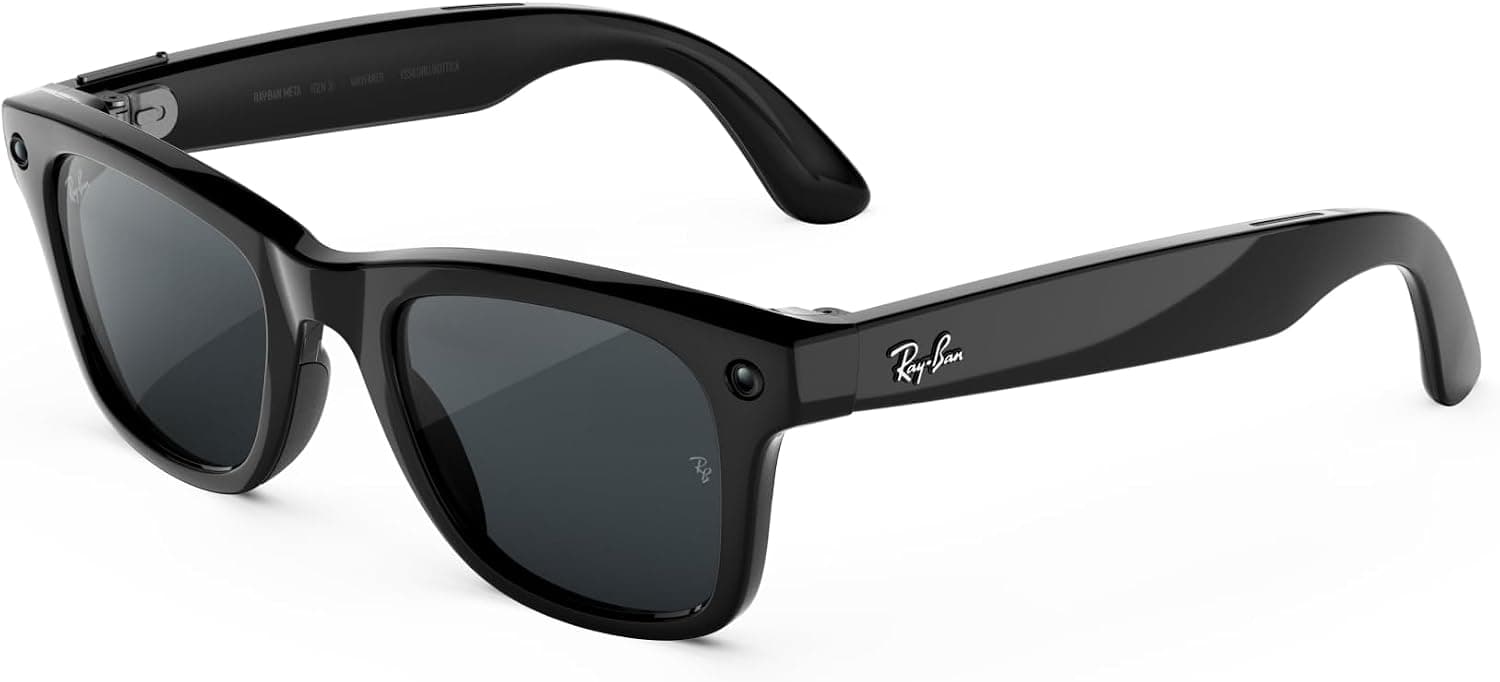
They look like classic Ray-Bans
Reviewers love that these still look and feel like normal Ray-Bans, with good open-ear audio, an easy camera and hands-free controls they use daily.
Our buying verdict
Great for hands-free photos and audio, but price and uneven AI are key caveats
People who want classic-looking sunglasses that quietly handle hands-free photos, video, calls and open-ear audio in everyday use.
Buyers expecting strong AI assistance, display features, or good value for the price, and those in regions where AI support is limited.
The 30-second read
What people like
Reviewers love that these still look and feel like normal Ray-Bans, with good open-ear audio, an easy camera and hands-free controls they use daily.
The main watch-out
Several buyers report slow or limited AI, with one noting the AI agent doesn't work in much of Latin America; another hit an outgoing call bug and poor support.
Before you choose
They run a bit larger and heavier than regular sunglasses and show nothing on the lenses, so confirm size, lens type and app setup before buying.
From a similar, more-reviewed product in this category: Tensky Smart Watch for Men Women(Call Receive/Dial), Alexa Built-in, 1.8" Touch Screen Fitness Tracker with Heart Rate Sleep Tracking, 100 Sports Modes, 5ATM Waterproof Smartwatch for Android iPhone
What people like
Reviewers repeatedly praise the watch for offering many features—like calls, Alexa, and health tracking—at a fraction of the cost of premium brands. Many also highlight long battery life and easy setup.
The main watch-out
One reviewer notes that the sleep tracker is not entirely accurate, which may matter if precise sleep data is important to you.
Before you choose
The product listing says 1.8 inches, but one review mentions a 1.7-inch screen, so verify the actual size. Also, while it pairs with iPhone and Android, some features like Alexa and notifications may depend on your phone.
Description
Meet Ray-Ban Meta (Gen 3), the next generation of the world's #1 selling AI glasses.* Two new styles, alongside the iconic Wayfarer, have been reimagined with Meta AI, creating the perfect combination of power and presence. Aviator and Zena each feature a slimmer design with a refined camera, along with up to 9 hours of battery life. With the action button, you can subtly trigger Meta AI or customize it for instant shortcuts to your favorite features. With the 12 MP camera and 3K Ultra HD video recording, you can capture the perfect shot, hands-free. Upgrade your look with the timeless styling and next-gen tech of Ray-Ban Meta (Gen 3).
Compare the trade-offs
A random selection of analyzed products from the same category. Different products are not necessarily interchangeable.

AI Smart Glasses with 8MP Camera, Real-Time Translation, 4K Video & Dual Microphone Noise Cancellation, Voice Assistant, for Travel, Vlogging, Meetings

Meta Ray-Ban (Gen 2) Wayfarer Smart AI Glasses, Black, Polarized Lenses

Meta Ray-Ban (Gen 2) Wayfarer Smart AI Glasses, Matte Black, Transitions®
Check the evidence
Included does not mean verified authentic. Flagged does not mean proven fake. These are analytical classifications.
Showing 3 illustrative excerpts, not the complete review set.
Impressive Technology, Comfortable Design, and a Few Frustrations
“The media could not be loaded. I’ve been spending some time testing the Ray-Ban Meta 3, and my overall experience has been a mix of genuinely impressive technology and a few frustrating limitations. They look and feel much more like a regular pair of glasses than I expected, but there is a surprising amount of technology packed into them. After using them for calls, music, photos and videos, voice commands, AI identification, translations, and walks where I asked Meta to describe what it could see, I’ve found quite a few features that I really like. At the same time, there are some things I think potential buyers should know before making the investment. Packaging and Initial Setup The packaging is sleek, professional, and minimalist. Everything feels well presented without being unnecessarily complicated. The charging case is one of the first things I liked. It is durable, holds its shape well, and doubles as the USB-C charging case for the glasses, so you don’t have to carry a separate charging accessory. When I first opened the box, I scanned the QR code and followed the setup instructions. I left the glasses in the case and pulled the activation tab, but I didn’t get the blue LED light the instructions indicated I should see. Instead, I was seeing a yellow LED. Fortunately, there is a help option within the setup process that provides troubleshooting steps if the blue light doesn’t appear. I followed those instructions and was able to continue with the setup. Lens and Polarization Performance The polarization on these glasses is really good. They do an excellent job of blocking bright light and reducing glare, which I noticed immediately when wearing them outside. The camera quality has also been better than I expected. Photos and videos are clear and crisp, and the microphones pick up background audio surprisingly well. The recorded audio is clear without making the glasses feel like they’re primarily a recording device. AI Vision and Object Recognition This is probably one of the most interesting parts of the glasses. I’ve spent quite a bit of time asking Meta to identify things I’m looking at, and the results have been a mixture of impressive and occasionally inaccurate. For example, Meta was able to identify hosta plants and maple trees. When it identified the maple tree, it also explained some of the characteristics it was using to determine that it was a maple. It was able to identify Ford trucks by make and Hyundai SUVs, but interestingly, it wasn’t able to identify a Chevrolet vehicle. Plant identification isn’t perfect either. When I showed it citronella plants, it identified them as fall mums. So, while the AI can be surprisingly good, I wouldn’t assume that every identification is correct. It is better viewed as a helpful tool that can provide information and suggestions rather than something that should replace your own judgment. Translation I also tested the glasses with French signs, and Meta was able to translate the text into English. This is one of those features that could be particularly useful while travelling or simply encountering information in another language. Being able to look at a sign and ask Meta what it says without having to take out your phone is a nice hands-free feature. Understanding Your Surroundings Another feature I found particularly interesting was asking Meta what it could see while I was walking. As I moved around, I could ask questions about what was in front of me or what the glasses were seeing, and Meta could provide descriptions of the surroundings. I can see this having potential as an accessibility feature, particularly for people with visual impairments. It could provide another way of getting information about objects, signs, plants, vehicles, and other things in the environment. That said, because the AI can occasionally misidentify objects, I would consider it an assistive tool rather than a completely reliable source of visual information. Music and Voice Commands Music has been one of the more inconsistent areas for me. If I manually start one of my playlists, I have much more control over what I’m listening to. However, when I ask Meta to play country music, it can sometimes start a free music playlist that includes rap, pop, or other genres rather than what I was actually looking for. I also tried asking Meta to play Reba McEntire from my music library, but instead of playing the music I expected from my Apple Music/iTunes account, it sometimes played a free music selection that wasn’t my preferred genre. Amazon Music has worked differently for me. When I ask Meta to play something from Amazon Music, it is able to connect to my account. My experience has been that you need to be fairly clear and precise with your voice commands. A compatible music subscription also seems to provide a better experience than relying on the free music options. Voice Assistant Options There are three standard Meta Assistant voice options available to choose from. The options I’ve encountered use North American accents, so there isn’t a particularly wide range of accent choices. One setting I think is worth paying attention to is whether you have “Hey Meta” active for continuous listening. You can instead switch to manual activation, where you tap the right arm of the glasses when you want to give a command. I prefer this option because it means the assistant isn’t constantly waiting for the wake command. Battery Experience I tested the glasses with Meta engaged in active listening for voice commands and used them fairly heavily for approximately two hours. During those two hours, I: * Listened to music. * Asked Meta numerous questions. * Imported photos and videos. * Asked Meta what it could see while I was walking. * Used the AI visual recognition features. * Used voice commands regularly. Starting at 100% battery, the glasses were at 53% after approximately two hours of this fairly intensive use. I wouldn’t consider that a typical two-hour use scenario because I was deliberately using many of the features continuously. However, it does give some perspective on how quickly the battery can drop when the glasses are actively listening, processing questions, playing music, using the camera, and working with AI features. For more everyday use, switching from constant “Hey Meta” listening to manual tap activation should help conserve battery. Comfort and Weight One of my pleasant surprises has been how lightweight these glasses feel. With all of the technology inside them, I expected them to feel heavier or more noticeable on my face. Instead, they sit comfortably across the bridge of my nose. There is a sensor built into the nose bridge that detects whether the glasses are being worn. This allows the glasses to respond differently when they’re on or off your face. The power switch is discreetly located on the inside of the arm. Its location can affect how the glasses feel slightly depending on where it sits against your head, but I didn’t find it to be a major issue. Heat After Extended Use I also paid attention to how warm the glasses became during use. After wearing them for approximately two hours, the right arm remained cool while the left arm was slightly warm. I didn’t actually notice the warmth while wearing them. I only noticed it when I took the glasses off and felt the difference between the two sides. It wasn’t uncomfortably hot, just a noticeable difference in temperature after extended use. The Fingerprint Problem The shiny finish looks nice, but it shows fingerprints very easily. This is particularly noticeable because the right arm is where you tap and swipe to control the glasses. Regular use means you’re touching that surface frequently, and it doesn’t take long before fingerprints and smudges become visible. It’s a minor issue, but something I noticed fairly quickly. Calls and Notifications Incoming calls and notifications have worked well for me. I can answer incoming calls through the glasses, and the audio is clear. I can also hear incoming text messages being read aloud. This makes the glasses useful when I don’t want to pull out my phone just to see or hear a notification. Making Outgoing Calls: My Biggest Frustration Unfortunately, making outgoing calls has been a completely different experience. When I ask Meta to call someone from my contact list, I hear a musical chime and then receive a message telling me to try restarting the app. Meta also tells me that it is still learning. I’m using an iPhone 16 with the glasses. My Bluetooth settings show that contact syncing is turned on. I’ve tried a long list of troubleshooting steps, including: * Clearing the app cache. * Restarting the app. * Restarting my phone. * Uninstalling and reinstalling the app. * Forgetting the glasses from Bluetooth. * Re-pairing the glasses. * Checking the contact-sync settings. * Following various troubleshooting suggestions I found online. I’ve spent approximately eight hours trying to troubleshoot this particular issue, and I still can’t make an outgoing call through the glasses. What’s particularly frustrating is that the phone connection clearly works for other functions. I can receive calls, hear incoming text messages, listen to audio, and use other connected features. The problem appears to be specifically with initiating an outgoing call. This could be something specific to my phone, software version, account, or particular setup, so I’m not suggesting everyone will experience the same problem. However, if hands-free outgoing calls are an important reason for purchasing these glasses, this is definitely something I would test carefully. Overall Impression There is a lot to like about the Ray-Ban Meta 3. The glasses are comfortable and surprisingly lightweight. The polarized lenses work very well, the camera produces clear photos and videos, and the audio quality is good. The ability to interact with Meta using voice commands without taking out your phone is convenient. The AI features are probably the most interesting part for me. Being able to identify plants, recognize certain vehicles, explain why it identified something, translate French signs, and describe things around me while walking makes the glasses feel quite different from a traditional pair of smart glasses. At the same time, the technology isn’t perfect. AI identification can be incorrect, music commands don’t always produce the results I expect, and my experience with outgoing calls has been particularly frustrating despite extensive troubleshooting. The battery also needs to be considered if you’re planning to use many of the features continuously. My battery dropped from 100% to 53% during approximately two hours of heavy use with active listening, music, AI questions, camera use, and visual recognition. For me, the Ray-Ban Meta 3 feels less like a replacement for a smartphone and more like a hands-free extension of one. They allow you to access information, take photos and videos, listen to audio, receive notifications, and interact with AI without constantly reaching for your phone. When the features work as expected, the experience is genuinely impressive. There are still some areas, particularly software integration and certain voice commands, where I think the experience could be more reliable. Overall, these are an interesting piece of technology that combine the everyday practicality of sunglasses with some surprisingly capable AI, camera, and audio features. My experience has been positive in many areas, but I’d also recommend going into the purchase knowing that some features may take experimentation and troubleshooting to get working the way you expect.”
Signals matched: Specific detail: entity, scenario, process · Reads as an authentic voice
Far More Than a Pair of Sunglasses, and Surprisingly Difficult Not to Love
“I was pleasantly surprised by just how much I have enjoyed these Ray-Ban Meta Gen 3 Wayfarers. I initially regarded them as an interesting technological novelty, but after spending considerable time with them, I have discovered that they offer far more practical applications than I anticipated. The shiny black frames look excellent, the polarized green lenses maintain that classic Ray-Ban appearance, and they are remarkably comfortable. I have worn them for several consecutive hours without experiencing discomfort around my nose, ears, or face. The charging case is equally impressive, resembling an ordinary glasses case while incorporating a convenient charging system and a small indicator light to communicate its status. My initial setup was not entirely seamless, although the problem ultimately turned out to be rather amusing. The glasses were not appearing through the standard pairing procedure, so I began following the troubleshooting instructions. Eventually, I discovered that they were not seated completely in their charging case. Once I pushed them properly into position, everything connected as expected. Apparently, even sophisticated AI glasses cannot compensate for their owner failing to put them away correctly. Since then, I have experienced very few connectivity issues. Where these glasses truly distinguish themselves is their integration with Meta AI. I have Alexa devices throughout my home and even use Alexa-enabled earbuds, so I am already quite accustomed to having a voice assistant readily available. Nevertheless, being able to ask questions about something directly in front of me introduces an entirely different level of usefulness. The live AI mode is particularly impressive. Rather than repeatedly saying “Hey Meta” before every question, you can engage in an ongoing conversation while the glasses interpret what you are looking at. You can ask about landmarks, request information about objects, or seek suggestions based on your surroundings. I particularly appreciate being able to adjust how descriptive the responses are, from brief explanations to considerably more detailed descriptions. One application I find especially compelling is translation. When travelling internationally, I frequently encounter signs in languages I cannot understand. Ordinarily, this involves retrieving my phone, opening a translation application, and pointing the camera at the text. With these glasses, I can simply look at the sign and ask what it says. Having the translation spoken directly into my ears is remarkably convenient, particularly when exploring an unfamiliar city. The ability to recognize food and suggest recipes is another feature I have enjoyed experimenting with. You can look at ingredients and ask what you might prepare with them, or point the camera towards something unfamiliar and ask the AI to identify it. I have also explored using it to estimate nutritional information and calories. Naturally, these identifications are not infallible, and I would not rely on them for precise dietary calculations, but the results have generally been reasonably close. Navigation has also impressed me. I can ask for directions to a particular business without knowing its address, and the assistant can identify a nearby location and provide spoken directions, including an estimated travel time. I appreciate being able to hear this information without continually checking my phone, although the directions can also be viewed through the Meta AI application. The audio might actually be one of my favourite aspects of the entire product. I do not wear these glasses every day, but I have increasingly found myself treating them as an alternative to headphones. The open-ear speakers produce surprisingly good sound while allowing me to remain aware of my surroundings. At moderate volumes, the audio is relatively discreet, although anyone expecting complete privacy at maximum volume will be disappointed. Turn them up sufficiently and the people around you can certainly hear what you are listening to. I particularly appreciate this arrangement for longer listening sessions. Traditional earbuds can eventually become irritating, whereas these allow me to listen to music without having anything inside my ears. I have already used them during walks, and I suspect they will become my preferred option for outdoor listening during the sunnier months. The touch controls are exceptionally convenient. A single tap pauses playback, a double tap advances to the next song, and a triple tap allows you to return to the previous track or restart playback. Volume adjustments require only a swipe along the side of the frame. I also appreciate being able to activate the assistant using the physical button rather than speaking the wake phrase. There is something mildly embarrassing about repeatedly addressing an invisible assistant while walking through a public space. The button provides a considerably more discreet alternative, while also saving me from occasionally addressing Meta as Alexa or Siri out of habit. The camera is another welcome addition. Both photographs and videos are of quite respectable quality, especially considering that the camera is integrated into something as compact as a pair of glasses. Being able to capture a moment from my own perspective without retrieving my phone is particularly appealing. There is, however, one area where I would genuinely appreciate improvement: music service integration. YouTube Music is my primary platform, and I was disappointed to discover that I could not control it directly through the glasses as I had hoped. Amazon Music has also been somewhat frustrating. When I request a particular playlist, the assistant frequently decides to play a station instead. Apparently, my musical preferences are open to negotiation, whether I intended them to be or not. Fortunately, this is more of an annoyance than a fundamental limitation. I generally select my music directly from my phone anyway, and once playback begins, the glasses work very well as an audio device. Consequently, I do not consider this sufficient reason to deduct a star, although improvements to music integration would certainly be welcome. Overall, these are an easy five stars from me. I expected to enjoy experimenting with them, but I did not anticipate finding so many genuinely practical applications. The comfortable frames, excellent charging case, capable audio, and remarkably useful AI features make them particularly appealing to anyone who enjoys voice assistants, frequently travels, or wants an alternative to wearing headphones for extended periods. There is still room for refinement, but I am thoroughly impressed with what these glasses can already accomplish.”
Signals matched: Specific detail: entity, process · Reads as an authentic voice
Cutting Edge Technology! The Future of Smart Glasses Is Already Here!!
“I was on a video call with a family member while checking out a local event, and this is where these glasses really impressed me. During the WhatsApp call, a small glasses icon appeared on the screen, and with one tap the other person could see exactly what I was seeing through the glasses camera. That felt like next-level technology. Instead of turning my phone around or constantly changing camera angles, I simply looked around naturally and shared my view hands-free. It was one of those features that immediately made me realize how different these glasses are from regular wearable tech. This Ray-Ban Meta Wayfarer combines classic Ray-Ban styling with modern AI technology. From the outside, they look like regular premium sunglasses, but inside they include cameras, speakers, microphones, AI assistance, voice controls, and connectivity features. They feel like a true next-generation product designed to help you capture moments, communicate, and access information without constantly reaching for your phone. The build quality is excellent. The frame feels solid and well constructed, and the materials have the premium quality expected from Ray-Ban. The shiny black finish looks stylish, while the polarized green lenses provide excellent glare reduction and visual clarity outdoors. Despite all the technology inside, the glasses are surprisingly lightweight and comfortable to wear for extended periods. The overall design blends technology and fashion very well. The camera system is one of the standout features. Photos are sharp, and the 12MP camera captures impressive images from your natural point of view. The Ultra HD video quality is excellent for everyday recording, and voice commands make hands-free recording incredibly convenient. Instead of pulling out a phone, you simply ask Meta to take a photo or start a recording. The microphones also capture clear audio, making recordings feel much more immersive. The open-ear audio experience exceeded my expectations. Music sounds clear, podcasts are easy to hear, and calls remain crisp without blocking surrounding sounds. Sound can be adjusted easily through touch controls on the frame. Audio remains private enough that people nearby generally cannot hear what you are listening to during normal use. Call clarity is excellent on both ends, and Meta's voice responses are surprisingly clear even in outdoor environments. Meta AI is where these glasses become truly impressive. I could ask questions naturally, request information, use translation features, identify objects, and get quick answers without touching my phone. Responses were fast and discreet, and other people around me generally could not hear Meta's responses. The AI feels useful rather than gimmicky and becomes more helpful as you use it regularly. App connectivity works very well with Meta's ecosystem. The most impressive feature for me was the ability to share the live camera view during WhatsApp and Messenger calls. The person on the other end can see exactly what you see through the glasses simply by selecting the glasses option during supported calls. Unfortunately, this feature currently does not work with FaceTime. I also initially became frustrated because voice commands for direct phone calls and messages through iPhone contacts frequently requested reconnecting the Meta app even when it was already running. After researching further, it appears to be largely related to Apple's platform restrictions and privacy policies rather than a hardware issue. Hopefully future cooperation between Apple and Meta improves this experience and allows features such as direct calling and camera sharing through FaceTime. Battery runtime has been very good during regular use. The charging case is excellent and functions much like premium wireless earbud cases, providing multiple recharges while protecting the glasses. The case charging system is convenient and makes daily charging simple. The on-off switch is discreet, and touch controls along the frame become easy to use after a short learning period. Overall, these glasses successfully combine AI, communications, photography, audio, and everyday eyewear into a single device. They are not perfect, but they offer one of the most advanced and practical wearable technology experiences currently available. Pros; + Premium Ray-Ban build quality + Stylish Wayfarer design that looks like regular sunglasses + Excellent polarized lens quality + Lightweight and comfortable fit + Impressive 12MP camera quality + Sharp Ultra HD video recording + Completely hands-free photo and video capture + Excellent open-ear audio experience + Clear music and podcast playback + Very good call quality + Responsive Meta AI assistant + Fast answers and information retrieval + Real-time translation capability + WhatsApp and Messenger camera-sharing feature is amazing + Charging case provides excellent convenience + Good battery runtime + Easy touch controls for volume and playback + Strong app connectivity within the Meta ecosystem + Great combination of fashion and technology Cons; - Direct calling and messaging integration with iPhone can be inconsistent - Live glasses camera view does not work with FaceTime - Some advanced features work best within Meta-owned apps - Premium price compared to traditional sunglasses - Battery drains faster when using AI, camera, and audio heavily - Smudges and fingerprints show easily on the glossy frame I highly recommend these glasses for anyone interested in wearable technology, AI features, and hands-free content creation. The ability to capture photos and videos naturally, listen to music, take calls, interact with Meta AI, and even allow someone on WhatsApp or Messenger to see exactly what you are seeing through the glasses feels genuinely futuristic. The sound quality, camera quality, comfort, and charging case are all excellent. While Apple ecosystem limitations currently prevent some features from working as seamlessly as they could, I believe many of these issues are software and platform restrictions rather than hardware limitations. If future Meta and Apple integration improves, these glasses could become even more powerful. Even today, they are one of the most impressive and practical pieces of consumer technology I have used and truly feel like a glimpse into the future.”
Signals matched: Specific detail: entity, scenario, process · Reads as an authentic voice
Transparent by design