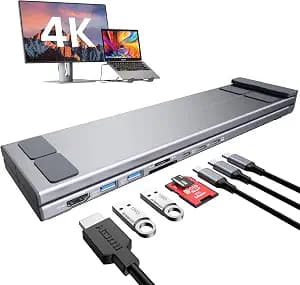
Mukiya USB C Laptop Docking Station Stand, Dock Tablet Stand, 8 in 1 USB C Hub with 4K HDMI, 2 USB 3.0, PD 100W, Universal Computer Holder Dock Station for MacBook Pro/Air/Dell/HP/Surface/Lenovo
Description
USB C Docking Station Stand: The Mukiya USB C dock stands perfectly combine the function of a USB C dock and a laptop stand transforms your cluttered desk into an organized minimalworkspace. USB C docking station for USB C macOS and Windows laptops is equipped with 4K HDMI, 2*USB 3.0(up to 5Gbps), 1*USB C PD 3.0 port, and 1*USB-C Data, 1*SD, 1*TF. The USB C dock stands perfectly combine the function of a USB C dock and a laptop stand, making it the best choice for your USB C laptop with more features and possibilities.; 4K HDMI Docking Station: You can use this universal laptop docking station stand to mirror or expand your MacBook or Windows laptop to a larger high-resolution display. The resolution can reach up to 4K UHD (3840x2160@30Hz) via the HDMI port.(Please check your computer model to confirm whether the Type-C port used for connecting the dock supports “video output” or “DisplayPort Alt Mode.” You can also check the Type-C parameters on your computer manufacturer’s official website; it should be USB3.2 Gen2, USB4, TBT3/TBT4/YBT5 or above for normal operation.); Super Speed Data Transfer & 85W Power Delivery: The portable laptop dock stand with 2*USB- A ports supports data transfer speed up to 5 Gbps, allowing you to transfer files quickly. Also connect a keyboard, mouse, U Flash drive or hard drive to your MacBook Pro, MacBook Air, macbook neo, Dell, and HP laptops without any lag; 1*USB-C data supports data transfer rates up to GEN1. TF card slots for superior data-storing versatility at a fast transfer speed up to 25MB/s. SD card transfer up to 25Mbps. Allows you tranfer files in seconds from your usb flash driver, usb/usb c hard disks; A PD charging port support max 100W power delivery, max 85W charge your laptop.; Ergonomic Design Laptop Stand: The Upgraded laptop docking station stand features 9-level to adjust the height, allowing you to choose the perfect angle for your posture and body type. The triangle support design makes the laptop stand more stable. The non-slip silicone pad on the stand can fix your laptop in place and protect your device from scratches and slipping. The forward-tilt angle and open design provide increased ventilation and more airflow to cool your laptop while operating other than lying flat on the table. End desk clutter with your all-in-one desk charging station.; Portable and Lightweight Docking Station: Crafted from premium aluminum alloy, this docking station stand effortlessly supports laptops up to 40 lbs without any bounce or wobble.This USB C hub multiport adapter is compact and lightweight, it can be folded to the size of 10.5*2.2*0.9 inches and is only 0.7 lbs lightweight. And this MacBook Pro docking station stands also comes with a portable storage bag it is so perfect to carry when you have a business trip or traveling.
One less thing to search
Before you buy: quick questions
Will this docking station fit my specific laptop, especially if it's not a MacBook?
The stand is designed to be universal and fits most modern laptops up to 17 inches. While MacBook Pro/Air models slide in effortlessly, some users with thicker business laptops from Dell, HP, or Lenovo have noted it's a snugger fit. We recommend checking your laptop's thickness against the 0.8-inch dock slot. If your device is significantly thicker, it might require gentle pressure to seat properly.
Does the HDMI port truly support 4K, and are there any limitations?
Yes, the HDMI port supports video output up to 4K resolution. It's important to note that it runs at 30Hz refresh rate at 4K, which is perfect for productivity, streaming, and general use. However, as some tech reviewers on YouTube have pointed out, gamers or video editors looking for a buttery-smooth 4K experience at 60Hz would need to consider a Thunderbolt-based docking station instead.
Is the 100W Power Delivery charging sufficient for a powerful laptop like a 16-inch MacBook Pro?
The 100W PD port is powerful enough to charge even demanding laptops like the 16-inch MacBook Pro under most conditions. However, a common insight from user forums is that the available power is shared across all ports. If you're simultaneously driving a 4K monitor, transferring large files to hard drives, and charging, your laptop may charge at a slower rate. For standard use with one or two accessories, it performs excellently.
I need a wired internet connection for work. Does this dock have an Ethernet port?
This model does not include a built-in Ethernet port. It's optimized for a clean, cable-reduced setup focusing on video, power, and USB-A peripherals. Many remote workers and students who require a stable wired connection use a simple and inexpensive USB 3.0 to Gigabit Ethernet adapter plugged into one of the available ports, which works perfectly.
What's the build quality like, and does it get hot during use?
The dock is consistently praised for its premium, solid aluminum construction that feels sturdy and looks great on a desk. Regarding heat, like most compact hubs, it can become warm to the touch during intensive, prolonged use (e.g., charging at high wattage while outputting video). Users on Reddit describe this as "noticeable but not concerning," and it's a normal characteristic of electronics managing power and data transfer within a small enclosure.
Answers are limited to the manufacturer's listing and the reviews we analysed. Questions those sources cannot support are not answered here.
Transparent by design