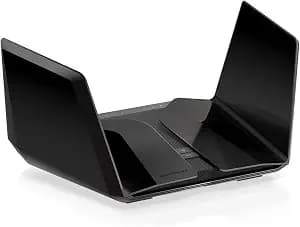
NETGEAR Nighthawk WiFi 6E Router (RAXE500) - Security Features, 12-Stream Gigabit Router AXE11000 Tri-Band Wireless Speed (Up to 10.8Gbps), New 6GHz Band, Coverage up to 3,500 sq. ft, 60 Devices
Description
6GHz WiFi band dedicated to WiFi 6E devices including Samsung Galaxy S21 Ultra 5G. Enjoy 4K/8K video streaming, AR/VR gaming and HD videoconferencing; Powerful 1.8GHz quad-core processor gives you exceptional 10.8Gbps WiFi speed, 9x faster than WiFi 5. Backward compatible for all WiFi devices on 2.4GHz and 5GHz bands; NETGEAR devices come with security measures built in as well as enhanced safety features and updates designed to help protect you and your family; Coverage up to 3,500 sq. ft. and 60 devices; Replace your existing WiFi Router (separate modem or modem router required). Compatible with any Internet Service Provider up to 2Gbps including cable, satellite, fiber, DSL and more; Sets up in minutes with the Nighthawk app – easily manage WiFi settings at the device and network level, test internet speed and monitor data usage; 4 x 1G and 1 x 2.5G Ethernet ports for computers, game consoles, streaming players and other wired devices; NETGEAR Armor provides a powerful suite of tools to help keep you safe online, including enhanced protection against hackers, malware and identity theft, at home or on the go. Includes 30-day trial; OFDMA, MU-MIMO, Dynamic QoS, 1024-QAM, Smart Connect for one WiFi name, Beamforming technologies and Amazon Alexa and Google Assistant Voice Control. Supports WPA2/WPA3 wireless security protocols. Includes Guest WiFi access, DoS, Firewall, VPN and more
Compare the trade-offs
Similar products, side by side
A random selection of analyzed products from the same category. Different products are not necessarily interchangeable.

TP-Link Tri-Band BE9700 WiFi 7 Router (Archer BE600)

TP-Link BE6500 Dual-Band WiFi 7 Router (BE400) – Dual 2.5Gbps Ports, USB 3.0, Covers up to 2,400 sq. ft., 90 Devices, Quad-Core CPU, HomeShield, Private IoT, Free Expert Support

Cudy Dual Band BE3600 Wi-Fi 7 Router WR3600E 4 Gigabit Ports, 2.0 GHz Quad Core, 4 Antennas VPN Clients & Server, Cudy APP, Cloud Control
One less thing to search
Before you buy: quick questions
Is the RAXE500 overkill if I only have a 1Gbps internet plan?
Not necessarily! While you won't max out its total wireless speed, this router excels at managing many devices *simultaneously* without slowdowns. If you have a smart home with 30+ devices, multiple 4K streams, and frequent large file transfers between devices on your local network (like to a NAS), the RAXE500's powerful processor and tri-band design provide a noticeable advantage in stability and reduced congestion over routers designed for basic gigabit service.
How reliable is the Wi-Fi coverage, really? Will it cover my 3,000 sq. ft. home?
Coverage is powerful but can be affected by building materials. In open-concept homes with few interior walls, users report strong signal across large areas. However, in multi-story homes or those with many brick/plaster walls, the signal may not reliably reach every corner. Based on user feedback, for consistent whole-home coverage in larger or obstructed spaces, many recommend considering a mesh system. The RAXE500 is best for maximizing speed in a central location.
I'm not very tech-savvy. Is this router difficult to set up and manage?
The initial setup via the Nighthawk app is straightforward. However, some advanced users on forums like Reddit have noted that the web interface can be complex, and occasional firmware updates may require manual reconfiguration of settings like QoS or port forwarding. If you prefer a "set it and forget it" experience with minimal tinkering, a simpler mesh system might offer a more user-friendly long-term management experience.
Is the new 6GHz band worth it, or just future-proofing?
Right now, it's primarily for future-proofing and specific high-performance scenarios. You need compatible devices (like newer laptops, phones, or consoles with Wi-Fi 6E) to use it. Its biggest current benefit is providing a completely clear, fast lane for those compatible devices, reducing interference from older devices on the 2.4GHz and 5GHz bands. If you have several Wi-Fi 6E devices or want to invest in the latest tech, it's a great feature. Otherwise, you may not utilize it fully today.
What's the most common complaint from users, and how can I avoid it?
The most frequent issue mentioned is the need for occasional reboots to restore stability or the 6GHz band. To mitigate this, many experienced users suggest: 1) Not enabling auto-updates immediately; wait to see feedback on new firmware in community forums before updating. 2) Ensuring the router is in a well-ventilated, cool location to prevent thermal throttling. 3) Using a high-quality, dedicated surge protector. Proper placement and cautious firmware management significantly improve the experience for most owners.
From a similar, more-reviewed product in this category: TP-Link Dual-Band AX3000 Wi-Fi 6 Wireless Gigabit Internet Router for Home
How easy is this router to set up?
Multiple reviewers describe setup as easy, including one who upgraded from a TP-Link Archer C7 and another who set it up for travel use. The listing also includes a Quick Installation Guide and an RJ45 Ethernet cable in the box.
What kind of Wi-Fi coverage and signal strength can I expect?
Reviewers report strong, stable coverage throughout the home, with one noting the 5 GHz signal strength seemed better than their previous router. The listing cites 4 high-gain external antennas and Beamforming technology to extend reliable Wi-Fi.
Does it support Wi-Fi 6 and fast speeds?
The listing states next-gen Gigabit Wi-Fi 6 speeds of 2402 Mbps on 5 GHz and 574 Mbps on 2.4 GHz, and reviewers say Wi-Fi 6 makes a noticeable difference with faster speeds and smoother streaming. One reviewer specifically praised its speed and processing power compared to other routers.
Can I combine the 2.4 GHz and 5 GHz bands under one network name?
Yes, reviewers mention "Smart Connect" allows combining the 2.4G and 5G bands under a single SSID, with the router deciding which to use per client. One reviewer confirmed selecting the smart option during setup.
Does it work with my internet service provider?
The listing states it works with all internet service providers such as AT&T, Verizon, Xfinity, Spectrum, RCN, Cox, CenturyLink, and Frontier, though a modem is required for most ISPs.
Answers are limited to the manufacturer's listing and the reviews we analysed. Questions those sources cannot support are not answered here.
Transparent by design