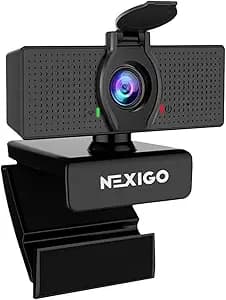
NexiGo N60 1080P Webcam with Microphone, Software Control & Privacy Cover, USB HD Computer Web Camera, Plug and Play, for Zoom/Skype/Teams, Conferencing and Video Calling
Description
【Full HD 1080P Webcam】Powered by a 1080p FHD two-MP CMOS, the NexiGo N60 Webcam produces exceptionally sharp and clear videos at resolutions up to 1920 x 1080 with 30fps. The 3.6mm glass lens provides a crisp image at fixed distances and is optimized between 19.6 inches to 13 feet, making it ideal for almost any indoor use.; 【Wide Compatibility】Works with USB 2.0/3.0, no additional drivers required. Ready to use in approximately one minute or less on any compatible device. Compatible with Mac OS X 10.7 and higher / Windows 7, 8, 10 & 11 / Android 4.0 or higher / Linux 2.6.24 / Chrome OS 29.0.1547 / Ubuntu Version 10.04 or above. Not compatible with XBOX/PS4/PS5.; 【Built-in Noise-Cancelling Microphone】The built-in noise-canceling microphone reduces ambient noise to enhance the sound quality of your video. Great for Zoom / Facetime / Video Calling / OBS / Twitch / Facebook / YouTube / Conferencing / Gaming / Streaming / Recording / Online School.; 【USB Webcam with Privacy Protection Cover】The privacy cover blocks the lens when the webcam is not in use. It's perfect to help provide security and peace of mind to anyone, from individuals to large companies. 【Note:】Please contact our support for firmware update if you have noticed any audio delays.; 【Wide Compatibility】Works with USB 2.0/3.0, no additional drivers required. Ready to use in approximately one minute or less on any compatible device. Compatible with Mac OS X 10.7 and higher / Windows 7, 10 & 11, Pro / Android 4.0 or higher / Linux 2.6.24 / Chrome OS 29.0.1547 / Ubuntu Version 10.04 or above. Not compatible with XBOX/PS4/PS5.
Compare the trade-offs
Similar products, side by side
A random selection of analyzed products from the same category. Different products are not necessarily interchangeable.

JLab, Go Cam, 1080p USB Webcam, Plug and Play, Omnidirectional Microphone, Black

Gritto 1080P HD Webcam with Auto Focus & Microphone, 30FPS Computer Camera, USB Plug-and-Play with Type-C Adapter, 360° Rotating Webcam for Zoom Meetings, Teams, Streaming & Online Classes

TONGVEO All-in-One Conference Room Video Camera System Al Auto-Tracking HD1080P 60fps 3X Optical Zoom USB3.0 HDMI PTZ Camera and Bluetooth Conference Speakerphone with Microphones
One less thing to search
Before you buy: quick questions
Is the NexiGo N60 actually plug-and-play, or will I have to install drivers on my Mac or Windows PC?
It is genuinely plug-and-play. You can plug it into a USB-A port on Windows, Mac, or Chromebook, and it is immediately recognized as a standard UVC camera. However, to make small adjustments like brightness or white balance, you can choose to download the free NexiGo software. Most users find that skipping the software entirely works just fine for daily meetings, but it's there if you need it.
I move around a lot during video calls. Are the auto-focus and microphone reliable enough to keep up, or will I look blurry and sound far away?
This is the most common question we see on social media about the N60. The auto-focus is quick, but it can occasionally "hunt" when you hold an object close to the lens. The dual microphones do a good job for normal desk setups—they pick up your voice clearly and reduce echo. However, for a more consistent filming experience, we recommend keeping your face at a stable distance of two to three feet from the camera and ensuring your room has decent overhead lighting. You won't need to shout, but a lot of ambient noise might still be picked up.
Does the privacy cover block the physical lens, and will the clip fit on thick monitors or a tripod?
The privacy cover is a manual, sliding shutter that physically covers the glass lens—it isn't a software-based blur. As for the mount, the clip is designed with a rubber gripper, so it opens wide enough to fit most flat monitors (up to about 0.8 inches thick) and thin laptop lids without scratching. However, keep in mind that the mounting hinge is plastic. It's flexible, but it's not built like a heavy-duty cinematic camera mount, so you should adjust it gently. It does not come with a tripod adapter, but you can place it on a flat surface without the clip if you need to.
Is the $20–$30 price tag worth it, or should I spend more on a different webcam?
For the price, we think it’s excellent value for a solid 1080p picture. It’s a great "set-and-forget" camera for remote work or online classes. But here’s the honest trade-off based on community feedback: if you plan to use this as a primary streaming camera or need a wider field of view to show objects or multiple people, you’ll likely outgrow it quickly. In that case, a pricier model with a wider FOV (like the NexiGo N60 Pro) or a 4K camera would be a better investment. For standard Zoom or Teams calls with just you in the frame, this is easily your best budget bet.
The review site says the rating is 4.3 stars. What’s the most common reason for a negative review, and what should I expect if I get a faulty unit?
The most frequent negative feedback revolves around the auto-focus issues in low light and, occasionally, a very stiff USB cable that can pull the camera's angle down. If you experience technical problems or receive a defective unit, the after-sales support is generally considered very responsive. They offer a standard one-year warranty and a 45-day return policy directly through their store. Don't hesitate to contact their support team; several buyers on forums confirmed they received replacements without hassle when their initial unit had a glitch.
From a similar, more-reviewed product in this category: Webcam with Privacy Cover
Does this webcam work with both PC and Mac?
One reviewer reported it is easy plug and play on both PC and Mac. The listing also states it is compatible with laptop, personal computer, tablet, and smartphone.
How is the video quality in low light?
Reviewers describe the image as clear and sharp even in low light, crediting the automatic light correction. The listing confirms the webcam includes Auto Light Correction as a special feature.
Does the built-in microphone pick up sound clearly?
Reviewers say the built-in microphone works well and picks up sound clearly, with one noting the noise cancellation keeps their voice clear without picking up much background noise. The listing lists Noise Cancellation as a special feature.
Does it have a privacy cover?
The listing lists Privacy Shield as a special feature, and the product title is "Webcam with Privacy Cover."
Is the webcam bulky?
One reviewer described it as a bit on the bulky side, though they felt the quality made up for it.
Answers are limited to the manufacturer's listing and the reviews we analysed. Questions those sources cannot support are not answered here.
Transparent by design