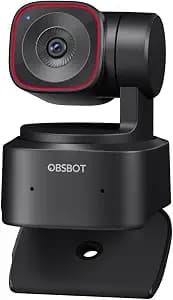
OBSBOT Tiny 2 Lite 4K Webcam for PC, AI Tracking PTZ Streaming Camera with 1/2" Sensor, Gesture Control, 60 FPS, HDR, Microphones, Web Camera for Desktop Computer, Laptop, Meeting, Video Calls, etc.
Description
【OBSBOT × EWC 2025 Official Partnership】OBSBOT is thrilled to be the 2025 Esports World Cup (EWC) Official Camera & Webcam Partner. Leveraging cutting-edge AI camera tech, OBSBOT will deliver immersive live broadcasts, capturing every epic moment of elite gamers. Also, OBSBOT provides content creators and streamers with the same pro imaging solutions, empowering global players to record esports highlights via EWC-approved AI camera tech.; 【Stay Pro, Stay Productive】The new version Tiny 2 Lite webcam 4K streamlines some streaming features (whiteboard mode and voice control) to prioritize teaching and meeting scenarios. Reasonable price, uncompromised quality. The inherited 4K resolution & 1/2'' CMOS sensor and easier operation make it a more professional business shooting partner.; 【Your Tracking Mode,Your Rule】The web cam boasts multiple tracking modes (e.g. upper body& hand tracking), to cater to a broader audience with diverse tracking needs. Beyond just these features, the PTZ camera also allows you to customize tracking areas and Non-tracking area, offering unparalleled freedom for personalized tracking.; 【Customizable Preset Modes】The webcam for PC newly upgraded Preset Position function not only can set multiple preset positions, but also customizes separate parameters and AI tracking modes for each preset position. Even when the scene switches, it reduces adjustment time while still ensuring that every frame is shot at the optimal setting.; 【Dynamic Gesture Control】 Along with the 2.0 dynamic gesture control, our streaming camera says goodbye to cumbersome manual operation. Simply face the web cam, make an “🖐” gesture to lock the portrait tracking target, and make an “👆” gesture to control the zoom easily.; 【Multiple Shooting Modes】The web camera not only supports horizontal, portrait, upside-down shooting modes, but also automatically adjusts the screen according to the machine's placement without sacrificing image quality. No matter which mainstream live broadcast platform, or any environment you want to shoot, it can easily cope with.; 【Apps for Novice and Experienced】Simple plug and play to use our computer camera, no need to download APP, friendly to newcomers. If you are a professional camera enthusiast, great news! Tiny 2 Lite webcam supports SDK, OSC, Stream Deck, and Global Hotkey functions, allowing you to customize your own 4K Webcam experience.
Compare the trade-offs
Similar products, side by side
A random selection of analyzed products from the same category. Different products are not necessarily interchangeable.
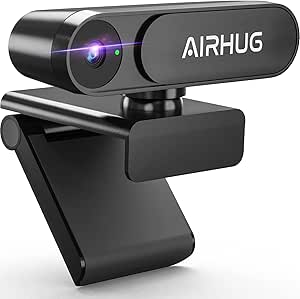
Webcam No Mic with Privacy Cover, USB Web Cam for Computer and Laptop Plug & Play, Web Camera Without Audio, 78° Wide-Angle,for Streaming and Conferencing (2K Webcam No Mic)

JLab, Go Cam, 1080p USB Webcam, Plug and Play, Omnidirectional Microphone, Black

Logitech Brio 100 Full HD 1080p Webcam for Meetings, Streaming, Desktop, Laptop, PC - Built-in Mic, Shutter, Works with Zoom, Microsoft Teams, Nintendo Switch 2’s new GameChat Mode-Off -White
One less thing to search
Before you buy: quick questions
Is the AI tracking reliable for things like streaming workouts or teaching, or will it get confused?
The AI tracking is highly praised for keeping you in frame during dynamic activities. Based on user feedback, it performs excellently for presenters, fitness instructors, and streamers who move around. A small note from some users: in very busy environments with multiple moving subjects, it can occasionally shift focus, but this is rare. For most, it's a significant upgrade over a static webcam.
How good is the built-in microphone, and will I need to buy a separate one?
While the dual microphones do a decent job of noise reduction, many users, especially streamers and podcasters, note that the audio quality is good for calls but may lack the full richness for professional content creation. If crystal-clear audio is a top priority (like for streaming or recording), pairing it with a dedicated external microphone is a common recommendation we've seen in reviews.
What's the real difference between the Tiny 2 and the Tiny 2 Lite? Is the Lite version still a good buy?
The main differences are that the Tiny 2 Lite uses a slightly smaller sensor, lacks the built-in touchscreen display for controls, and has a different microphone array. However, the Lite retains the core 4K HDR video quality, AI tracking, and gesture control. It's an excellent buy if you want premium AI features and stunning video but don't need the onboard screen. The full Tiny 2 is for users who want absolute top-tier specs and in-camera controls.
Is the setup complicated, and do I have to use the Obsbot app for it to work?
For basic use, it's plug-and-play! You can connect it directly to Zoom, Teams, or OBS as a standard UVC camera. The Obsbot Center app is needed to unlock and customize the advanced features like gesture control, specific tracking modes, and firmware updates. Some users on forums recommend installing the app for the initial setup to configure your preferences, after which it works seamlessly.
The magnetic mount looks cool, but is it stable and secure on my monitor?
The magnetic mount is designed for quick attachment and a clean look. Most users find it perfectly stable for daily use. However, if your monitor has a very thick or curved bezel, or if your desk is prone to vibrations, a few reviewers have mentioned preferring a more locked-in feel. The mount is sturdy, but if you're frequently adjusting your setup, just be mindful when handling the camera directly.
From a similar, more-reviewed product in this category: Webcam with Privacy Cover
Does this webcam work with both PC and Mac?
One reviewer reported it is easy plug and play on both PC and Mac. The listing also states it is compatible with laptop, personal computer, tablet, and smartphone.
How is the video quality in low light?
Reviewers describe the image as clear and sharp even in low light, crediting the automatic light correction. The listing confirms the webcam includes Auto Light Correction as a special feature.
Does the built-in microphone pick up sound clearly?
Reviewers say the built-in microphone works well and picks up sound clearly, with one noting the noise cancellation keeps their voice clear without picking up much background noise. The listing lists Noise Cancellation as a special feature.
Does it have a privacy cover?
The listing lists Privacy Shield as a special feature, and the product title is "Webcam with Privacy Cover."
Is the webcam bulky?
One reviewer described it as a bit on the bulky side, though they felt the quality made up for it.
Answers are limited to the manufacturer's listing and the reviews we analysed. Questions those sources cannot support are not answered here.
Transparent by design