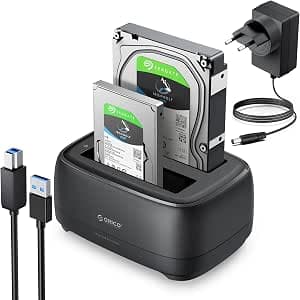
ORICO Docking Station for 2 2.5 and 3.5 Inch SATA SSD HDDs, USB 3.0 Hard Disk Docking Station, Supports UASP and 20TB Disks (DD28U3)
Description
【High Speed Protocol】2.5/3.5'' SSD HDD docking station supports UASP transmission protocol, achieving transfer speeds of 5Gbps with USB 3.0 ports. USB 3.0 HDD dock also comes with a 1m long USB 3.0 (A-B) data cable and uses 12V 3A power supply for fast and stable operation; 【Multiple Compatibility】ORICO hard drive dock is compatible with 2.5" and 3.5" SATA HDD/SSD hard drives. It can be connected to USB port devices (please make sure the device supports external extensions), including PCs, laptops, Xbox, TVs, etc. The hard drive docking station is compatible with Windows/Mac/Linux systems; 【20TB Ultra-Wide Capacity】Single drive support for 20TB hard drives. Plug & Play, no tools or drivers required. LED activity indicator for HDD access status; 【All-round protection】The dust cover prevents dust from entering and effectively protects the SATA interface. The four rubber pads reduce friction on the desktop and provide a stable slot for the hard drive; 【Safety and Stability】 The hard drive base is equipped with a high-performance main control chip. It features over current, short circuit, overheating, over-voltage and leakage protection to protect the safety of your SSD hard drive and valuable data
One less thing to search
Before you buy: quick questions
Is this truly plug-and-play for Mac and Linux, or are there extra steps?
While the docking station itself is plug-and-play, macOS and Linux require drives to be formatted in a compatible filesystem (like exFAT or APFS for Mac) to be recognized for reading *and* writing. If you're inserting a brand new or Windows-formatted (NTFS) drive, you may need to format it first, which often requires a PC. Many Mac users on social media highlight this as a key pre-purchase consideration.
How reliable is the build quality and power supply? I've seen mixed comments.
The majority of users report solid performance, especially for intermittent use like data transfers and drive cloning. However, a common point in reviews is that the external power adapter can be a point of failure over time. For best longevity, we recommend connecting it to a stable power source and avoiding frequent unplugging of the power brick. The unit itself has a lightweight plastic build, which is great for portability but may not feel as rugged as some metal enclosures.
What's the best use case for this dock? Who is it really for?
It's perfect for tech enthusiasts, PC builders, and anyone who needs to frequently access or swap multiple internal SATA drives (SSDs or HDDs) for tasks like data recovery, drive cloning, or backing up files from old laptops. It's not designed as a permanent, always-on storage array. Think of it as a versatile "drive reader" or maintenance tool rather than a replacement for a NAS.
My large hard drive (e.g., 12TB, 18TB) gets very hot during long transfers. Is this normal?
It's common for both the drive and the dock to generate noticeable heat during extended, high-speed data transfers, as noted by many users in online forums. This is typical of most docking stations. For optimal drive health during long operations, ensure the dock is in a well-ventilated area. The dock supports drives up to 20TB, but always monitor your drive's temperature using its dedicated software if possible.
Should I buy this, or spend more on a branded dual-bay enclosure?
It depends on your needs. The ORICO DD28U3 offers exceptional value and convenience for its core job: quickly reading and writing to multiple drives. If you need advanced features like hardware RAID, a fan for active cooling, or a more rugged metal housing for 24/7 operation, investing in a brand like Sabrent or Startech is wise. For the price, this dock is hard to beat for casual and semi-professional drive management.
Answers are limited to the manufacturer's listing and the reviews we analysed. Questions those sources cannot support are not answered here.
Transparent by design