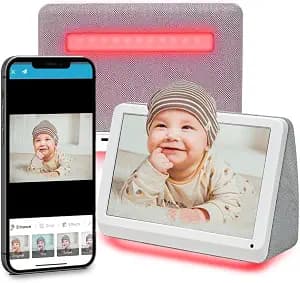
PhotoShare MyLuma LED 7” WiFi Digital Photo Frame with LEDs and Soft Touch Back Panel | Send Photo or Video from Phone to Digital Picture Frame | White Lightning Finish
Description
Instant & Private Sharing: Securely send photos and videos to this digital photo frame via app or email—no fees or subscriptions.; HD Display & Design: The 7" WiFi-enabled HD touchscreen comes with a soft-touch fabric back for a stylish, premium look.; Custom Alerts: Assign LED colors and sounds to contacts for fun, personalized photo notifications.; Smart Effects & Slideshows: Add stickers, borders, and seasonal themes automatically with the free PhotoShare app.; Gift-Read: This frame is perfect as a wedding gift or family picture frame.; 💫 Edit photos with filters, crops, stickers & more before sending; 👯 Send to one frame or your whole crew at once — so easy!; 🎁 Perfect gift for kids & teens (with parent supervision); 🌈 Assign custom LED colors + sounds to contacts—instantly know who sent what; 🎨 Add filters, captions, stickers & borders in the free PhotoShare app
Compare the trade-offs
Similar products, side by side
A random selection of analyzed products from the same category. Different products are not necessarily interchangeable.

10.1 Inch Digital Calendar Chore Chart with Touchscreen - Full HD Interactive Display, Wall & Desk Mountable Family Planner, to-Do List & Meal Planner, Digital Picture Frame Gifts for Women Mom

15.6inch Digital Picture Frame - WiFi Large Digital Photo Frame with Touch Screen for Mothers Day Gi-fts, FHD IPS Electronic Picture Frame Uhale 32GB Storage, Share Photos and Videos Instantly

Digital Picture Frame, 10.1'' Frameo Digital Frame Wifi, 32GB Memory, 1280*800 HD Touch Screen Digital Photo Frame, Wall Mountable, Auto-Rotate, Share Instantly, Wedding, Birthday Gifts for Women, Mom
One less thing to search
Before you buy: quick questions
Is the screen bright and clear enough for a well-lit room?
The 7" LED display offers good clarity for casual viewing. However, based on user feedback, it can appear somewhat dim or washed out in direct sunlight or very bright rooms. For the best experience, we recommend placing it in indirect light. If superior screen brightness and contrast are your top priority, you may want to compare it to frames specifically marketed for high-definition displays.
How reliable is the WiFi and the app for sending photos?
Most users find the initial setup and photo-sharing process very easy. It's common to see reviews praising how simple it is for families to share pictures. That said, a minority of users report occasional connectivity drops or app glitches. Ensuring a strong WiFi signal and keeping the app updated typically resolves most issues. The convenience of wireless sharing from your phone is a major highlight for the vast majority of owners.
Can I use this frame without forcing the recipient to use a complicated app?
Yes, but with a caveat. The frame owner needs the app for initial setup. After that, *you* (as the sender) use your app to send photos to the frame's email address—the recipient doesn't need to do anything. This works brilliantly for, say, sending pics to your grandparents' frame. However, if the recipient themselves wants to upload personal photos from their own phone without help, they would need to use the app, which some less tech-savvy users find challenging.
What is the build quality like, and is the back panel durable?
The frame has a modern, lightweight design with a soft-touch back panel that gives a premium initial feel. It's important to note that some users mention this soft-touch material can attract fingerprints and dust over time. The frame is designed for tabletop or shelf use and is durable for everyday handling in a home environment, but it may not feel as substantial as some higher-priced, heavier alternatives.
What happens if there's a problem? What's the warranty and support like?
The PhotoShare MyLuma comes with a standard 1-year manufacturer's warranty. Customer support is primarily handled online. From community discussions, experiences vary; some users report quick resolutions, while others note response times can be slow for complex technical issues. We always recommend purchasing from an authorized retailer with a good return policy for peace of mind in the first 30 days.
From a similar, more-reviewed product in this category: Frameo 15.6" Digital Picture Frame WiFi, Large Display Digital Photo Frame
Does this frame work with my Wi-Fi, and do I need a subscription?
The Frameo frame connects to **2.4GHz Wi-Fi only** — a detail many TikTok and Reddit users flag, so double-check your router before setup (most routers broadcast both bands; just pick the 2.4GHz one). There's **no subscription and no hidden cloud fees**: your 32GB of built-in storage is yours to use, and photos are shared privately through the Frameo app.
Can several family members send photos to one frame — and can I send to more than one frame?
Absolutely, and this is the feature buyers rave about most. A single frame can receive photos and videos from **unlimited app users**, while one Frameo user can push photos to **multiple frames at once** — perfect for keeping grandparents, siblings, or a whole team connected across any distance.
Do I need a smartphone to use it, and is setup difficult?
You'll need the free **Frameo app** (iOS or Android) to send photos and manage the frame, so it isn't a fully standalone device — something to keep in mind if you're gifting to someone non-technical. That said, setup is quick: connect to Wi-Fi, pair with a code, and you're sharing in minutes. Many reviewers suggest setting it up *for* an older recipient before gifting.
Can I mount it on a wall or use it without a cord?
The frame is **corded electric (DC powered)** and does not run on battery, so it needs to stay near an outlet — a common point of surprise in reviews. It's designed to sit on a console, nightstand, or desk, and its auto-rotate and sleep-mode features make it easy to leave plugged in and always ready.
Is the 15.6" screen worth it over the smaller 10.1" model, and what about loading my own photos via SD or USB?
If the frame is a centerpiece or a gift for someone with limited vision, the **15.6" 1080p IPS touchscreen** delivers a genuine "wow" that smaller frames can't match — though the 10.1" is a better fit for tight nightstands. For local loading, note it accepts a **full-sized SD card or USB drive** (not micro-SD), so grab an adapter if your photos live on a micro card. Either way, the crisp display and 32GB capacity make it a well-loved, high-value pick.
Answers are limited to the manufacturer's listing and the reviews we analysed. Questions those sources cannot support are not answered here.
Transparent by design