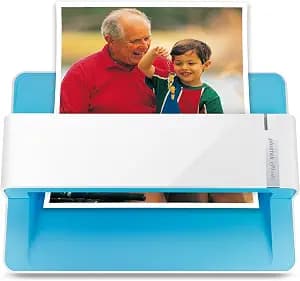
Plustek Photo Scanner ePhoto Z300, Scans 4x6 inch Photos in 2 Seconds, Auto crop and deskew with CCD Sensor, Supports Mac and PC
Description
The easiest way to scan photos and documents. Supports 3x5, 4x6, 5x7, and 8x10 in sizes photo scanning but also letter and A4 size paper. Optical Resolution is up to 600 dpi ( PS: two setting: 300dpi/ 600dpi).; Fast and easy, 2 seconds for one 4x6 photo and 5 seconds for one 8x10 size photo@300dpi. You can easily convert about 1000 photos to digitize files in one afternoon and share with your family or friends.; More efficient than a flatbed scanner. Just insert the photos one by one and then scan. This makes ePhoto much more efficient than a flatbed scanner.; Powerful Image Enhancement functions included. Quickly enhance and restore old faded images with a click of the mouse.; ePhoto Z300 works with both Mac and PC : Supports Windows 7/8/10/11 , Mac OS X 10.12~15.x User can download the latest version on Plustek website.
One less thing to search
Before you buy: quick questions
Will this scanner work with my Mac, or is it Windows-only?
It supports both Mac and PC, and most users are scanning within minutes of unboxing. A handful of Mac owners mentioned needing to try a different USB port or reinstall the driver once, but after that it runs smoothly. Just check the listed macOS/Windows versions before you buy to be safe.
Can it handle any photo size, or is it limited to 4x6 prints?
It's built around standard 4x6 inch prints, which it scans in about 2 seconds each — that's the sweet spot. It can manage some other common sizes, but very small, irregular, or Polaroid-style prints may need workarounds. If your collection is mostly standard prints, you're in great shape.
Do I need to clean it often, and does it stay reliable over time?
Reviewers consistently call it reliable, even across thousands of scans. The one recurring tip: keep the feed rollers free of dust, since build-up can cause photos to feed slightly crooked. A quick wipe every so often keeps performance crisp — a small habit for a big payoff.
Is it worth the price compared to a flatbed or a scanning service?
If you have a large pile of standard prints, most users say yes — the speed and auto crop/deskew save hours versus a flatbed. It's less ideal if you need slides, negatives, or batch feeding. For irreplaceable or odd-format photos, some people pair it with a professional service.
Does it need a computer, and what if it doesn't work for me?
Yes — it's a USB scanner that stays tethered to your Mac or PC; it's not wireless or standalone, which surprised a few buyers. Setup is plug-and-play for most. If it isn't the right fit, check the retailer's return window and warranty terms before purchasing so you can send it back without stress.
From a similar, more-reviewed product in this category: SLON New Scanner Brake and Pick Roller Set Compatible with Fi-7030 Fi-7160 fi-7260 fi-7140 fi-7240 fi-7180 fi-7280 PA03670-0001 PA03670-0002
Will this roller set fit my Fujitsu scanner?
The listing says it is compatible with Fujitsu fi-7140, fi-7240, fi-7160, fi-7260, fi-7180, fi-7280, and fi-7300NX, and several reviewers report a perfect fit on models such as the Fi 7140 and fi-7260. However, one reviewer said it did not fit their Fujitsu scanner, so results may vary.
Does it work as well as the original Fujitsu parts?
One reviewer said it worked just like OEM parts and got their scanners running smoothly again, but another reviewer warned against generic brands after experiencing paper jams, and a third said their scanner misfed multiple pages until they reinstalled the original rollers.
Is installation difficult?
Reviewers describe it as easy to change, and one noted the instructions were a bit hard so they watched a YouTube video and completed it easily. The listing also states installation is simple if you follow the given instructions.
How long will these rollers last?
The manufacturer's listing states a use life of 200,000 pages, and one reviewer said they would buy again after the next 20,000 scans.
What is included in the set?
The listing states the packing list is 1PCS PA03670-0001 Brake Roller, 1PCS PA03670-0002 Pick Up Roller, and 1PCS Cleaning wipe.
Answers are limited to the manufacturer's listing and the reviews we analysed. Questions those sources cannot support are not answered here.
Transparent by design