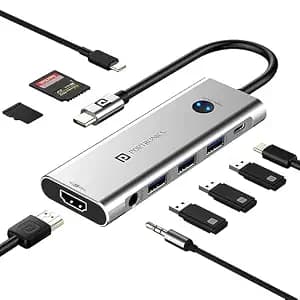
Portronics Mport One USB C Hub Dock (9-in-1) with 4K 60Hz HDMI, 3-Port USB, HDMI On-Off Button, 100W Type-C Charging, Card Reader, 3.5mm AUX, Type C Plug for Laptop, Mac, PC (Grey)
Description
Experience seamless connectivity with the Portronics Mport One 9-in-1 USB hub, consolidating multiple ports for effortless device integration. Enjoy stunning clarity and smooth video playback with the 4K 60 Hz HDMI port, providing an immersive viewing experience. Simplify control and management of HDMI connection with the convenient On/Off button, offering privacy when needed. Move files rapidly with the USB 3.0 & USB 2.0 ports, enhancing productivity with efficient file sharing. The 100W Type-C PD pass-through charging ensures rapid power delivery to keep your laptop charged up and ready for action. Transfer files quickly and conveniently with the microSD and SD card reader, facilitating seamless data transfer between devices. Enjoy clear and uninterrupted audio connectivity with the 3.5mm AUX port, ensuring a seamless audio experience wherever you go. The Type-C plug supports universal compatibility, making it compatible with a wide range of devices including MacBook and laptops.
One less thing to search
Before you buy: quick questions
Is this hub truly compatible with my specific laptop model, like an M1 MacBook or a Dell XPS?
It offers broad compatibility with most modern laptops featuring USB-C, including MacBooks, Windows PCs, and Chromebooks. However, based on user reports, performance can vary slightly by model, particularly with the HDMI output and power delivery. For the best experience, we recommend checking your laptop's specifications for USB-C/Thunderbolt support and cross-referencing with the hub's requirements. Many TikTok and Reddit users have shared success stories with specific models, so searching "[Your Laptop Model] + Mport One" can provide real-world insights.
I've read hubs can overheat. Will this one get too hot if I'm using most of the ports at once?
Like many compact hubs, the Mport One may become warm during intensive, simultaneous use (e.g., 4K video output, data transfer, and high-wattage charging). This is a normal thermal management behavior for the electronics inside. While it shouldn't overheat to the point of failure under standard use, we don't recommend covering it or using it on soft surfaces like a bed to ensure proper ventilation.
How useful is the dedicated HDMI On/Off button in practice?
This is consistently highlighted as a standout, practical feature! Instead of fiddling with display settings or unplugging cables, you can instantly connect or disconnect your external monitor with a single click. It's perfect for presentations, quickly switching to a single-screen setup, or troubleshooting display issues. Reviewers on YouTube and Amazon love the convenience it adds to their workflow.
What's the real-world performance of the 100W charging pass-through?
The 100W PD (Power Delivery) port is designed to pass through sufficient power to charge most laptops, including many MacBook Pros, while the hub is in use. It works reliably for standard charging and light use. Note: If you're simultaneously using many high-power-draw ports (like HDMI and multiple USB-A drives), some power will be allocated to the hub itself, which might result in a slightly slower charge for your laptop compared to using its dedicated charger alone.
I'm deciding between this and a more expensive brand like Anker or Satechi. Who is this hub best for?
The Portronics Mport One is an excellent value-for-money choice for students, remote workers, and general users who need reliable multi-port functionality and the clever HDMI button without a premium price tag. If your priority is absolute, guaranteed compatibility for professional creative work, premium metal construction, or you have a very power-hungry laptop, investing in a higher-end hub from brands like Anker or CalDigit might be worthwhile. For most everyday connectivity tasks, however, this hub delivers solid performance that has satisfied the majority of its users.
Answers are limited to the manufacturer's listing and the reviews we analysed. Questions those sources cannot support are not answered here.
Transparent by design