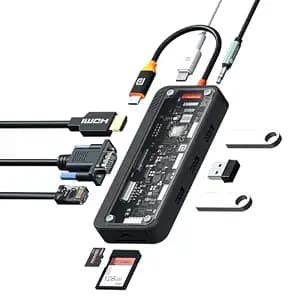
Portronics MPort View Three 10-in-1 USB-C Docking Station, 100 W PD Charging, 4K HDMI, VGA, RJ45 Ethernet, SD/TF Card Slots, USB 3.0/2.0 Ports, 3.5 mm Audio, for All Type C Devices, Windows/MacBook
Description
Unlock the full potential of your laptop, tablet or smartphone with this high-performance 10-in-1 USB-C multifunction docking station. With up to 100 W Power Delivery, it lets you charge your device while you connect to external displays, wired internet and multiple peripherals. The HDMI port supports 4K output, while the VGA port ensures backwards compatibility with older monitors and projectors. A built-in RJ45 Ethernet port ensures stable and reliable wired internet connection for work, streaming or gaming. Transfer files effortlessly with multiple USB 3.0/USB 2.0 ports and SD/microSD card readers, and plug in audio devices with the dedicated 3.5 mm jack. The transparent casing gives it a premium, tech-centric look while remaining compact and travel-friendly. With plug-and-play ease and wide compatibility across operating systems and device types, this hub becomes the single-station for all your connectivity needs — perfect for home offices, mobile professionals and content creators alike.
One less thing to search
Before you buy: quick questions
Is this docking station compatible with my M1/M2/M3 MacBook or specific Windows laptop like a Dell XPS?
Yes, it's designed for all USB-C devices. For MacBooks (including M-series chips) and most modern Windows laptops (Dell XPS, HP Spectre, Lenovo ThinkPad), it works plug-and-play for charging, data, and audio. For video output, please check your laptop's specific video-over-USB-C capabilities. A small number of Reddit users with older Intel Macs noted needing a connection sequence (dock to power first, then peripherals, then laptop).
Can I connect two external monitors and have them act as separate, extended displays?
This is a common question. The dock supports video output to two monitors *simultaneously* via HDMI and VGA, but for most laptops, this will mirror the display on both screens, not extend it. To achieve a true dual extended monitor setup, your laptop needs to natively support MST (Multi-Stream Transport), which many do not. Many users on tech forums recommend a docking station with DisplayLink technology if dual extended monitors are a must-have for you.
Does it get the full 100W charging speed if I'm using all the ports at once?
The 100W Power Delivery (PD) is the maximum available for your laptop. As noted in several YouTube reviews, the total power is shared across all ports. If you are using several high-power USB devices (like multiple external hard drives) simultaneously, the available wattage for laptop charging may be reduced. For standard use (keyboard, mouse, phone charging), this isn't an issue.
What's included in the box, and is a power adapter provided?
The box contains the Portronics MPort View Three docking station itself and a USB-C to USB-C cable for connecting to your laptop. You will need to provide your own 100W USB-C PD power adapter to enable laptop charging and power all the ports. This is a standard practice to keep costs down and allows you to use an adapter you may already own.
I've read about it getting hot and a specific plug-in order. Should I be concerned?
Some warmth during operation, especially under heavy load (charging + multiple data transfers), is normal for compact docks and is mentioned in several authentic reviews. It's designed to handle this. Regarding the connection order, this seems to affect a minority of setups. If you experience issues, the tried-and-true method from user forums is: 1) Connect the power adapter to the dock, 2) Connect your peripherals (monitor, keyboard, etc.) to the dock, and 3) Finally, connect the dock to your laptop. This sequence ensures a stable handshake.
Answers are limited to the manufacturer's listing and the reviews we analysed. Questions those sources cannot support are not answered here.
Transparent by design