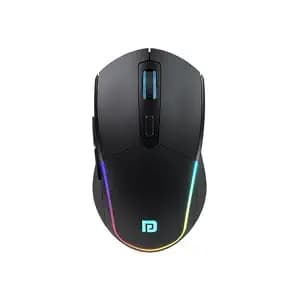
Portronics Toad One Bluetooth Mouse with 2.4 GHz & BT 5.3 Dual Wireless, 6 Buttons, Rechargeable, RGB Lights, Connect 3 Devices, Ergonomic Design for Laptop, Smartphone, Tablet (Black)
Description
[WIRELESS FREEDOM] - Enjoy up to a 10-meter wireless connection with the Toad One wireless mouse’s tiny plug-and-forget nano dongle. No software or driver installation is needed. The mouse automatically connects to your computer system. It is ready to go when you are.; [ADJUSTABLE DPI RESOLUTION] - With the button to adjust DPI resolution, now adjust your mouse sensitivity as per your requirement. This feature gives you more room to enhance your gaming skills and even work on editing with pixel-based simplicity.; [CARRY IT ANYWHERE, EVERYWHERE] - Toad One wireless optical mouse is the perfect accessory for those who travel for work, executives who give presentations, or anyone who wants greater control and freedom.; [ADDING COLOURS TO LIFE] - This wireless optical mouse comes with a lighting feature to make your working experience a colourful one. Moreover, Toad One gives you 7 coloured light functionality to adjust the lighting as per your desire.; [BATTERY THAT DOESN’T DIE EASILY] - This optical sensor mouse comes with a rechargeable battery through its Type-C charging port. Now work seamlessly for up to 9 days without any breaks or disruption
One less thing to search
Before you buy: quick questions
I use a laptop, a desktop, and an iPad for work. Will this mouse easily switch between all three devices?
Absolutely! This is one of its most praised features. The Portronics Toad One can connect to three devices simultaneously—one via the included 2.4GHz USB dongle and two more via Bluetooth 5.3. Switching is as simple as pressing the dedicated mode switch button on the bottom. Many users on Reddit and YouTube highlight how seamless this makes their multi-device workflow.
How is the battery life in real use, especially with the RGB lights on?
The battery life is consistently rated as excellent. With the RGB lights active (which cycle through colors), you can expect several weeks of use on a single charge under normal office conditions. If you prefer, you can set the lights to a single static color to extend it even further. Most customer reviews mention being pleasantly surprised by how infrequently they need to recharge it.
Is the ergonomic design suitable for larger hands or long work sessions?
Yes, the shape is a standout feature for users with medium to larger hands. The contoured, right-handed design provides good palm support, preventing wrist strain during long sessions. A common piece of feedback in reviews is, "Finally, a budget mouse that doesn't make my hand cramp." It's a significant advantage over many smaller, flatter travel mice.
I've seen comments about connectivity issues. Is this a common problem?
Occasional connectivity quirks are mentioned by a small minority of users, typically when first pairing or in very dense wireless environments. For the vast majority, the dual wireless modes are stable. For the best performance, use the 2.4GHz dongle for your primary device (like a desktop) as it offers the most robust connection. For tablets or secondary laptops, Bluetooth works perfectly. Ensuring the dongle isn't blocked by other USB devices often resolves any rare lag.
Can I turn off the RGB lights completely, and is there software to customize the buttons?
You can turn the RGB lights off for your current session by pressing the dedicated light button, but they will turn back on when the mouse sleeps and wakes up. There is no permanent "off" setting or companion software for advanced customization like button remapping or DPI fine-tuning. If fully customizable RGB and programmable buttons are essential, you might want to look at gaming-branded alternatives. However, for users wanting a reliable, multi-connectivity mouse that works straight out of the box, this is a noted trade-off for its very competitive price.
Answers are limited to the manufacturer's listing and the reviews we analysed. Questions those sources cannot support are not answered here.
Transparent by design