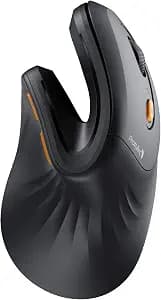
ProtoArc EM11 NL Wireless Ergonomic Vertical Mouse, Rechargeable, Black | 58° vertical design supports a natural wrist posture, connect 3 devices via Bluetooth/2.4G USB-A, 500mAh USB-C rechargeable.
Description
Connection Guide: This mouse pairs via Bluetooth or the included USB-A receiver only. Note: A USB-C receiver is not included. The Type-C cable is for charging; Connect up to 3 Devices: This ergonomic wireless mouse features dual Bluetooth connectivity and 2.4G USB-A connectivity modes for simultaneous connection of up to 3 different devices, and is compatible with Windows 8, Windows 10 or higher, Mac OS X 10.12 or higher, and Android 4.3 or higher; Rechargeable Ergonomic Mouse: The Bluetooth Vertical Mouse has a built-in 500mAh Li-Ion battery that can be conveniently recharged using the included Type-C cable(The Type-C cable is for charging only); Ergonomic Vertical Design: The ergonomic mouse wireless keeps your wrist naturally straight, putting your forearm and wrist in a more natural and relaxed position, which can reduce discomfort and strain, helping to improve productivity and reduce the risk of repetitive strain injuries compared to a standard mouse. Warm tips: We encourage you to relax your palm and hold the mouse naturally when using a vertical mouse; Perfect Fit for Small to Medium Hands: Designed specifically for hand lengths under 7.5 inches (19.05 cm), the EM11 NL reduces wrist strain by aligning with your natural grip. Please measure the size before ordering for a better fit and more comfort; Learning curve: Since it takes a learning curve to get used to the shape when using our ergonomic mouse for the first time, it may cause inconvenience to your mouse grip, We recommend that you take 1-2 weeks to get used to it, as many users find that it will help reduce the pressure and pain on your wrist caused by long-term use of the mouse and improve comfort; Adjustable Dpi & High Performance: 1000/1600/2400 DPI levels provide higher sensitivity than standard optical mice for precise optical tracking; with the back and forward buttons, you can easily navigate websites and increase work efficiency. Note: All buttons are not programmable and the forward and back buttons are not compatible with Mac OS systems; Quiet Clicking: The silent click sound of the left and right mouse buttons help you focus on your work, Note:the middle scroll wheel and and the back/forward buttons are not silent
Compare the trade-offs
Similar products, side by side
A random selection of analyzed products from the same category. Different products are not necessarily interchangeable.

Logitech Signature Comfort Plus M850 L Wireless Mouse Bluetooth - Graphite

ProtoArc EM01 NL Wireless Trackball Mouse, Rechargeable Thumb Control, Gray

Logitech M330 Silent Wireless Mouse, 2.4GHz with USB Receiver, Optical Tracking, Quiet & Lightweight, Long Battery Life, for PC, Mac, Laptop, Chromebook - Black
One less thing to search
Before you buy: quick questions
Will this mouse feel too small for me if I have larger hands? Is it suitable for a palm grip?
The EM11's symmetrical, 58° angled design works best for medium to small hands. If you wear a men's large glove size or have broader palms, you'll likely find the mouse too short for a full palm rest—your pinky might drag on the desk. Most users with larger hands report needing a "claw" grip. If you have larger hands, you might prefer the ProtoArc EM01 (larger frame) or a bigger brand like the Logitech MX Vertical. For small to medium hands, the EM11 provides an excellent, natural palm grip.
The reviews mention varying battery life. How long does the 500mAh battery realistically last, and can I use it while charging?
While the official spec is 500mAh, real-world usage puts the battery life at around 2 to 3 weeks with 8-hour workdays, depending on your screen resolution and sensor settings. The mouse is fully functional while plugged in, but you'll need to use the included USB-C cable. Note that the charging port is recessed—some third-party, thicker cables may not seat fully, which can cause intermittent charging. If you have issues, stick to the cable included in the box.
Does the multi-device switching work smoothly across Windows and Mac, or do I need software to switch between devices?
Switching is incredibly seamless and requires zero software on either OS. To change between your PC, Mac, or tablet, simply tap the button on the bottom of the mouse to cycle through the 2.4G dongle connection and the two Bluetooth channels (BT 1 and BT 2). It pairs instantly without the need to re-sync. Many users note that this is the smoothest part of the experience—switching between a work laptop and personal tablet takes less than a second.
I've seen some comments about the sensor skipping—will this work on a glass table or a wooden desk without a mousepad?
This is a valid concern. The optical sensor works perfectly on standard surfaces like plastic, wood desktops, and fabric mousepads. However, it does not track well on transparent glass or high-gloss white desks. If your workspace is a glass table or a highly reflective surface, you will need to use a dark mousepad to prevent cursor jitter and skipping. For most standard desks, it is perfectly fluid.
Is this a good purchase for wrist pain, and is the click really "silent"?
The 58° vertical angle is very effective at reducing the forearm twist that causes repetitive strain injuries (like RSI) in the wrist. It aligns your hand in a handshake position, which is the primary selling point. However, be aware that the clicks are "quiet" rather than "silent"—they are significantly softer than a standard Logitech mouse, making them ideal for offices, but not completely noise-free. The left click button has a dampened, soft feel; if you prefer a tactile, snappy rebound for rapid clicking (like gaming), this may feel slightly mushy to you. For general productivity, typing, and browsing, the comfort upgrade is substantial.
From a similar, more-reviewed product in this category: TECKNET Wireless Mouse, BT 5.0/2.4G, Rechargeable 6-DPI Silent, Grey
How long does the battery last on a full charge?
The listing states a full charge takes 1.5 to 2 hours and delivers 3 months of use at 2 hours per day. Reviewers back this up, with one reporting no charge needed after a month and a half of roughly 9 hours daily use, and another saying one charge lasts for months.
Are the mouse clicks actually quiet?
Yes. The manufacturer describes silent technology for noiseless clicks, and reviewers consistently call the left and right clicks "super silent," "quiet but satisfying," and a good fit for offices and quiet environments.
How do I connect it, and can I use it with more than one device?
It supports both a USB-A dongle and Bluetooth (3.0/5.0), and you can connect two devices at once and switch between them with a slide switch. Reviewers confirm both the USB and Bluetooth connections work well and are easy to set up, and the dongle is stored in a slot underneath the mouse.
Is this mouse suitable for small hands?
The listing notes it is better suited for small to medium-sized hands, though larger-handed users who prefer a smaller mouse may still like it. A reviewer who wears a small women's glove said it fits perfectly, and another described it as somewhat small but still comfortable in a man's hand.
Does it work with macOS?
The listing says it is compatible with Windows, macOS, Chrome OS, and Linux, but notes that the side buttons are not compatible with macOS.
Answers are limited to the manufacturer's listing and the reviews we analysed. Questions those sources cannot support are not answered here.
Transparent by design