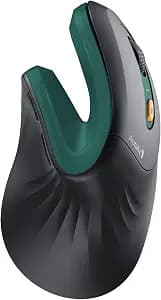
ProtoArc Ergonomic Mouse, EM11 NL Bluetooth Rechargeable Wireless Vertical Mouse, 3 Multi-Device Connectivity for Computer/PC/Laptop, 2.4GHz USB-A Optical Mice for Windows, Mac OS, Green
Description
Connection Guide: This mouse pairs via Bluetooth or the included USB-A receiver only. Note: A USB-C receiver is not included. The Type-C cable is for charging; Connect up to 3 Devices: This ergonomic wireless mouse features dual BT 5.0 and 2.4G USB-A connectivity modes for simultaneous connection of up to 3 different devices, and is compatible with Windows 8, Windows 10 or higher, Mac OS X 10.12 or higher, and Android 4.3 or higher; Rechargeable Ergonomic Mouse: The Bluetooth Vertical Mouse has a built-in 500mAh Li-Ion battery that can be conveniently recharged using the included Type-C cable(The Type-C cable is for charging only); Ergonomic Vertical Design: The ergonomic mouse wireless keeps your wrist naturally straight, putting your forearm and wrist in a more natural and relaxed position, which can reduce discomfort and strain, helping to improve productivity and reduce the risk of repetitive strain injuries compared to a standard mouse. Warm tips: We encourage you to relax your palm and hold the mouse naturally when using a vertical mouse; Perfect Fit for Small to Medium Hands: Designed specifically for hand lengths under 7.5 inches (19.05 cm), the EM11 NL reduces wrist strain by aligning with your natural grip. Please measure the size before ordering for a better fit and more comfort; Learning curve: Since it takes a learning curve to get used to the shape when using our ergonomic mouse for the first time, it may cause inconvenience to your mouse grip, We recommend that you take 1-2 weeks to get used to it, as many users find that it will help reduce the pressure and pain on your wrist caused by long-term use of the mouse and improve comfort; Adjustable Dpi & High Performance: 1000/1600/2400 DPI levels provide higher sensitivity than standard optical mice for precise optical tracking; with the back and forward buttons, you can easily navigate websites and increase work efficiency. Note: All buttons are not programmable and the forward and back buttons are not compatible with Mac OS systems; Quiet Clicking: The silent click sound of the left and right mouse buttons help you focus on your work, Note:the middle scroll wheel and and the back/forward buttons are not silent
Compare the trade-offs
Similar products, side by side
A random selection of analyzed products from the same category. Different products are not necessarily interchangeable.

TALONGAMES Curved Edges Ultra Strong Glass Universal 6mm Mouse Feet Skates Compatible with Gaming Mouse Feet Replacement,Super Smooth Glide Fast and Durable Sole (Black)

TECKNET Ergonomic Mouse, Rechargeable 2.4G+Bluetooth Vertical Mice 6 DPI Adjustable, Wireless Optical Carpal Tunnel Mouse Right Hand, Multi Device for Laptop, PC, Computer, MacBook, iPad - Grey

HOTLINEGAMES 2Sets 3.0 Plus Rounded Curved Edges Mouse Feet Skates Compatible with Logitech G305 / G304 Gaming Mouse feet Replacement (0.8mm,Glide Feet Pads, White PTFE) Professional Upgrade Kit
One less thing to search
Before you buy: quick questions
I have larger hands. Will this mouse be comfortable for me?
This is a common consideration. The EM11 is generally best suited for small to medium hand sizes. Several users with larger hands on Reddit have mentioned their palm can feel unsupported or that the mouse feels a bit cramped. If you have particularly large hands, you might want to consider a larger vertical mouse like the Logitech MX Vertical. For average or smaller hands, the ergonomic shape receives widespread praise for comfort.
How does the "3 Multi-Device Connectivity" actually work in practice?
Great question! It's important to clarify this feature. The mouse can remember pairings with up to three different devices via Bluetooth. However, it can only be *actively connected* to one Bluetooth device at a time. To switch between them, you typically need to press the pairing button. The third connection is the included 2.4GHz USB-A receiver for a separate computer. So, you can easily switch between, for example, a laptop (via Bluetooth) and a desktop (via the dongle), but not between three Bluetooth devices simultaneously without manual switching.
What is the build quality and durability like for daily office use?
The overall build quality is considered good for its price point, with a solid, matte finish that many find premium-feeling. The vast majority of users report it holds up well to daily use. However, as with any electronic device, experiences can vary. A small number of online reviews mention issues like a mushy middle click or the mouse failing after several months. The product has a 12-month warranty for peace of mind.
I'm buying this to help with wrist pain. Is it effective, and what's the return policy if it isn't?
Yes, relief from wrist, hand, and forearm discomfort is the most frequently praised benefit. Thousands of users with conditions like carpal tunnel or general RSI report significant improvement. However, ergonomics are personal. ProtoArc offers a standard return window (check their website for the most current policy, often 30 days) if the mouse doesn't work for you. We recommend giving your hand a week or two to adjust to the vertical orientation, as it can feel unusual at first.
How long does the battery last, and is it replaceable?
The built-in lithium battery is rechargeable via the included USB-C cable. Most users report getting 2-4 weeks of use on a single charge with typical 8-hour workday usage, which aligns with the advertised performance. The battery is not user-replaceable, as it's built into the unit. If you encounter a battery issue within the warranty period, customer support can assist.
From a similar, more-reviewed product in this category: TECKNET Wireless Mouse, BT 5.0/2.4G, Rechargeable 6-DPI Silent, Grey
How long does the battery last on a full charge?
The listing states a full charge takes 1.5 to 2 hours and delivers 3 months of use at 2 hours per day. Reviewers back this up, with one reporting no charge needed after a month and a half of roughly 9 hours daily use, and another saying one charge lasts for months.
Are the mouse clicks actually quiet?
Yes. The manufacturer describes silent technology for noiseless clicks, and reviewers consistently call the left and right clicks "super silent," "quiet but satisfying," and a good fit for offices and quiet environments.
How do I connect it, and can I use it with more than one device?
It supports both a USB-A dongle and Bluetooth (3.0/5.0), and you can connect two devices at once and switch between them with a slide switch. Reviewers confirm both the USB and Bluetooth connections work well and are easy to set up, and the dongle is stored in a slot underneath the mouse.
Is this mouse suitable for small hands?
The listing notes it is better suited for small to medium-sized hands, though larger-handed users who prefer a smaller mouse may still like it. A reviewer who wears a small women's glove said it fits perfectly, and another described it as somewhat small but still comfortable in a man's hand.
Does it work with macOS?
The listing says it is compatible with Windows, macOS, Chrome OS, and Linux, but notes that the side buttons are not compatible with macOS.
Answers are limited to the manufacturer's listing and the reviews we analysed. Questions those sources cannot support are not answered here.
Transparent by design