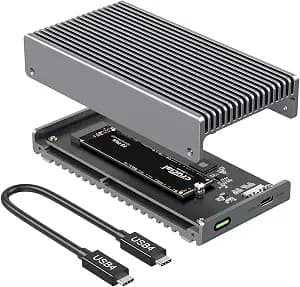
Qwiizlab Fanless 40Gbps USB4 SSD Enclosure with Aluminum Chasiss, Compatible with Thunderbolt 5/4/3. Supports PCIe M.2 NVMe up to 8TB, Gray (SSD Not Included)
Description
Ultra Speed: It supports data transfer with USB4 and Thunderbolt 4/5 ports to achieve soaring sequential read speed up to 40Gbps (3,840/3,840 MB/s). It is also backward compatible with Thunderbolt 3 port but not compatible with Thunderbolt 2/1 ports.; Rugged and Fanless: It comes in solid enclosure made of aluminum with curved surface to achieve efficient heat dissipation without any noisy mechanical fan.; SSD Compatibility: It is compatible M.2 NVMe PCIe SSD with M Key and B-M Key connectors in size of 2280/2260/2242/2230 mm up to 8TB capacity. It is compatible with both macOS and Windows OS.; What You Get: Fanless SSD enclosure (model name ES40UR), coaxial USB-C data cable (40Gbps), silicone thermal pads for NVMe SSD and USB4 chip (ASM2464PD) , screw driver and screws, quick start guide, velvet drawstring gift bag.; Note This Before You Buy: This product does not include any SSD.
One less thing to search
Before you buy: quick questions
Will my double-sided M.2 NVMe SSD fit in this enclosure?
It depends on the drive's thickness. The Qwiizlab enclosure is designed for standard single-sided M.2 NVMe SSDs. Many double-sided (where chips are on both sides) or higher-capacity drives (like some 4TB/8TB models) may be too thick and not fit properly. We recommend checking your SSD's specifications or sticking with known single-sided models for guaranteed compatibility.
Does it come with the cable I need to achieve the fastest speeds?
No, a USB4/Thunderbolt cable is not included. To unlock the full 40Gbps potential, you must use a high-quality, certified USB4 or Thunderbolt 4 cable (40Gbps). Using a lower-spec cable will limit your transfer speeds. This is a common point mentioned in reviews, so factoring in the cost of a good cable is part of the total investment.
I've heard it gets warm. Is that normal, and will it harm my SSD?
Yes, it's normal for it to become quite warm during sustained heavy use. The fanless design relies on the solid aluminum chassis to act as a heatsink, drawing heat away from the SSD. This is a standard thermal management approach and is generally safe for your drive. However, as noted by many users on tech forums, for very long, continuous transfers, it's advisable to ensure it's in a well-ventilated area.
Is this truly plug-and-play with Apple Silicon Macs (M1, M2, M3)?
Generally, yes. Most users report excellent compatibility with modern Macs. For the best experience, format your SSD to APFS (for macOS use) or exFAT (for cross-platform use with Windows) using Apple's Disk Utility. No additional drivers are needed for macOS. It's a favorite among creative professionals for this reason.
Who would benefit most from this enclosure, and who might want to look elsewhere?
This enclosure is ideal for video editors, photographers, and power users with Thunderbolt 3/4/USB4 ports who need maximum speed for large files and appreciate a premium, tool-free build. If your computer only has standard USB-A or slower USB-C ports, you won't benefit from the high speed, and a more affordable USB 3.2 enclosure would be better value. Likewise, if you prioritize silent *and* cool operation for 24/7 use, an actively cooled enclosure might be a better fit.
Answers are limited to the manufacturer's listing and the reviews we analysed. Questions those sources cannot support are not answered here.
Transparent by design