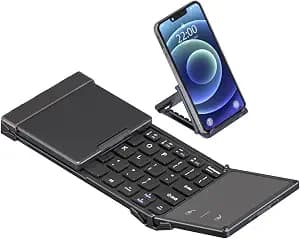
ROCK&ROWN Foldable Bluetooth Keyboard with Full-Size Touchpad,Portable Wireless Ultra Slim Pocket-Size Keyboard,USB-C Rechargeable for Android Windows iOS Tablet & Laptop - Black
Description
【Foldable Bluetooth Keyboard with Full-size Touchpad】Foldable keyboard equipped with very sensitive Multi-Touch touchpad,designed right and left click working as mouse and multi-touch trackpad offering gestures swipe zoom and scroll. it is much more convenient and efficient for you to control the device without the mouse; 【Wireless Bluetooth keyboard】Folding Keyboard With Bluetooth 5.1 technology, wireless foldable keyboard with touchpad sync up to 3 devices with 33 feet max working distance; 【Patented Hinged 】Portable keyboard with touchpad uses patented strong hinge, the special designed hinge can keep the keyboard straight when you open up to use on uneven surface, such as on your lap; 【Rechargeable Lithium Battery】Bluetooth foldable keyboard has built-in lithium battery, it will offer the power foe the keyboard to work for 60 days after 2 hours full charge; 【Wide Compatibility】Compatible with all iOS/ Window/ Android/ Linux system devices
Compare the trade-offs
Similar products, side by side
A random selection of analyzed products from the same category. Different products are not necessarily interchangeable.

MOFII Wireless Bluetooth Keyboard, Typewriter Retro Round Keycaps Keyboard, Bluetooth 5.1 Tech Compatible with iPhone, iPad, Android, Windows, PC, Mac, Perfect for Home/Office (Blue Colorful)

MONSGEEK FUN60 Ultra Rapid Trigger Gaming Keyboard 8k Magnetic Switch TMR Aluminum Wired Keyboard 60% White Shine-Through MagMech, Glare Magnetic Switch

ProtoArc Foldable Bluetooth Keyboard, XK01 Full-Size Portable Wireless Keyboard for Travel, 105 Keys, 0.65" Keycaps, Multi-Device Sync for iPad Tablet Smartphone Laptop PC Windows iOS Android, Blue
One less thing to search
Before you buy: quick questions
Is the keyboard truly comfortable for all-day typing, or is it too small?
This keyboard prioritizes ultra-portability, so the keys are compact. If you have larger hands or plan on marathon typing sessions, there will be an adjustment period. Most users on TikTok and Reddit praise it for travel and short bursts of work but recommend a standard-sized keyboard for primary, desk-based use. It's perfect for students on the go or finishing emails at a cafe.
I've seen comments about scrolling issues and missing keys. Are these common problems?
Some users report the touchpad's vertical scroll direction feels "inverted," which is usually a simple setting in your device's OS that can be changed. Also, note that this keyboard uses "FN" key combinations for functions like volume and brightness, as dedicated keys were omitted for size. While most units work flawlessly, a small percentage may have quality control issues—our warranty covers any defects in materials or workmanship.
How does the real-world battery life compare to the advertised 30 days?
The 30-day estimate is based on moderate usage (about 2 hours per day). In practice, heavy users might charge it weekly. Many YouTube reviewers confirm getting 2-3 weeks of regular use. The USB-C charging is quick, and a low battery warning on your connected device will give you plenty of heads-up.
What is your return policy if the keyboard isn't right for me or has an issue?
We offer a 30-day return window for any reason. If you receive a defective unit or encounter an issue covered under our 12-month warranty, please contact our support team immediately. We're committed to resolving any problems, as we understand the importance of reliable gear for our mobile-focused customers.
Who is this keyboard really best for, and who should consider something else?
This keyboard is a fantastic fit for tablet users (iOS/Android), frequent travelers, and students who need a supremely portable typing solution with a built-in touchpad. If your main need is a primary keyboard for a desktop setup, long-form writing, or gaming, a full-sized keyboard would be more comfortable. For those concerned about key spacing, alternatives like the Logitech K380 are often suggested in online forums.
From a similar, more-reviewed product in this category: Razer Joro Wireless Gaming Keyboard, Portable Compact 75%, Low Profile Keys
Does the Razer Joro work wirelessly with Bluetooth, and how many devices can it pair with?
The listing states Bluetooth 5.0 with pairing for up to three devices across Windows, Mac, handhelds, and mobile, with shortcuts to switch between them. Reviews are mixed on wireless reliability: one reviewer reported stable, fast Bluetooth, while others reported connection problems and missed keystrokes after the keyboard sleeps.
How does the keyboard feel to type and game on?
The listing describes ultra low-profile switches with quick, precise actuation and satisfying tactile feedback. Reviewers who liked it compared the feel to laptop scissor keys and Apple-style chiclet keys, calling it quiet with good tactile response, though one noted the spacebar is small.
Is the Razer Joro actually portable and well built?
The listing says it weighs 374 g and is 16.5 mm thin with a full function row and full-sized arrow keys. Reviewers described it as sturdy and minimalist, and one noted the static angle is a deliberate trade-off for a keyboard meant to be carried around.
What are the complaints about the RGB lighting?
The listing advertises Chroma RGB with 16.8 million colors and dynamic effects. Reviewers reported a glow around the keys rather than through the lettering, secondary symbols that are hard to see, and one said the lighting stayed on while the PC was locked.
Do I need Razer Synapse software to use all the keyboard's features?
The listing ties Snap Tap and Chroma customization to Razer Synapse 4. Reviewers noted that some functions, such as turning off Fn lock to use F1–F12 directly, require Synapse, and one complained there is no Synapse software for SteamOS.
Answers are limited to the manufacturer's listing and the reviews we analysed. Questions those sources cannot support are not answered here.
Transparent by design