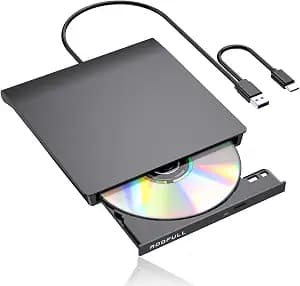
ROOFULL External CD DVD Drive for Laptop, USB 3.0 Type-C CD DVD Disc Reader Writer Burner, USB-C Portable CD DVD Player for Windows 11/10/7 PC Apple Mac MacBook Linux Computer, RF21-MAS
Description
【External CD/DVD Drive for Laptop & Mac】If you simply need a reliable disc drive without complicated extensions, the ROOFULL RF21-MAS is designed for everyday use — durable, stable, and built to last for years. It performs just like an internal drive, letting you easily play movie DVDs, listen to music CDs, burn or back up data, install software, copy or rip discs, and even access photo or medical discs. Fully compatible with all common CD and DVD formats (except Blu-ray & 4K discs); 【Plug and Play】No driver installation or complex setup required! Simply connect the USB Type-A or Type-C plug to your computer, and the drive will be detected automatically (on Mac, the disc drive icon will appear on the desktop once a disc is inserted and read). You can then use your preferred software to read or write discs with ease! (Scroll down for detailed setup instructions and recommended software.); 【Wide Compatibility】This USB external CD/DVD drive works with most laptops, desktops, and all-in-one PCs running Windows (from Windows 98 to Windows 11), Linux, and macOS 10.16 or later, including MacBook Air, MacBook Pro, iMac, Mac mini/ Studio. For desktop towers, connect directly to a rear USB port for stable power. Not compatible with Chromebooks, iPads, iPhones, tablets, TVs, projectors, cars, trucks, Microsoft Surface (some models), PS4/5, Xbox, Switch, or Blu-ray/4K discs; 【High-Speed & Reliable Performance】This external CD/DVD drive offers USB 3.0 fast and stable read/write speeds—up to 8× for DVDs and 24× for CDs—delivering smooth playback and reliable burning every time. The built-in 2-in-1 data cable includes both USB-A and USB-C connectors for easy use with almost any device. For older or low-power PCs or Macs, an extra power cable can be connected to a 5V power adapter or power bank to ensure stable performance during tasks like burning or ripping; 【Slim, Lightweight & Portable】Designed with a sleek, ultra-slim profile, this ROOFULL external DVD drive easily fits into your laptop bag, backpack, or desk drawer—perfect for travel, office, or home use. Its compact and lightweight build ensures easy portability without compromising performance, making it an ideal companion for laptops and desktops whenever space and mobility matter.; 【Why ROOFULL?】 Since 2015, ROOFULL has been focused on designing and manufacturing external CD/DVD drives, accumulating over 10 years of professional experience. Every drive undergoes strict quality checks to ensure reliable performance. For your peace of mind, we offer up to 2 years of after-sales service—if your drive fails for any reason, you can request a free replacement or money-back, no return required!; 【Other Things to Know Before Purchasing】① Due to macOS limitations, the tray cannot be opened via the button after playing or burning a disc. To eject a disc on a Mac, right-click the desktop icon and select "Eject," or go to "File" > "Eject" from the menu. ② Connect the USB 3.0 Type-C data cable (stored under the drive) to your computer—do not confuse it with the power cable
Compare the trade-offs
Similar products, side by side
A random selection of analyzed products from the same category. Different products are not necessarily interchangeable.

ASUS ZenDrive V1M External DVD Drive and Writer with Built-in Cable-Storage Design, USB-C Interface, Compatible with Win 11 and macOS, M-DISC Support, SDRW-08V1M-U, 1 Year Warranty

8-in-1 External Blu-ray Drive, USB-C Hub & Card Reader for Laptop

External CD DVD Drive,8 in 1 USB 3.0 and Type-C Disc Reader Writer Burner Player,Slim and Portable CD DVD +/-RW Optical Drive for PC Laptop Desktop MacBook Mac Windows Linux OS Apple
One less thing to search
Before you buy: quick questions
Is this drive truly plug-and-play with modern laptops like MacBooks and Windows 11 PCs?
Yes, absolutely. Overwhelmingly, users across social media and reviews highlight its plug-and-play simplicity. For most modern computers (Windows 10/11, macOS), you simply connect it via USB, and it's recognized instantly—no extra software or drivers needed. This makes it a favorite for MacBook owners who only have USB-C ports.
I need to burn DVDs and rip my music CD collection. Does it come with the necessary software?
The drive itself does not include bundled software. It relies on your computer's built-in capabilities (like Windows Media Player or macOS Finder for basic tasks) or free third-party applications. Many Reddit users recommend programs like ImgBurn (Windows) or HandBrake (ripping) for more advanced features. It handles common formats (CD-R, DVD±R) without issue.
How durable is it for regular use? Some reviews mention a lightweight, plastic build.
It's designed as a portable, convenience-focused drive for occasional to moderate use (e.g., installing software, watching a movie, transferring old files). While many users report it lasting for years, those needing it for daily, heavy-duty burning or in a rough environment might find a more industrial-grade option better suited. The lightweight design is a trade-off for portability.
My laptop only has one USB port. Will it work, or do I need the second cable?
This is a common pre-purchase question. The drive often needs power from two USB ports to read/write reliably, especially on thinner laptops. If you only have one free port, you will need to use the included dual-headed cable (USB-A + USB-C) with a powered USB hub or a wall adapter for the auxiliary power cable. Many TikTok users have shared simple workarounds for this.
Who is this CD/DVD drive best suited for, and who might want to look elsewhere?
It's perfect for students, home users, or professionals who need occasional access to discs for old files, software, music, or movies on a modern, port-limited laptop. It's an excellent value for this casual use. However, if you're a multimedia professional needing to burn batches of DVDs daily, work with specialized formats, or require a metal-housed drive for rugged use, investing in a higher-end model from brands like Asus or LG might be a better fit.
From a similar, more-reviewed product in this category: ASUS BW-16D1HT - Ultra-Fast 16X Blu-ray Burner with M-DISC Support, Black, 1 Year Warranty
Does this drive work with Windows 10 and Windows 11?
Yes. Reviewers report it working on Windows 10, and one reviewer notes ASUS officially lists it as fully compatible with Windows 10 and Windows 11 without needing extra drivers.
How fast is this drive at burning and reading discs?
The manufacturer states it writes at up to 16X Blu-ray speed, backing up 25GB in about 8 minutes, and reviewers describe it as very fast, including ripping an extensive CD/DVD/Blu-ray collection in a few hours.
Is this drive noisy during operation?
One reviewer describes it as almost silent, and another notes it is surprisingly accurate and reliable during heavy ripping use.
Can it play or rip 4K UHD Blu-ray discs?
Not out of the box. Reviewers note the newer firmware does not support 4K UHD playback, but that flashing to an earlier firmware version can enable it, and some use it to rip 4K discs.
How much data can it store on a single disc, and does it support M-DISC?
The manufacturer states it supports BDXL for up to 128GB of storage on one disc, and M-DISC support for storing photos or documents for more than 1,000 years.
Answers are limited to the manufacturer's listing and the reviews we analysed. Questions those sources cannot support are not answered here.
Transparent by design