What people like
Quiet, comfortable, easy setup
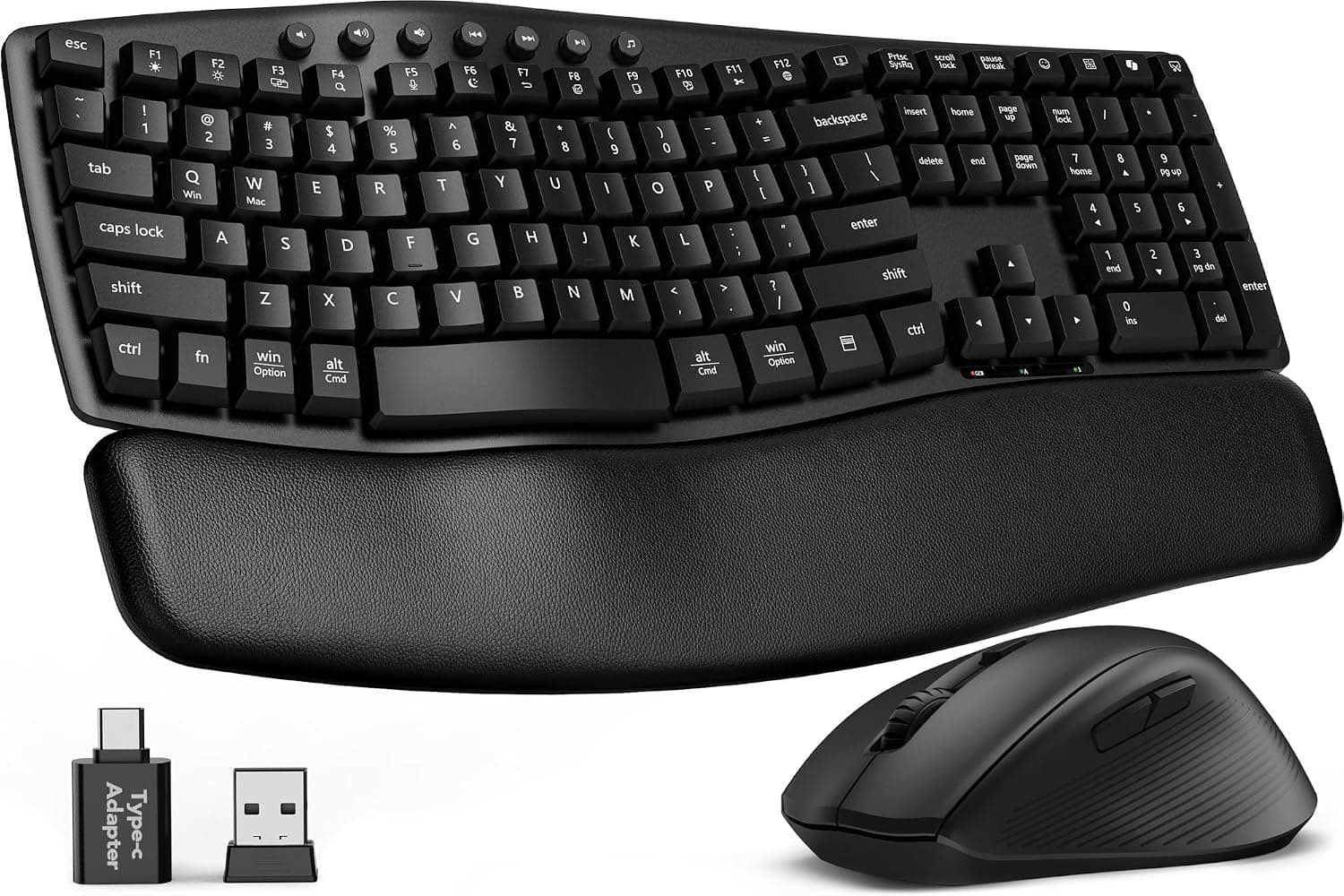
Reviewers consistently praise the whisper-quiet keys, the comfortable wave design with wrist support, and the simple plug-and-play setup.
The 30-second read
What people like
Reviewers consistently praise the whisper-quiet keys, the comfortable wave design with wrist support, and the simple plug-and-play setup.
The main watch-out
One reviewer notes the wrist pad foam is very thin and cheap-feeling, especially if you rest your elbows on it.
Before you choose
The keyboard uses 2 AAA batteries and the mouse 1 AA battery, and it connects via a USB-A dongle with a USB-C adapter included.
From a similar, more-reviewed product in this category: seenda COE401 3-Device Bluetooth Keyboard Mouse Combo, Silent, Black Gray
What people like
Reviewers consistently praise the rechargeable design that avoids battery purchases, simple setup with one USB receiver or Bluetooth, and reliable switching between devices. Many also like the slim, portable build and quiet, comfortable typing.
The main watch-out
One reviewer notes the charge does not stay long, and another reports some functions stopped working after six months. These are the clearest reliability concerns raised.
Before you choose
The keyboard is smaller than a standard one, which some find great for travel but others find makes the arrow keys cramped. Also, function keys require pressing FN first, which may not suit work applications needing full FN functionality.
Your use case first
31 of 152 mentions describe a negative experience (20%).
4 of 52 mentions describe a negative experience (8%).
1 of 30 mentions describe a negative experience (3%).
3 of 21 mentions describe a negative experience (14%).
4 of 17 mentions describe a negative experience (24%).
40 of 110 mentions describe a negative experience (36%).
14 of 34 mentions describe a negative experience (41%).
11 of 25 mentions describe a negative experience (44%).
One review can mention several topics. Percentages describe the reviews we analysed, not all buyers or the product's overall failure rate.
From a similar, more-reviewed product in this category: seenda COE401 3-Device Bluetooth Keyboard Mouse Combo, Silent, Black Gray
4 of 43 mentions describe a negative experience (9%).
4 of 15 mentions describe a negative experience (27%).
2 of 13 mentions describe a negative experience (15%).
2 of 10 mentions describe a negative experience (20%).
0 of 9 mentions describe a negative experience (0%).
1 of 9 mentions describe a negative experience (11%).
0 of 8 mentions describe a negative experience (0%).
4 of 10 mentions describe a negative experience (40%).
Compare the trade-offs
A random selection of analyzed products from the same category. Different products are not necessarily interchangeable.

Wireless Keyboard and Mouse Combo, Ergonomic Wave Keys, Cushioned Palm Rest, Rechargeable, Phone Holder, Natural Typing, 2.4G Lag-Free, Full Size Keyboards Cordless Set for Windows/Mac -SABLUTE

MOFII Ergonomic Keyboard and Mouse, 2.4G USB Wireless Comfortable Natural Typing Split Keyboard and Mouse Combo with Palm Rest, for Windows Computer Desktop Laptop (Milk Tea)

Wireless Keyboard and Mouse Combo, 2.4G Full Size Wave Keys Ergonomic Keyboard with Wrist Rest, Phone Holder, 3-Level DPI Wireless Silent Mouse with 6-Buttons, for Windows, Mac OS, Laptop, PC (Black)
Check the evidence
Included does not mean verified authentic. Flagged does not mean proven fake. These are analytical classifications.
Showing 3 illustrative excerpts, not the complete review set.
Quiet, and a comfortable typing experience with a built in wrist support
“I ordered this keyboard to have a nice wireless option for a keyboard. I'm happy with my keyboard setups, but sometimes I want to sit away from the desk with a keyboard on my lap. There probably aren't many keyboards that I can do that as well as I can with this one. It comes with its own wrist support - a nice wide cushion. The keyboard requires two AAA batteries and the mouse requires one AA battery. I had a little trouble getting the first AAA battery in. I took them all out and found it difficult. The first keyboard battery has to be pushed halfway in, so pulling it back out needs a little grip. I put ribbons underneath all three batteries for when they'll need to be replaced later. I easily installed this keyboard/mouse combo on my old Windows 7 laptop, and on this Windows 10 desktop by plugging in the dongle and waiting for it to be recognized. I wanted a wireless keyboard and not Bluetooth; my computers don't recognize Bluetooth devices very well. The mouse is fine and one of my better ones, but I haven't used it much. I have plenty of trackballs and mice already. It has the usual Left, Right, and scroll buttons. Unusually for me, the two buttons on the left side are Back and Forward (web browsing). I can see that those buttons might be useful, but I really like my trackballs. The mouse has a storage compartment for the dongle. It's nice that there is one, but it's too bad for me. I was mostly only interested in the keyboard, so I would rather store it there when needed. Using the keyboard initially felt cramped, which is weird because the key spacing on the main keypad looks the same as my regular keyboard. I'm using this keyboard to type this review, and it's fine. Sometimes I want to press Backspace and overreach, and accidentally press the Logoff key (with a monitor icon). It disrupts what I'm doing. My other keyboards don't have that key. It's a little annoying, but I'll have to learn not to overreach. I tried using a program to disable the key (SharpKeys), but pressing the key just logs off and the keystroke isn't recognized. This keyboard has a good feel, with its wrist support, wide surface, and curved keys. It's definitely quieter than the clicking of my regular keyboard. Most of the problems I have with it are adjustable, and are things that I can get used to. I'm happy with this keyboard. It gives me a comfortable way to type away from my desk.”
Signals matched: Specific detail: scenario, quantity, entity · Mentions: quiet, connectivity, ergonomics, battery life · Reads as an authentic voice
Quiet and Comfortable to Use
“This is a good quality wireless keyboard and mouse combo that uses a USB-A dongle for communication. There is an adapter so you can use the dongle with USB-C. The package comes with the keyboard, mouse, a USB-A dongle, a USB-C adapter for the dongle, and some good instructions. The keyboard requires 2 AAA batteries and the mouse requires 1 AA battery. Note that the batteries are not included. Once I placed the batteries in the mouse and keyboard and inserted the dongle into my laptop, I was connected and working right away. Note there are on/off switches on the bottom of the mouse and keyboard that must be turned on. I like thatyou can turn these switches off to preserve battery power when the keyboard and mouse are not in use. Although this an ergonomic keyboard, I find the angles to be less extreme than other ergonomic keyboards I have used. I much prefer this keyboard and find it easier to use out of the box. The palm rest is the perfect height and feels very natural when using the keyboard. It is also very, very soft with just the right amount of padding for long periods of use. There are legs on the back of the keyboard that allow you to select from 2 different heights so you can choose the angle that works best for you. I really like how quiet this keyboard is. I can easily type while I am in virtual meetings and don't have to worry about the keystrokes becoming a distraction. The mouse is very comfortable to use as well. I like the size and find that my thumb can easily access the buttons that can be paired to keyboard shortcuts. Overall this is an excellent wireless keyboard and mouse combo. I have been using this combo for 2 full days of office work and find it to be very comfortable to use with no lag time when using the mouse or keyboard. This combo also comes with a 30 day return policy and 1 year replacement warranty for piece of mind. I give this keyboard and mouse combo at 5 stars.”
Signals matched: Specific detail: entity, quantity, process · Mentions: quality, connectivity, battery life, setup · Reads as an authentic voice
5.0 out of 5 stars
“This is a really great set, and I would recommend it to just about anyone. The wave styling is SO much better to type on, and the soft-key touch is quiet and smooth. The mouse has a nice ergonomic shape too. That said - I was having some strange connectivity issues when gaming, and we couldn't troubleshoot our way out of it. Sablute customer service was exceptional, sending me a replacement set and walking me through a number of different settings within Windows to try and resolve it. Pleasantly surprised that I was able to find such quality and comfort in a keyboard at this price point. A terrific alternative to the high price of Logitech gear these days.”
Signals matched: Specific detail: scenario, process · Mentions: quiet, smooth operation, ergonomics, connectivity · Reads as an authentic voice
One less thing to search
Yes. Reviewers describe the keys as whisper-quiet, silent, and not loud when typing, and the listing states typing and mouse clicks are reduced by up to 90% (30dB quiet).
It uses a single 2.4GHz USB-A receiver that connects both devices, and a USB-C adapter is included. Reviewers report plug-and-play setup working in a couple of minutes with clear instructions, and one noted it worked immediately with a Linux machine.
The keyboard requires 2 AAA batteries and the mouse requires 1 AA battery, neither included. The listing states auto sleep technology extends battery life to 6–12 months of daily use, and reviewers report the batteries lasting a long time.
The listing describes a 3-layer memory foam leather palm rest that provides soft cushioning and is durable and easy to clean. One reviewer found the wrist pad foam very thin and cheap-feeling, though still comfortable for the wrists, while others called the wrist rest comfy.
Yes. The listing cites an ergonomic wave design with 2 adjustable tilt angles to support natural posture and reduce fatigue, and reviewers say the wave styling is much better to type on and easier on hands and wrists.
From a similar, more-reviewed product in this category: seenda COE401 3-Device Bluetooth Keyboard Mouse Combo, Silent, Black Gray
Yes. The listing says Bluetooth pairing works with Windows, macOS 10.12+, iPadOS/iOS 13.0+, and Android 4.3+, and one reviewer confirms it works great for a MacBook and Windows Desktop PC. Note that the 2.4G USB receiver works with Windows systems only, so Mac users should connect via Bluetooth.
Both are USB-C rechargeable, charging in about 2–3 hours for 60–90 days of use and up to 300 days of standby, per the listing. One reviewer notes the charge doesn't stay long, so real-world results may vary.
It is a compact, slim keyboard rather than a standard full-size one. One reviewer notes it is smaller than a standard keyboard, and another mentions the arrow keys feel a tiny bit cramped.
Yes. It connects to 3 devices at once via 2.4G USB and dual Bluetooth, and one reviewer confirms the devices switch reliably once connected. However, that reviewer notes the keyboard's switch buttons do not switch the mouse at the same time, so the mouse must be switched using its own buttons on the bottom.
Yes. The listing describes scissor-switch keys that reduce typing noise and low-noise clicking and scrolling, and one reviewer reports no lag issues while typing quickly.
Answers are limited to the manufacturer's listing and the reviews we analysed. Questions those sources cannot support are not answered here.
Transparent by design