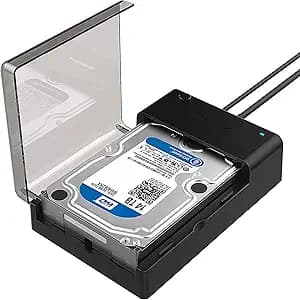
SABRENT USB 3.0 to SATA External Hard Drive Lay-Flat Docking Station for 2.5 or 3.5in HDD, SSD [Support UASP] (EC-DFLT)
Description
Supports all 2.5 and 3.5-inch SATA drives. Make sure you have the latest firmware installed for this dock to work with larger capacities. Firmware updates can be downloaded on our website; Connects via SuperSpeed USB 3.0 (up to 10x as fast as USB 2.0).; UASP (USB Attached SCSI Protocol) support for even faster performance. UASP requires UASP capable host system; Serial ATA bus up to 6Gbps Signal bandwidth for fast storage backups; This Docking station comes with a free download of Acronis True Image for Sabrent software for easy cloning
Compare the trade-offs
Similar products, side by side
A random selection of analyzed products from the same category. Different products are not necessarily interchangeable.

CENMATE Aluminum 8 Bay Hard Drive RAID Enclosure with Cooling Fan for 2.5“/3.5" SATA HDD/SSD with USB A/C 3.0, Tool-Free HDD Enclosure, 8 Modes

WAVLINK USB 3.0 and USB C to SATA Dual-Bay External Hard Drive Docking Station for 2.5/3.5 Inch HDD/SSD with UASP (6Gbps), Support Offline Clone/Duplicator Function [16TB X2 ]-Black

4 Bay NVMe M.2 & SATA SSD/HDD Hard Drive Docking Station, ICY BOX USB-C 10Gbps NVMe Reader, SATA to M.2 NVMe enclosure, 2.5/3.5 Hard Drive Dock Station Up to 48TB, Individual Power Switches, Tool-Free
One less thing to search
Before you buy: quick questions
What exactly do I need to get started with this docking station? Do I need to buy anything else?
You'll need a SATA hard drive or SSD (2.5" or 3.5") to dock. The station comes with a power adapter for 3.5" drives, but it does not include a USB 3.0 cable. Please ensure you have a USB-A to USB-B cable (the square connector) handy. Many users on Reddit suggest checking your old printer cables, as they often use the same type.
Can I use this with both a laptop (macOS) and a desktop (Windows) without issues?
Absolutely. This is a major highlight in reviews. The dock is truly plug-and-play and supports Windows, macOS, and Linux without requiring any additional driver installations. It's formatted for Windows by default, but macOS will recognize it and can reformat it if needed for full compatibility.
I've read about power supply concerns. How reliable is it, and can I use my own adapter?
While the vast majority of users report no issues, a small number have experienced problems with the included power adapter. The dock requires a 12V/2A DC power supply with a 5.5mm x 2.5mm barrel connector. If you ever need a replacement, any quality adapter meeting those specs will work. For peace of mind, ensure your drive is fully seated and the power connection is secure.
Is this better for temporary tasks like data recovery, or can I use it as a permanent external hard drive?
It excels at temporary tasks like cloning, diagnostics, and data recovery—this is where most 5-star reviews come from. For permanent use, consider that the drive is exposed. While the lay-flat design is stable, a dedicated single-bay enclosure offers better physical protection and portability if you plan to move it around frequently.
How do I safely eject my drive? The hardware button sometimes doesn't seem to work on my PC.
This is a common point of confusion. The safest method is always to use your operating system's software ejection first (right-click the drive > "Eject" in Windows/macOS). The hardware button on the dock is a secondary method. If the software ejects successfully, you can then safely remove the drive. If you're done, simply turning the dock's power off before unplugging the drive is also a completely safe and widely used method mentioned in many community forums.
From a similar, more-reviewed product in this category: WAVLINK Dual Bay Hard Drive Docking Station - USB 3.0 to SATA I/II/III for 2.5" & 3.5" HDD/SSD with Fixed Bezel, Supports Offline Clone/Duplicator Function, Supports 2x20TB with UASP 6Gbps - Black
Can I use both hard drives at the same time, or does the dock switch between them?
Yes, you can access both drives simultaneously.
Does the offline clone function require a computer?
No, offline data copy works between two hard drives with no computer involved; press the Clone button for about 5 seconds to start the process, and make sure the target disk's capacity is larger than or equal to the source disk's.
Is the power supply compatible with 230V AC?
Yes, it supports 100-240V AC.
Does it include a USB-C adapter?
Yes, it includes a USB-A to USB-C adapter.
Is the dock easy to set up and use?
Reviews describe it as easy to set up and working perfectly, and the listing notes it is tool-free, requires no driver, and is plug and play.
Answers are limited to the manufacturer's listing and the reviews we analysed. Questions those sources cannot support are not answered here.
Transparent by design