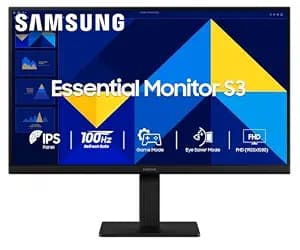
Samsung 24" (60.5 cm) S3 Flat Monitor|Super Slim Borderless Design|IPS Panel|FHD 1920 x 1080|100 Hz|5 ms|Ports-HDMI,VGA|Game Mode|Eye Saver Mode||Wall Mountable|LS24D300GAWXXL|Black
Description
Samsung 24 Inch Flat IPS Display Monitor FHD 1,920 x 1,080 Resolution; Aspect Ratio: 16:09 | 178°(H)/178°(V) Viewing Angle | 16.7 Million Color Support | 250 cd/㎡ Brightness (Typical) | 1,000:1 Contrast Ratio | Refresh Rate: 100 Hz | Response Time: 5.0 ms (GTG); IPS Panel | 100Hz Refresh Rate | Game Mode | Eye Saver Mode & Less Screen Flickering | Super Slim Design; Additional Features: Color Gamut (NTSC) 72% | Eco Saving Plus | Off Timer Plus | Tilt -2.0˚(±2.0˚)~21.0˚(±2.0˚); Connectivity options: D-Sub, HDMI Port, HDMI Version 1.4 || 3-Year Warranty from Manufacturer; Included Components: 1 Unit Monitor, 1 Unit Power Cable, 1 Unit HDMI Cable, 1 Unit User Manual
One less thing to search
Before you buy: quick questions
Is the 24\" Samsung S3 monitor a good fit for desk productivity with 1080p resolution?
For everyday tasks and classroom or office use, yes—the 24\" IPS panel offers sharp color and wide viewing angles. If you primarily edit text-heavy documents or work on detailed spreadsheets, you may notice crisper text on higher-resolution displays. Many TikTok and Reddit reviews appreciate the color accuracy, while noting that text can appear a little blocky at 1080p on a 24\" screen.
What ports does it have, and will it work with modern laptops or Macs?
It includes HDMI and VGA, with no DisplayPort or USB-C. It’ll work with most modern laptops via HDMI, and you can use VGA for older devices. If your device relies on DP or USB-C, you’ll need adapters or a different monitor.
Does it offer ergonomic adjustments or mounting options?
The monitor is wall-mountable, which many users like for a clean setup. However, the stand itself generally lacks height adjustment; you’ll want a wall mount or a separate adjustable arm if you need height/pivot flexibility. This is a common topic in user discussions about ergonomic setup.
How suitable is it for gaming?
It’s a solid choice for casual gaming thanks to 100 Hz and decent IPS color. It’s not a high-end gaming monitor—there’s no official FreeSync/G-Sync listed, and the 5 ms typical response time won’t satisfy competitive gamers. If you mostly play less demanding titles or enjoy smooth UI and light gaming, it’s a good value.
What about warranty, return policy, and value for money?
It’s generally regarded as a budget-friendly option with solid color and features for the price. Warranty and return policies vary by retailer, but typical arrangements include a standard manufacturer warranty and a flexible return window. If you’re after a low-cost display with dependable color and easy setup, many social reviews frame it as a strong value; if you need premium features, you may want to consider alternatives.
Answers are limited to the manufacturer's listing and the reviews we analysed. Questions those sources cannot support are not answered here.
Transparent by design