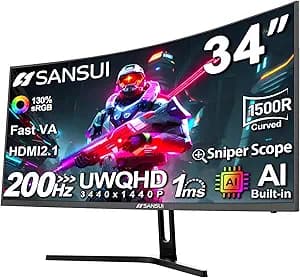
SANSUI 34-Inch Curved Gaming Monitor UWQHD 3440 x 1440P Up to 200Hz 165Hz Curved 1500R - PIP/PBP, OD 1ms, HDR, 300nits, sRGB 130%, DCI-P3 97%,AI Crosshair,HDMI2.1x2,DP1.4(Cable Included)
Description
34 inch Curved 1500R UWQHD(3440 x 1440) @ 200Hz Fast VA Ultrawide Gaming Monitor with AI built-in.; Performance: Up to 200Hz or 165/100Hz Refresh Rate | OD 1ms Response Time丨 FastVA | AI Blue light reduction | AI Crosshair | AI PQ | Sniper Scope | Support VRR with HDMI2.1; Ergonomic Stand: Tilt / Kensington Lock: -5°~15°(+/-2°) / Yes丨VESA Compatible (100 x 100mm) | 178° Wide Viewing Angle | PIP/PBP,21:9; Input &Output: DP 1.4 (Up to 200/165Hz)|HDMI X 2 (Up to 200/100Hz)|Earphone |No speakers; Warranty: SANSUI 34-inch Curved gaming computer monitor support money-back and free replacement warranty from order date within 30 days and lifetime technical support.
One less thing to search
Before you buy: quick questions
Is the 200Hz refresh rate real, or is it only 165Hz? Can I use it with my Xbox or PS5?
The monitor can reach 200Hz over DisplayPort, but only at specific resolutions and refresh settings—165Hz is the consistent out-of-box experience. For consoles, HDMI 2.1 works well, but many PS5 and Xbox games cap at 60Hz or 120Hz. Just keep in mind that most console titles don't fully support ultrawide 21:9 ratios, so you may see black bars on the sides.
Does it come with the cables I need? And can I mount it on my own arm?
Yes, it includes a DisplayPort 1.4 cable and an HDMI cable in the box. The stand can be removed, and it uses a standard 100x100mm VESA mount, so you can easily swap it onto your own monitor arm or wall mount. Many TikTok users have pointed out that the included stand is a bit wobbly, so mounting is a popular upgrade.
Out of the box, do the colors look good? Do I need to calibrate it?
The monitor has strong sRGB and DCI-P3 coverage on paper, but out-of-the-box calibration is hit-or-miss. Some users experience washed-out HDR or oversaturated colors. We recommend following an online calibration guide or using Windows/macOS display calibration tools for best results. If you're a creative professional, this may not be a "plug and play" solution.
What happens if I get a dead pixel or light bleed? Is the return process easy?
Customer reviews mention that returns can be slow—expect up to a few weeks for a response on defective units. The dead pixel policy typically allows a few dead pixels per panel, so check the specific seller's policy before buying. For light bleed, it's common on curved VA panels at this price point; if it's severe, document it clearly and contact support directly. Some Reddit users recommend buying from a retailer with a generous return policy (like Amazon) rather than directly from the manufacturer.
Is this monitor good for work and gaming, or should I look for something else?
It's a solid choice for budget-conscious users who want an ultrawide for mixed use—working on spreadsheets, watching movies, and casual gaming. Competitive esports players or creative professionals may be better off saving for a Dell S3422DWG or Gigabyte M34WQ, which offer better build quality, more consistent performance, and reliable customer support. But if you're new to ultrawides and want to test the waters without breaking the bank, this is a popular entry point.
Answers are limited to the manufacturer's listing and the reviews we analysed. Questions those sources cannot support are not answered here.
Transparent by design