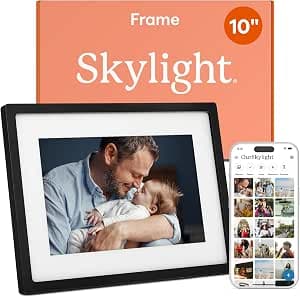
Skylight Frame – WiFi Digital Picture Frame Customer Support, Touch Screen Digital Photo Frame with Easy Setup, Photo Gifts for Parents and Grandparents - 10 Inch Black
Description
EASY SET-UP: Setting up your Skylight digital frame is a breeze—just plug it in, connect to Wi-Fi, and select a unique Skylight email address. Instantly share photos and videos on the Full HD display from anywhere. It’s truly plug-and-play!; CELEBRATE WITH PHOTO GIFTS: Transform any day into a special occasion by sending a unique photo to your loved ones. Perfect for capturing silly moments, vacation adventures, or cherished memories, making it the ultimate photo gift.; A BRIDGE FOR EVERY GENERATION: Our digital photo album makes it easy for everyone to stay connected, offering a cherished space for those not on social media and a delightful surprise for the tech-savvy with daily updates of beloved memories through digital picture frames.; ELEGANT DESIGN MEETS TECHNOLOGY: Revel in the stunning 10-inch color touch-screen display, boasting a 1280x800 resolution for your electronic picture frame. Enjoy cloud-based storage convenience, eliminating the need for SD cards.; THOUGHTFULLY CRAFTED FEATURES: Activate Gift Mode to preload and personalize your digital frame without unboxing, making it a ready-to-enjoy photo gift. Use offline mode to enjoy existing photos without a Wi-Fi connection (a Wi-Fi connection is required to receive or upload new photos).
One less thing to search
Before you buy: quick questions
Is there a monthly subscription fee, and what do I get without it?
The Skylight Frame works perfectly without a subscription for sending unlimited photos via email or the app—this is how most families use it. A paid Skylight Plus membership unlocks advanced features like video playback, custom slideshows, and premium app integrations. You get a free trial to test these, but the core photo-sharing experience is forever free.
How easy is it to set up for someone who isn't good with technology, like my grandparents?
Incredibly easy, which is why it's a top gift. You do the initial setup. Then, your relative just plugs in the frame and connects to their WiFi (with your help if needed). After that, you send photos directly to their frame via a unique email address. They never have to touch an app. As many TikTok users have shown, it often takes grandparents mere minutes to start enjoying photos.
Can I use a computer or do I need a smartphone to send photos?
You can use both! While the mobile app is popular, you can also manage your frame and send photos entirely from the Skylight website on your desktop or laptop computer. This is a great option if you organize your photos on a computer.
What happens if my WiFi goes out or the frame loses connection?
The frame will display the photos already stored in its memory until the connection is restored. If it seems "stuck," a simple unplug and replug (a power cycle) usually resolves it. A small number of Reddit users have mentioned this quick fix for occasional connectivity glitches.
How does the Skylight Frame compare to a digital frame that uses a USB stick?
The Skylight is designed for effortless, remote sharing. Instead of manually updating a USB, you (or any family member) can send new photos instantly from anywhere. If you prefer direct, local control and want to avoid any cloud service, a traditional USB-frame might be better. However, for keeping a distant family member's frame constantly updated with fresh memories, the Skylight's convenience is unmatched.
From a similar, more-reviewed product in this category: Enabot EBO SE Home Robot Camera: 1080P Mobile FamilyBot Pet Companion
Can the EBO SE be driven around the house to check on pets or family while I'm away?
Yes. Reviewers describe driving it around the house to check on their pets and family, with one noting it's a great feature and another saying they love being able to check through the house for the cats instead of a stationary camera.
What is the camera and image quality like?
Reviewers report great image quality and good camera quality, and the listing states it offers clear 1080P views with enhanced night vision for seeing pets in the dark.
Does the EBO SE charge itself automatically?
Yes. The listing states EBO automatically returns to its charging dock when power is low, and one reviewer notes it docks itself when needed. The listing advises keeping the dock area clear and driving EBO near its dock after each use, since it uses infrared to locate the dock.
Can I talk to my pet or family through the robot?
Yes. The listing describes built-in two-way audio for talking to family or pets in real-time, and one reviewer confirms it has 2-way voice communication that's good to have when you're not around.
Will the EBO SE connect reliably to my Wi-Fi?
Not always. One reviewer reported that after a year the app would no longer connect to the camera and kept showing network and Wi-Fi error messages despite troubleshooting, and another noted connection and gallery loading slow down as more is stored on the SD card. The listing advises ensuring good Wi-Fi coverage in the robot's activity area, and recommends switching Wi-Fi networks and placing the EBO SE near your router to reset and reconnect if you experience disconnection issues.
Answers are limited to the manufacturer's listing and the reviews we analysed. Questions those sources cannot support are not answered here.
Transparent by design