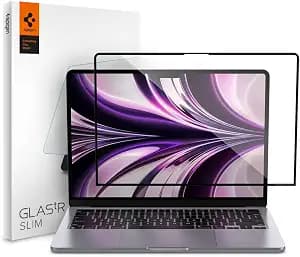
Spigen Tempered Glass Screen Protector [Glas.tR Slim] Designed for Macbook Air 13 inch M5 (2026) / M4 / M3 / M2
Description
Tempered glass durability rated at 9H hardness; Full screen coverage for ultimate protection from impact and scratches; Extreme clarity preserves the original screen brightness; Easy and convenient bubble-free installation; Screen Protector Designed for Macbook Air 13 inch M5 (2026) Macbook Air 13 inch M4 (2025) / Macbook Air 13 inch M3 (2024) / Macbook Air 13 inch M2 (2023)
Compare the trade-offs
Similar products, side by side
A random selection of analyzed products from the same category. Different products are not necessarily interchangeable.

Spigen Privacy Filter Screen Protector [SafeView] designed for Macbook Air 13 inch M5 (2026) / M4 / M3 / M2

MUBUY-GOL Anti Blue Light Screen Protector for 2026 MacBook Neo 13 inch with A18 Pro Chip, Matte Anti Glare Filter Eye Protection Shield Anti Scratch Protector

KEANBOLL 2 Pack Tempered Glass Screen Protector for New Apple 2026 MacBook Neo 13 inch (Model: A3404) Laptop with A18 Pro Chip 13-lnch Laptop, 9H Hardness, Anti Scratch, Bubble Free
One less thing to search
Before you buy: quick questions
Does this screen protector fit the 2026 M5 MacBook Air, or is it only for M4/M3/M2?
We designed Glas.tR Slim for the 13-inch MacBook Air lineup from M2 through the new M5 (2026). That said, some early M5 users on Reddit noted slight camera notch alignment differences. We recommend checking your specific model’s bezel dimensions before purchase. If you see any gap or offset, our return team can help within 30 days.
I’ve heard the installation frame isn’t very accurate—will I end up with bubbles?
The included alignment frame works best on a clean, dust-free screen in a well-lit room. Many TikTok users recommend watching a quick install video first. If you still get bubbles, gently lift the glass with a credit card and re-press from the center. For persistent issues, contact us—we’ll replace it at no extra cost (but please keep the original backing).
Is this really 9H hardness? I’m worried about scratches from a laptop sleeve.
Yes, it’s certified 9H hardness, which means it resists scratches from keys, coins, and most everyday items. However, sand, fine dust, or abrasive cloths can still leave micro-scratches over time. A few users on YouTube noticed fine lines after months of use with a rough sleeve. For best results, wipe with a soft microfiber cloth and store in a clean case.
Will this work with a thin case or a keyboard cover?
It’s designed to work with most slim cases, but we’ve seen complaints from buyers using ultra-thin snap-on covers—the glass can lift at the edges. It rarely causes issues with keyboard covers. If you plan to use a case, test the fit with the protector first; you can always return the protector if it doesn’t sit flush.
I’m not very handy—how easy is it to remove or replace later?
Removal is straightforward: gently lift from a corner with a fingernail or a plastic spudger. It peels off cleanly without damaging your MacBook’s anti-reflective coating. Many first-time users say it’s easier than plastic films because the glass stays rigid. Just go slowly—if you rush, you may flex the glass and risk cracking. If you mess up, we offer a one-time replacement within 90 days.
From a similar, more-reviewed product in this category: Mamol Magnetic Laptop Privacy Screen 15.6 inch ,16:9 Aspect Removable Anti Glare Protector Blue Light Privacy Screen Filter,Filter Shield Compatible with HP/Dell/Acer/Asus/Samsung/Lenovo/Thinkpad Envy
Will this privacy screen fit my 15.6 inch laptop?
The listing states it is designed for 15.6" laptops with a 16:9 aspect ratio, with a width of 13 9/16" (345 mm) and height of 7 5/8" (194 mm), and it advises verifying your screen's width and height rather than just the diagonal. Some reviewers reported fit issues, so measuring your exact screen dimensions before ordering is recommended.
How does the magnetic attachment work?
The listing describes an automatic snap-on magnetic attachment where you place the screen along the top and side of your laptop and the magnets snap on, with no adhesive needed on the screen. Reviewers confirm it is easy to put on and remove, though some note the magnets only adhere to the top edge and that thin-framed laptops may not hold as well.
Does it leave air bubbles or residue on the screen?
Because it attaches magnetically rather than with adhesive film, reviewers report no air bubbles and no sticky residue on the screen. One reviewer specifically noted it "won't slide or have air bubbles on the screen."
Does the privacy filter actually block the view from the side?
The listing states the viewing angle is narrowed to +/- 30 degrees, so facing the screen you can see it, but off to the side you only see a darkened screen. Reviewers confirm the privacy function works, with several noting people beside them cannot see their screen.
Does it reduce glare and blue light?
The listing states it reduces UV light up to 97% and blue light up to 65% to help with eye strain, and it has a matte finish. Reviewers confirm the matte finish reduces glare and reflections, though some note it can slightly reduce screen brightness and clarity.
Answers are limited to the manufacturer's listing and the reviews we analysed. Questions those sources cannot support are not answered here.
Transparent by design