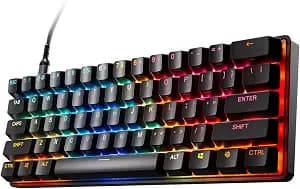
SteelSeries Apex Pro Mini Gen 3 OmniPoint 3.0 HyperMagnetic Switches — Adjustable Actuation — Rapid Trigger — Game-Ready Presets — Protection Mode — Rapid Tap/SOCD — RGB — PBT Keycaps — USB-C
Description
The World's Fastest Keyboard, Just Got Smarter. Stay one step ahead of everyone else with the world's fastest and first Hall Effect magnetic switch gaming keyboard. Featuring upgraded OmniPoint 3.0 Adjustable HyperMagnetic Switches, change the actuation range from 0.1 mm to 4.0 mm, adapting to fast-paced gaming or deliberate, precise typing. This results in 20x quicker actuation and 11x faster response times. Rapid Trigger is a game-changer, eliminating latency by resetting each key as soon as you lift your finger, allowing for super-responsive counter-strafing and repeated keystrokes. A SteelSeries-exclusive setting, Protection Mode, further reduces the chances of mistyping by lowering the sensitivity of keys surrounding your current press. Manage this arsenal of settings with one-click ease thanks to GG QuickSet — curated presets for top games, letting you skip all the tinkering. Rapid Tap prioritizes the most recent key press in a selected pair without needing to release the previous key, enabling faster input. With up to 5 key pairings, you’ll be more responsive than ever, whether counter-strafing, peeking, or slide canceling. It wouldn't be a SteelSeries product without fancy RGB and our new key-specific illumination, so you can glow up when you blow up enemies. The RGB can also sync with other devices via Prism. We've elevated the typing experience even further with triple layer sound-dampening foam and per-key lubrication to make it super-smooth. With Double Shot PBT keycaps, expect a lifetime of durability. All this while saving precious desk space in the powerful Mini form factor.
Compare the trade-offs
Similar products, side by side
A random selection of analyzed products from the same category. Different products are not necessarily interchangeable.

SteelSeries Apex 3 TKL RGB Gaming Keyboard – Tenkeyless Compact Form Factor - 8-Zone RGB Illumination – IP32 Water & Dust Resistant – Whisper Quiet Gaming Switch – Gaming Grade Anti-Ghosting,Black

Yoidesu TT-A01 78-Key USB Mini Keyboard - Ultra Thin, Mute, Russian/French/German Layout for PC/Laptop/Desktop

MOFII Wireless Bluetooth Keyboard, Typewriter Retro Round Keycaps Keyboard, Bluetooth 5.1 Tech Compatible with iPhone, iPad, Android, Windows, PC, Mac, Perfect for Home/Office (Blue Colorful)
One less thing to search
Before you buy: quick questions
I’ve seen complaints about the price for a 60% keyboard. Is the SteelSeries Apex Pro Mini Gen 3 worth the cost for competitive gaming?
Many competitive players on Reddit and YouTube agree it’s a worthwhile investment if you mainly play FPS titles. The OmniPoint 3.0 switches with Rapid Trigger give you a tangible advantage in games like Valorant or CS2—quicker strafe-stops and instant actuation in clutch moments. That said, if you play MMOs or need dedicated arrow keys, you might find the 60% layout limiting for the price. For pure performance in fast-action shooters, the consensus is that it delivers.
Can I use any custom keycaps with this keyboard, or are there compatibility issues?
This is a common question, and several TikTok teardown videos have highlighted the issue. The Apex Pro Mini uses a non-standard bottom row with a 6.25u spacebar, plus the switches have a unique stem design. Most standard Cherry MX keycap sets won’t fit perfectly—especially the spacebar. If you love swapping keycaps, you may want to check compatibility lists on enthusiast forums before buying. The included PBT keycaps are high-quality, so many users just stick with those.
Do I need to keep the SteelSeries GG software running all the time to use the adjustable actuation and Rapid Trigger?
Yes, the keyboard saves your profiles to onboard memory, but for full adjustability—like changing actuation points mid-game or enabling Rapid Tap—you’ll want the GG software active. Some users on Reddit reported their custom settings reset after a system restart if the software wasn’t running at startup. It’s a minor annoyance, but for the best experience, plan to have GG installed and running in the background when you game.
Does this keyboard work with consoles like PS5 or Xbox, and does Rapid Trigger function on them?
The Apex Pro Mini Gen 3 works via USB-C on PS5 and Xbox for basic typing and gameplay, but advanced features like Rapid Trigger and adjustable actuation are only fully supported on PC through the SteelSeries GG software. Console players on YouTube have noted it works out of the box for standard inputs, but you won’t get the magnetic switch customization. For full OmniPoint 3.0 functionality, stick with a Windows PC.
I’ve heard about the Protection Mode and Rapid Tap features—what exactly do they do, and who should use them?
Protection Mode prevents accidental key presses when you’re resting your fingers on WASD or other keys, which is great for avoiding unwanted inputs during intense firefights. Rapid Tap (also known as SOCD) lets you press two opposite keys simultaneously and prioritizes the most recent input—ideal for counter-strafing in shooters. Many competitive players on TikTok call this a “cheat code” for movement, but it’s perfectly legal in most tournaments. If you’re a casual user, you probably won’t need these features, but hardcore FPS fans love them.
From a similar, more-reviewed product in this category: Keychron K4 HE 96% Wireless Hall Effect Keyboard with Number Pad, Rapid Trigger Magnetic Switches, QMK Launcher, 2.4GHz/Bluetooth/Wired, Mac & Windows, Wood Accent Frame, Black (Non-Shine-Through)
Is the K4 HE quiet enough to use around other people?
Multiple reviewers describe it as near silent or having only a low level of noise, with one noting it was almost dead silent compared to a prior mechanical keyboard. Another calls it "not too loud, but just perfect linear."
How does the 96% layout feel compared to a full-size keyboard?
The listing states it keeps most keys but with more condensed spacing, and reviewers confirm it takes time to get used to. One reviewer found the numpad/arrow key layout too cluttered and returned it, while another said the compact layout just takes time to adapt to.
Can I use the Keychron Launcher to customize keys and switches?
Yes, the listing says the Launcher web app lets you remap keys, set macros, adjust actuation points, and toggle rapid trigger with no installation needed. Reviewers also mention adjustable features and excellent customization options.
Does it work with both Mac and Windows?
Yes, the listing states it supports macOS and Windows with OS toggle support and extra system keycaps. One reviewer confirms it connects to their Mac via Bluetooth and works well.
Are the keycaps shine-through?
No, the listing states the wood special edition keycaps are not shine-through, and the keycaps are OSA double-shot PBT.
Answers are limited to the manufacturer's listing and the reviews we analysed. Questions those sources cannot support are not answered here.
Transparent by design