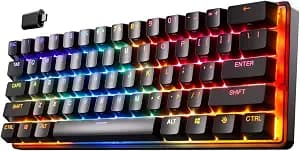
SteelSeries Apex Pro Mini Wireless Keyboard - 60% Design - OmniPoint 2.0 - Quantum 2.0 Wireless - Double Shot PBT Keycaps - Black
Description
The Apex Pro Mini Wireless is the world's first Hall Effect magnetic switch gaming keyboard. Featuring OmniPoint 2.0 Adjustable HyperMagnetic Switches with Rapid Trigger, total adjustability of actuation points, and 2-in-1 Acton keys for 20x quicker actuation and 11x faster response, all while playing on a compact, 60% keyboard.
Compare the trade-offs
Similar products, side by side
A random selection of analyzed products from the same category. Different products are not necessarily interchangeable.

RK ROYAL KLUDGE RK96 90% Triple Mode BT5.0/2.4G/USB-C Hot Swappable Mechanical Keyboard with Magnetic Wrist Rest, 96 Keys Wireless Gaming Keyboard with Software, Blue Backlight

AULA F99 Wireless Mechanical Keyboard,Tri-Mode BT5.0/2.4GHz/USB-C Hot Swappable Custom Keyboard,Pre-lubed Linear Switches,RGB Backlit Computer Gaming Keyboards for PC/Tablet/PS/Xbox

Redragon K552 Mechanical Gaming Keyboard, 87-Key Compact, LED Gaming Keyboard with Red Switches, Anti-Ghosting, Metal Frame for PC Gaming & Typing, Beginner-Friendly (Black)
One less thing to search
Before you buy: quick questions
Is the 60% size too small for productivity tasks or programming?
It depends on your workflow. The 60% design removes the dedicated arrow keys, function row, and navigation cluster, requiring you to use secondary layers (accessed via the Fn key). Many programmers and power users on Reddit love the compact efficiency once they build muscle memory. However, if you constantly use arrow keys or F-keys without thinking, the learning curve can be steep. If you're unsure, many users suggest looking at the Tenkeyless (TKL) version of the Apex Pro as a compromise.
How does the adjustable OmniPoint 2.0 switch actually benefit gaming, and is it worth the premium price?
The OmniPoint 2.0 switch lets you digitally change how far you need to press a key for it to register (actuation point). In fast-paced games like FPS titles, you can set a very shallow press (e.g., 0.2mm) for lightning-fast response. For typing or MMOs, a deeper press prevents accidental keystrokes. This unique customization is the keyboard's flagship feature. As noted in reviews, whether it's "worth it" comes down to you: competitive gamers who want every edge often swear by it, while casual players might not leverage it enough to justify the cost.
What's the real-world battery life, especially with the RGB lighting on?
While the advertised 200+ hour battery life is achievable with lighting off, real-world usage with RGB active is lower. Based on user reports from forums and YouTube tests, with moderate RGB brightness, you can expect roughly 40-60 hours of use. This typically means charging every 1-2 weeks for heavy users. You can always use it in wired mode to charge while playing for uninterrupted sessions.
Is the SteelSeries GG software difficult to use, and is it required?
The software is required to unlock the keyboard's full potential, like adjusting the per-key actuation, creating macros, and customizing RGB profiles. The consensus among tech reviewers is that it's powerful but has a learning curve. Some users find it complex for simple tasks. The good news is you can set up your preferred actuation and lighting profile, then close the software—it will save directly to the keyboard's onboard memory.
Who is this keyboard NOT a good fit for?
This keyboard might not be the best fit if: 1) You are on a tight budget and are value-focused, 2) You are new to mechanical keyboards and want a simple, plug-and-play experience (the 60% layout and software add complexity), or 3) Your primary use is data entry or office work requiring frequent use of arrow keys and a numpad without wanting to learn new shortcuts. For these users, a full-size or TKL keyboard from other brands might be a more suitable and cost-effective choice.
From a similar, more-reviewed product in this category: MechLands AJAZZ AK980 V2 Mechanical Gaming Keyboard with Display Screen, 10000mAh Battery, 98% Wireless Keyboard with BT/USB-C/2.4GHz, Hot Swappable, Linear Switch, Knob, RGB for Win/Mac (Black)
How long does the battery last on the AK980 V2?
The manufacturer states the 10000mAh battery provides about 35 hours with RGB on and 138 hours with RGB off. A customer also noted that it keeps a charge well.
Is the AK980 V2 compatible with Mac?
Yes, the listing says it supports BT/2.4GHz/USB wired connections and works with Windows, Mac, iOS, and Android. However, one reviewer noted the screen-customization software is not compatible with MacOS.
How does the keyboard sound and feel when typing?
Reviewers describe the typing as smooth and comfortable with a satisfying, creamy, "clacky" sound, and one noted there is no bounce in the keys.
What is the polling rate of this keyboard?
The listing states the polling rate is 1000Hz for USB wired and 2.4G wireless, and 125Hz for Bluetooth.
Does the keyboard have RGB backlighting and is it customizable?
Yes, the listing mentions 16.8M RGB backlights, and reviewers praise the many RGB backlight options. One reviewer recommends shine-through, side-print, or clear keycaps for better lighting visibility.
Answers are limited to the manufacturer's listing and the reviews we analysed. Questions those sources cannot support are not answered here.
Transparent by design