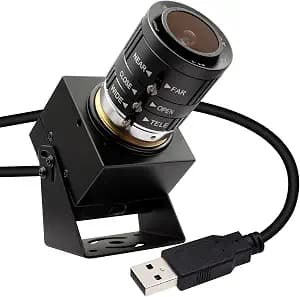
SVPRO 1080P 120fps High Speed USB Camera,12 Megapixels 4K Glof Swing Webcam Manual Focus with 3X Optical Zoom,Industrial Lightburn Cam UVC Plug and Play for Computer Laptop Raspberry Pi
Description
High Resolution: This USB camera utilizes a 1/2.3" 12MP image sensor, achieving a maximum still resolution of 3840x3040 pixels which can help you capture incredibly detailed images.; High Speed: With this high-speed UVC camera module, you can enjoy programmable frame rates, with the potential to reach up to 120fps at 1080p resolution that ensures smooth and fluid video capture.; The zoomable Lens 3.6-10mm with CS mount and manual zoom enables creative controls via the 3X optical zoom,great for shooting in detail at different distance and always delivers clear and precise images.; Great Low Light Performance: This lightburn camera adopt IMX577 sensor, capable of capturing clear images in low light environments.; Plug and Play: This USB camera has effortless compatibility with Windows and Linux through plug and play functionality, eliminating the need for additional drivers. OTG support to connect with USB-C device via OTG adapter.; Application: this high speed zoom camera not only an industrial camera for video systems, 3D scanners, lightburn cameras, medical equipment, computer vision, machine visions, industrial inspections and sports analysis. Also can use for webcam and small surveillance camera.; Please Note: Quicktime and some regular webcam software has limited frame rate, when you need to operate 1080P 120fps, please use other professional video software that that can set higher frame rate.
Compare the trade-offs
Similar products, side by side
A random selection of analyzed products from the same category. Different products are not necessarily interchangeable.

1080P HD Webcam with Microphone, Noise Cancellation, Privacy Cover, Wide-Angle Lens, Auto Light Correction, Plug & Play USB Webcam for Laptop, Desktop, PC, Mac, Zoom, Skype, Streaming (Black)

1080P Full HD Webcam with Privacy Cover, Wide Angle Lens, Active Light Correction, Plug and Play USB Webcam for PC, Desktop, Laptop

TONGVEO All-in-One Conference Room Video Camera System Al Auto-Tracking HD1080P 60fps 3X Optical Zoom USB3.0 HDMI PTZ Camera and Bluetooth Conference Speakerphone with Microphones
One less thing to search
Before you buy: quick questions
Is this a true plug-and-play webcam for Zoom, OBS, or streaming?
While it's a UVC device, many users report needing additional configuration. It may not be recognized at its highest resolutions in all software right away. Think of it more as a high-performance camera module that may require some technical setup and driver management, rather than a consumer-grade, out-of-the-box webcam. It shines in dedicated applications like analysis software.
Can I actually use the advertised 4K and 12MP resolution?
The hardware is capable, but accessing these maximum resolutions typically requires specific software (like certain industrial camera apps or fully compatible programs). In common applications like OBS or Windows Camera, it often defaults to 1080p. Reviewers love the 120fps slow-motion at 1080p, but if your primary need is simple 4K video calls, a standard 4K webcam might be a more straightforward choice.
Who is this camera best suited for?
This camera is a fantastic value for technical hobbyists and specialists. It's praised by users for niche applications like high-speed swing analysis (golf, baseball), macro videography (soldering, crafts), LightBurn laser alignment, and Raspberry Pi machine vision projects. It's less ideal for someone seeking a simple, no-hassle webcam for daily meetings or streaming.
How is the build quality and manual focus?
The build quality is consistently highlighted as a major plus. It features a solid metal housing that feels durable and industrial. The manual focus and 3x optical zoom offer great control but require careful adjustment. As noted in reviews, achieving perfect focus on fast-moving objects can be tricky, so it's best for setups where the camera distance remains fairly constant.
What if I have technical issues or it doesn't work with my setup?
Be prepared to rely on community forums and your own troubleshooting. A common point of feedback is that manufacturer support and documentation can be limited. Before purchasing, please check our return policy carefully to understand your options if the camera is not compatible with your specific hardware or software requirements.
From a similar, more-reviewed product in this category: Webcam with Privacy Cover
Does this webcam work with both PC and Mac?
One reviewer reported it is easy plug and play on both PC and Mac. The listing also states it is compatible with laptop, personal computer, tablet, and smartphone.
How is the video quality in low light?
Reviewers describe the image as clear and sharp even in low light, crediting the automatic light correction. The listing confirms the webcam includes Auto Light Correction as a special feature.
Does the built-in microphone pick up sound clearly?
Reviewers say the built-in microphone works well and picks up sound clearly, with one noting the noise cancellation keeps their voice clear without picking up much background noise. The listing lists Noise Cancellation as a special feature.
Does it have a privacy cover?
The listing lists Privacy Shield as a special feature, and the product title is "Webcam with Privacy Cover."
Is the webcam bulky?
One reviewer described it as a bit on the bulky side, though they felt the quality made up for it.
Answers are limited to the manufacturer's listing and the reviews we analysed. Questions those sources cannot support are not answered here.
Transparent by design