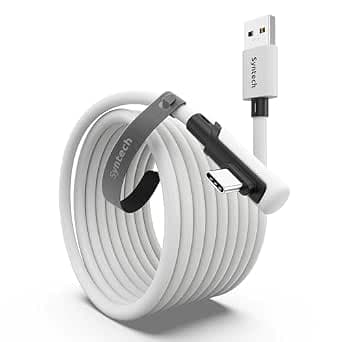
Syntech Link Cable 16FT for PCVR Compatible with Oculus/Quest 3/Meta Quest 3S, Quest2/Pro/Pico 4/Ultra Accessories and PC/SteamVR, High Speed PC Data Transfer, USB 3.0 to USB C Cable for VR Headset
Description
Compatible with Meta Quest & Pico Headsets: The VR link cable is compatible with Meta Quest 3S / Quest 3 / Quest 2 / Quest Pro / Pico 4. Connect your headset to a gaming PC to unlock SteamVR and PC VR content for a stable, immersive wired experience. Note: This cable is NOT for charging—please do not use it to charge your headset!; Designed for PC VR Gaming: Perfect for wired PC VR and room-scale VR gameplay, supporting seated, standing, or full-body movement. Keeps your VR experience stable and smooth during long gaming sessions, avoiding latency or signal issues associated with wireless streaming.; USB 3.0 High-Speed Performance: Features a USB-A to USB-C connection with USB 3.0 support, providing up to 5Gbps data transfer (typical 2–3Gbps in real-world VR use). Ensures low latency and reliable signal. For best results, plug into a USB 3.0 / 3.1 / 3.2 port and keep your headset and PC Link software updated.; Comfortable & Secure Design: The L-shaped USB-C connector reduces headset port strain and improves comfort during long VR sessions. Includes a Velcro strap to keep the cable in place and prevent disconnection. Flexible, tangle-free design allows smooth, unrestricted movement.; Durable and Reliable Build: Constructed with flexible, abrasion-resistant materials and reinforced stress points for long-term use. Comes with a user guide, 18-month warranty, and dedicated Syntech customer support.
One less thing to search
Before you buy: quick questions
Is this cable really a good alternative to the official Meta/Oculus Link Cable?
Absolutely. Based on thousands of user reviews, the Syntech cable delivers nearly identical high-speed data transfer for PCVR at a significantly lower cost. The main trade-off noted by some users is that the Syntech cable is stiffer, which aids durability but requires a bit more active cable management than the ultra-flexible official cable.
How do I handle the cable's stiffness, and is 16ft too long to manage?
The braided design is intentionally robust, which can make it less flexible. Many Reddit users recommend using the included routing clip and gently "training" the cable by loosely coiling it in the opposite direction before use. For room-scale play, 16ft provides essential freedom, and the included velcro straps help manage the excess length neatly behind you.
I'm worried about damaging my headset's USB-C port. How tight is the connection?
This is a common pre-purchase concern. The connector is designed for a secure, snug fit to prevent disconnections during movement. While it feels very firm, it's safe for the port. To ease removal, gently wiggle it side-to-side rather than pulling straight out. Many TikTok users have shown this method works perfectly.
What if the cable doesn't work well with my specific PC setup?
For optimal performance, connect the USB-A end to a USB 3.0 (blue) port directly on your motherboard. Using front-panel or unpowered hub ports can cause instability. If you experience disconnections, try different ports first. Syntech offers reliable customer support and an 18-month warranty, so you're covered if there's a hardware defect.
Who is this cable NOT ideal for?
If your primary play style involves constant, rapid 360-degree rotation (like in competitive rhythm games), the cable's stiffness may be frustrating. In that case, a premium wireless setup might be a better investment. It's also less suitable for PCs that only have older USB 2.0 ports, as they can't provide the necessary power and speed.
Answers are limited to the manufacturer's listing and the reviews we analysed. Questions those sources cannot support are not answered here.
Transparent by design